Answer

I want to map workgroup from company tree with customer directly

  • June 11, 2025
  • 4 replies
  • 80 views

Forum|alt.badge.img

I want to map workgroup from company tree with customer directly. In employee we can map to company tree workgroup but customer module cannot find where to map workgroup. Can we make or not ?

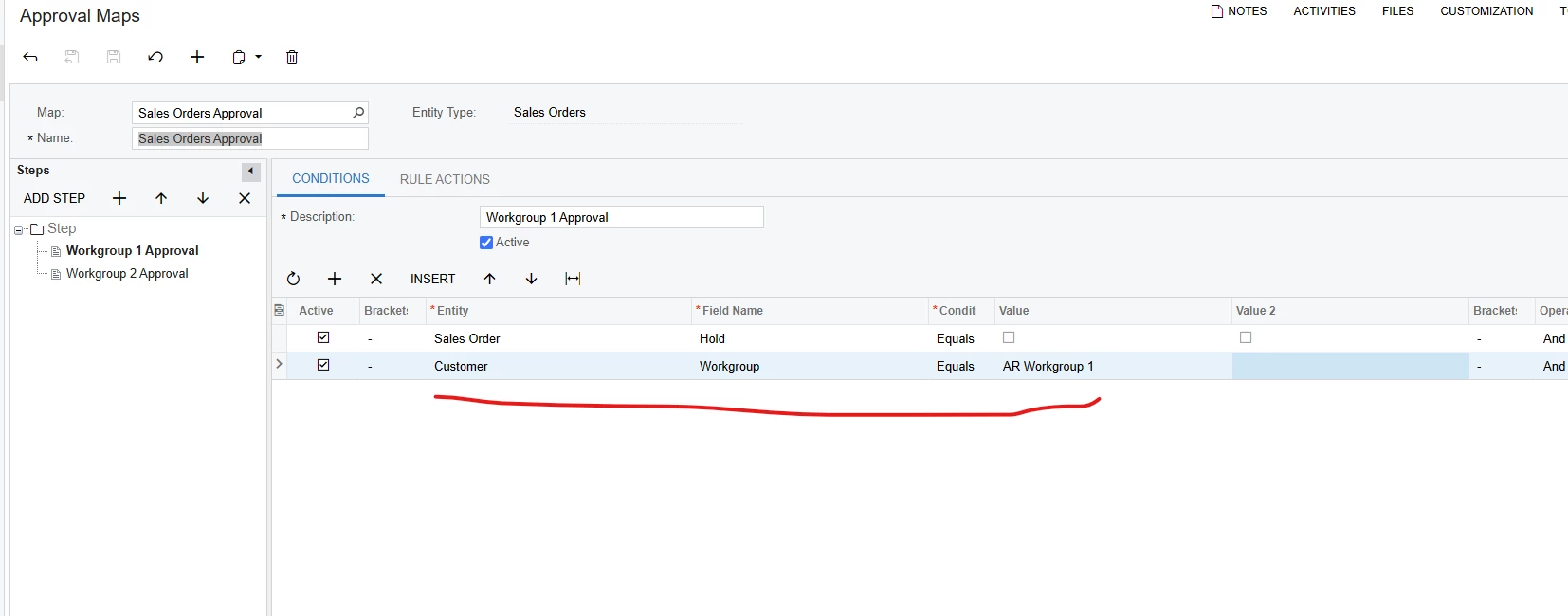
Because I want to configure approval in sales orders I see this 
 

Best answer by meganfriesen37

The Workgroup field is only available in the CRM module as far as I can see.  Could you use Customer Class, Salesperson or Owner or some other field to achieve a similar result?

4 replies

meganfriesen37
Captain II
Forum|alt.badge.img+12

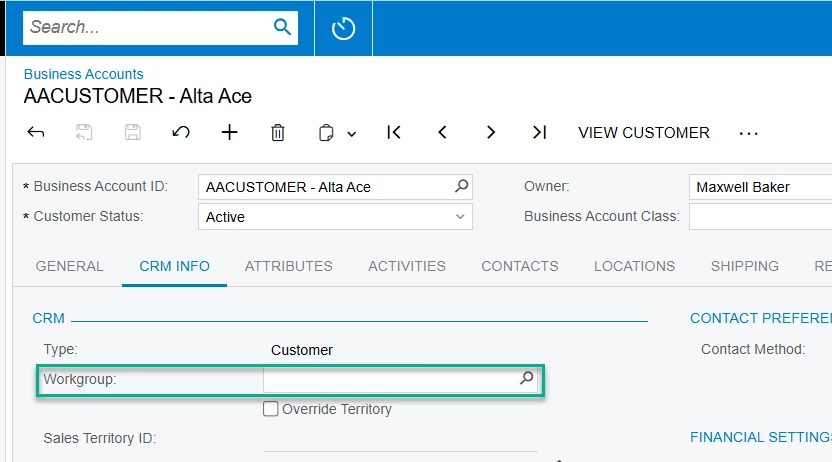
The Workgroup is managed on the Business Accounts screen:
 

Workgroup The workgroup assigned to work with the business account. Once you select this group, the list of owners is limited to the members of the group.

Forum|alt.badge.img
  • Author
  • Freshman II
  • June 17, 2025

The Workgroup is managed on the Business Accounts screen:
 

Workgroup The workgroup assigned to work with the business account. Once you select this group, the list of owners is limited to the members of the group.

This related to CRM module but my company doesn’t have CRM module like business account so how can I use it 


meganfriesen37
Captain II
Forum|alt.badge.img+12

The Workgroup field is only available in the CRM module as far as I can see.  Could you use Customer Class, Salesperson or Owner or some other field to achieve a similar result?


CherryStreet
Jr Varsity I
Forum|alt.badge.img
  • Jr Varsity I
  • June 19, 2025

We are testing our new AI Assistant and ran your scenario through it, I hope this helps:

Without the CRM module, Acumatica does not allow native Workgroup assignment to the Customer record, because the Customer Contact/Opportunity/Case hierarchy (which supports workgroups) is CRM-dependent.

But there’s still a valid solution — and it works even without the CRM module.


Add a Custom Workgroup Field to Customer (No CRM Module Needed)

Even without CRM, you can still add a custom Workgroup field to the Customer screen, because BAccount (the base DAC for Customers) is extensible, and you can reference Company Tree Workgroups using PXCompanyTreeSelector.


Objective:

  • Add a Workgroup selector field to the Customer record
  • Use that field in Approval Maps for Sales Orders
  • Avoid CRM dependencies entirely
 

🛠️ Implementation Plan (No CRM Required)

🔹 Step 1: Create a Customization Project

  1. Go to: Customization Customization Projects
  2. Create a new project (e.g., CustomerWorkgroup)
 

🔹 Step 2: Extend the Customer DAC

Extend the BAccountR or Customer DAC with this code:

[PXDBInt]

[PXUIField(DisplayName = "Customer Workgroup")]

[PXCompanyTreeSelector]

public virtual int? UsrCustomerWorkgroupID { get; set; }

public abstract class usrCustomerWorkgroupID : PX.Data.BQL.BqlInt.Field<usrCustomerWorkgroupID> { }

This creates a field that references the Company Tree, just like employees.


🔹 Step 3: Add the Field to the UI

  1. In the Customization Project, open the Customers (AR303000) screen.
  2. Add the new field (UsrCustomerWorkgroupID) to the General Info tab or a new Assignments tab.
 

🔹 Step 4: Publish the Customization

  • Save and publish your customization.
  • You’ll now see a dropdown on each Customer to select a Workgroup from your company tree.
 

🔹 Step 5: Use in Approval Maps

In Approval Maps (EP205015):

  1. Entity: Customer
  2. Field Name: UsrCustomerWorkgroupID
  3. Condition: Equals → select from company tree (e.g., AR Workgroup 1)
 

👀 What You'll Get

  • You can now drive Sales Order approvals based on the Workgroup assigned to the Customer.
  • No CRM module required.
  • Simple, scalable, and aligns with Acumatica’s existing workflow engine.
 

💡 ERP Pro Tips

💡 Tip: If you don’t want users manually assigning the workgroup, you can use Customer Class or Branch logic to set defaults in a small automation script.

💡 Tip: You can report on Customer Workgroup using a Generic Inquiry or restrict visibility by workgroup using Row-Level Security.


Final Summary

Feature

Supported Without CRM?

Assign Workgroup to Customer

✅ With Custom Field

Use Workgroup in Approval Maps

✅ Yes

Use Default Acumatica CRM Mapping

❌ Not without CRM