Answer

How to set up to pick the COGS by the customer

  • July 24, 2024
  • 5 replies
  • 160 views

Forum|alt.badge.img

Hi,

I need track the COGS and Sales for a specific customer . I was looking for a way to set up the COGS and sales account to be picked based on this specific customer.

This seems  not possible with the available options and I identified one issue which is if we have set up the posting class to pick the sales account by the inventory and also we have a different sales account in the customer’s GL accounts, the system always picks the account from the Inventory ID. How can I set the priority to pick the account entered in the customer rather than picking it from inventory ID?

Further, I can check the sales for the specific customer in the sales account, since in the account details customer is available. I can filter and see. But in the COGS account, the business account is not available. I will be able to create a GI to connect and show the customer for COGS transactions but Do you see any other options to see the COGS for a specific customer?

Thank You,

Dulanjana
 

Best answer by Laura03

Hello,

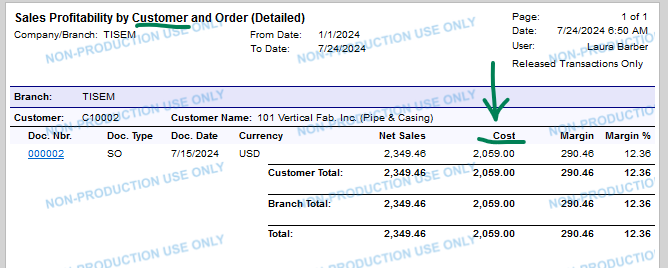
Did you try Profitability reports? Acumatica’s standard Profitability reports show COGS by Customer. With Profitability reports, you can select a Customer, a range of dates and can select only Released (posted) documents or include all documents for the range.

You can simply print the Profitability reports to find COGS by customer over a range of time… or you can study the design of Profitability reports as a model for adding COGS to your custom report.

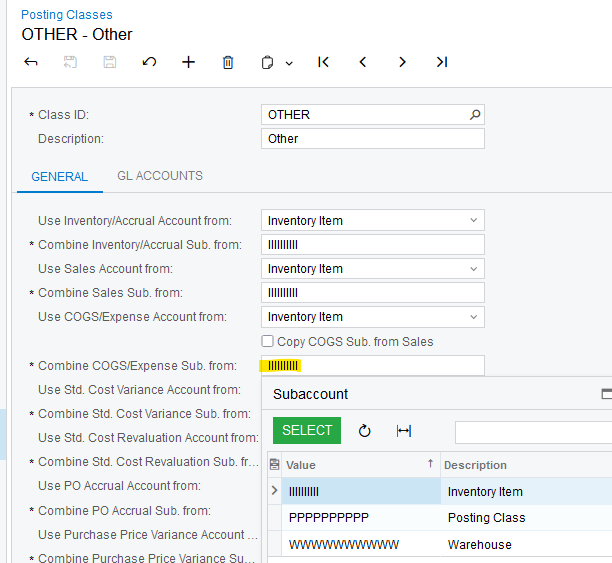
Inventory Posting Classes control the options for choosing which Account COGS is posted to, and Customer is not one of the options:

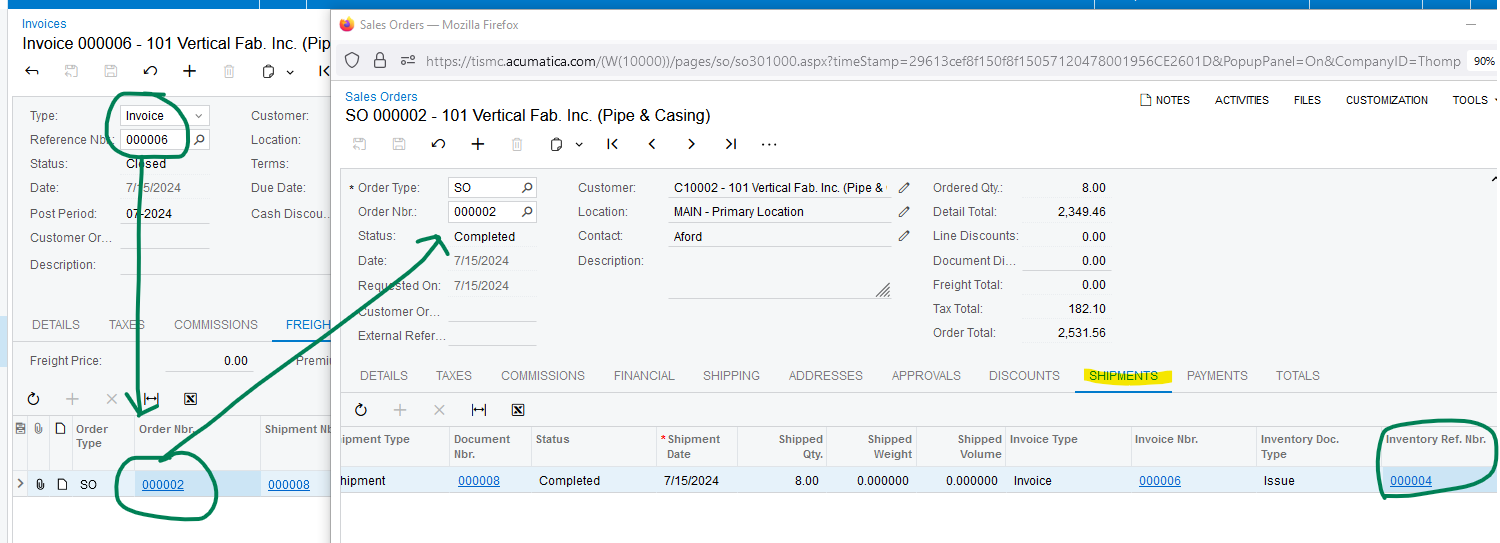
On your custom GI, you would need to connect the posted Invoiceto the Sales Order, to the Inventory batch, by line, to find COGS by customer: difficult but not impossible:

Laura

5 replies

Laura03
Captain II
Forum|alt.badge.img+19
  • Captain II
  • Answer
  • July 24, 2024

Hello,

Did you try Profitability reports? Acumatica’s standard Profitability reports show COGS by Customer. With Profitability reports, you can select a Customer, a range of dates and can select only Released (posted) documents or include all documents for the range.

You can simply print the Profitability reports to find COGS by customer over a range of time… or you can study the design of Profitability reports as a model for adding COGS to your custom report.

Inventory Posting Classes control the options for choosing which Account COGS is posted to, and Customer is not one of the options:

On your custom GI, you would need to connect the posted Invoiceto the Sales Order, to the Inventory batch, by line, to find COGS by customer: difficult but not impossible:

Laura


Forum|alt.badge.img

Hello @Laura02 ,

Thank you for your detailed response. Yes for the moment we can decent on the profitability report. 


Thank you,

Best Regards,

Dulanjana


  • Freshman II
  • February 2, 2025

This works for just one or two customers, but I need to see COGS for a range of customers. It sounds like I need to build a complex GI mentioned. But I am mystified as to why this is not available standard out of box; we can’t be the only ones who need this and it seems like a lot of wasted hours reinventing the wheel. If anyone has such a GI and would not mind sharing it, the community would thank you!


debbiereed72
Varsity I
Forum|alt.badge.img
  • Varsity I
  • November 11, 2025

@Julie Baker I have the same requirement.  I too am mystified that there’s not a way to control this!  Did you happen to find another solution?


  • Freshman II
  • November 11, 2025

@debbiereed72 I did find a solution but not within the app: I already had a SQL backend that refreshes data from specific tables nightly to SQL, which allows me to pull data from disparate sources like this. For our primary need we’ve switched to a GI using the Sales Account/Subaccount as our primary reference point, “assuming” the COGS code is correct if the Sales Account is correct. Not ideal but it’s just too hard to get at the information that was so readily available to us in our previous ERP. We’ve decided we’ll live without it-now that we’ve settled in to using Acumatica, we don’t want to spend resources chasing down minor coding errors that may occur only infrequently. I do still think it would be good to have though.