Answer

How to return a drop-shipped item that was received in error but customer was not invoiced

  • October 29, 2025
  • 6 replies
  • 65 views

Forum|alt.badge.img

Hey there. I have a SO that had a drop ship item on it. Twice as much product was received via a purchase receipt. The PR was released but not billed. The customer has also not been invoiced for the “extra” product received. 

I saw some documentation on how to undo this if the product had been invoiced to the customer and billed by the vendor. Do I need to go thru that entire process even though the customer has not been invoiced for the additional product and the PR does not have an AP Bill?

Best answer by PaulMainard55

@SBaldwin  - As I read through Irina’s article, it appears that she suggesting that the RC Order doesn’t automatically select the “Mark for PO”, but is manually selected by the sales manager (in her scenario).  Irina suggested that drop-shipped product can either be returned directly to the vendor (Drop Shipped) or to your warehouse.

I suspect that unless your default replenishment class for the item and warehouse involved is set for “Drop Ship” and/or purchase-to-order, you would need to create the RC in the same fashion as the original Sales Order.  The default selection logic is effectively the same for both order types, even though your selecting the return of an item from a drop-ship invoice line. 

The selection of the invoice line is really more of a control feature to ensure that (a) you’re approving a return for product that the customer actually purchased, and (b) that the customer is being credited based on the correct price on the order.  I don’t believe that the invoice line selction is designed to govern fulfillment or return workflow - that comes from a combination of the order type, inventory item, and warehouse.  

With all that said, will the system allow you to check the “Mark for PO” box and select “Drop-Ship” manually?

Let us know.

 

6 replies

mohammadnawaz51
Jr Varsity I
Forum|alt.badge.img+4

@SBaldwin Can you check the below article?


Forum|alt.badge.img+1
  • Acumatica Employee
  • October 29, 2025

@SBaldwin ,

To be able to do a drop-ship return, you will need to create the Invoice and then create an RC order. See below the steps 


Forum|alt.badge.img
  • Author
  • Varsity I
  • October 29, 2025

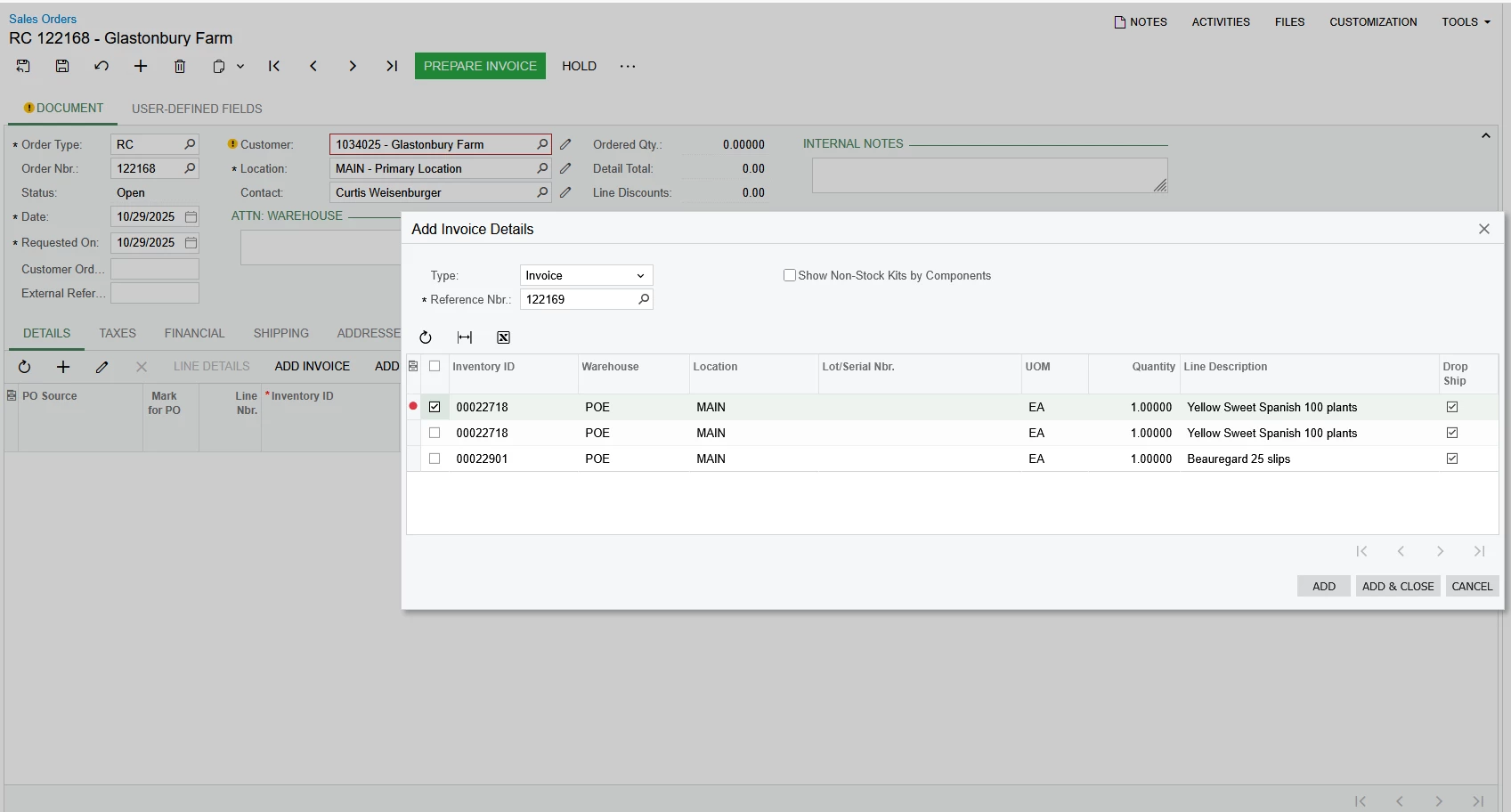
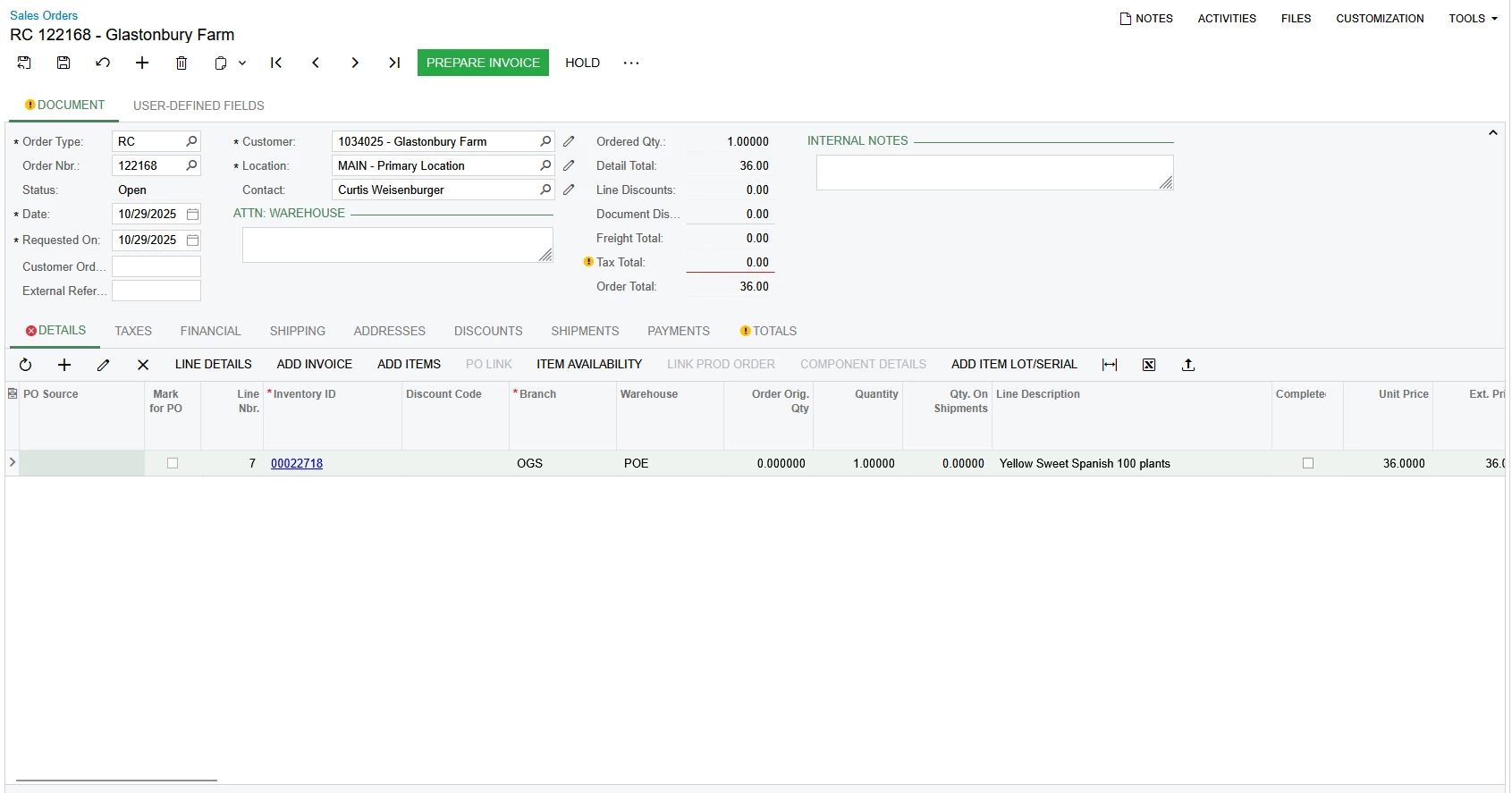
I created the invoice, created an RC, added said invoice to the RC but the “Mark for PO” was not checked and the “PO Source” is blank which is not the behavior that the guide explained would happen.


Forum|alt.badge.img
  • Author
  • Varsity I
  • October 29, 2025


Forum|alt.badge.img
  • Author
  • Varsity I
  • October 29, 2025

@SBaldwin Can you check the below article?


The Mark for PO check box doesn’t get checked nor does the “PO Source” get filled in as drop-ship even though when click “Add Invoice” the drop ship checkbox is checked for the item I am selecting.


PaulMainard55
Captain I
Forum|alt.badge.img+2
  • Captain I
  • Answer
  • October 29, 2025

@SBaldwin  - As I read through Irina’s article, it appears that she suggesting that the RC Order doesn’t automatically select the “Mark for PO”, but is manually selected by the sales manager (in her scenario).  Irina suggested that drop-shipped product can either be returned directly to the vendor (Drop Shipped) or to your warehouse.

I suspect that unless your default replenishment class for the item and warehouse involved is set for “Drop Ship” and/or purchase-to-order, you would need to create the RC in the same fashion as the original Sales Order.  The default selection logic is effectively the same for both order types, even though your selecting the return of an item from a drop-ship invoice line. 

The selection of the invoice line is really more of a control feature to ensure that (a) you’re approving a return for product that the customer actually purchased, and (b) that the customer is being credited based on the correct price on the order.  I don’t believe that the invoice line selction is designed to govern fulfillment or return workflow - that comes from a combination of the order type, inventory item, and warehouse.  

With all that said, will the system allow you to check the “Mark for PO” box and select “Drop-Ship” manually?

Let us know.