

Answer

How to identify if a purchase receipt was created manually or automatically ?

  • August 8, 2024
  • 3 replies
  • 85 views

Forum|alt.badge.img

I have a list of purchase receipts . I guess some of those purchase receipts are manually created in Acumatica in the Purchase Receipts screen. How to segregate the purchase receipts that was created manually from the list of all Purchase receipts.

Best answer by nhatnghetinh

Hi @skumar98 

You can identify it in 3 ways:
1. Specify 1 User who only performs importing scenario/automation schedule. Based on this User, you know it is automatically by import.
2. You add Note to the import scenario/automation schedule list to note that it is automatically by import.
3. You add APRefNbr (Reference Nbr.) to the import scenario/automation schedule list to note that it is automatically by import.
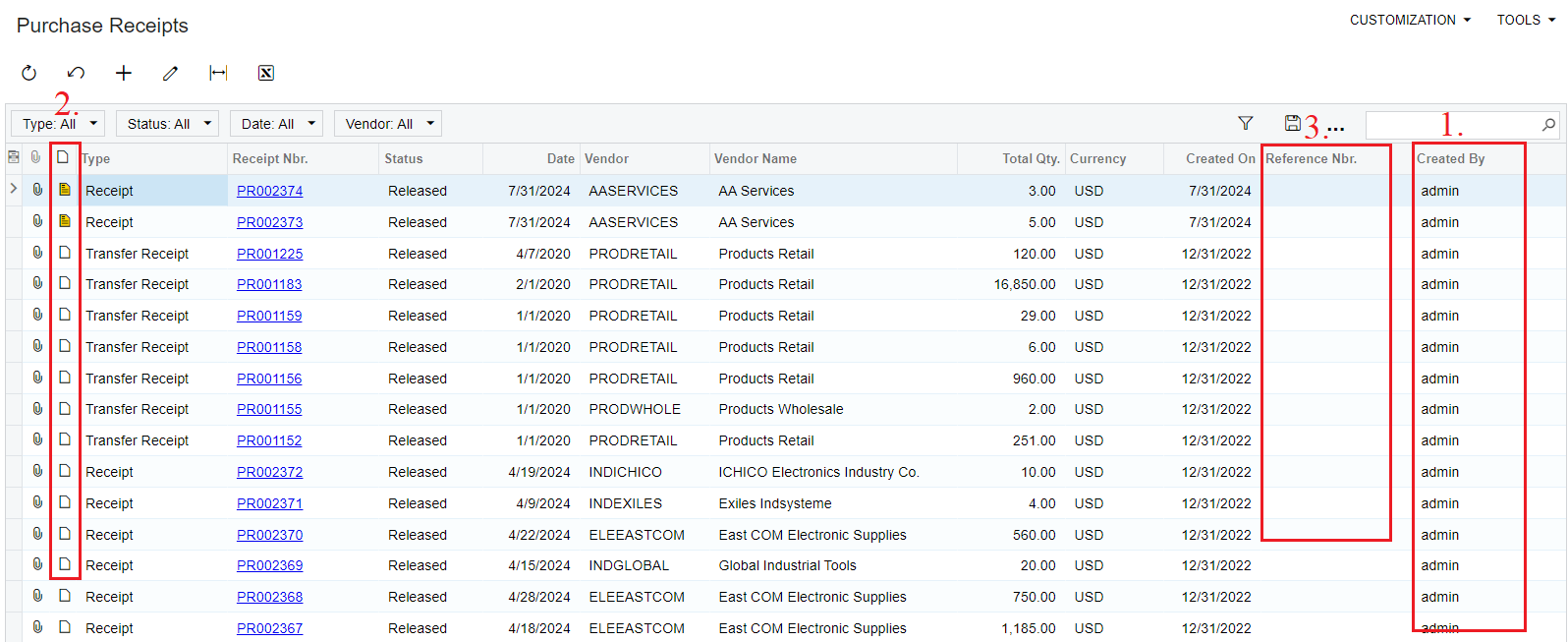


Best Regards,

NNT

3 replies

nhatnghetinh
Captain II
Forum|alt.badge.img+11
  • Captain II
  • August 8, 2024

Hi @skumar98 

Let me ask:

- a purchase receipt was created manually => Does that mean you entered the Purchase Receipt without going through Purchase Order?
- a purchase receipt was created automatically => Does that mean you create a Purchase Order then you do "Enter PO Receipt" to create a Purchase Receipt?


Best Regards,

NNT


Forum|alt.badge.img+8
  • Captain II
  • August 8, 2024

HI @skumar98 

Second to @nhatnghetinh’s question is there an import scenario/automation schedule that does any of the receipting process?

If so, the way to distinguish between the two could be too look at the ‘Created By ID’ field. Any system generated transactions are created by ‘Admin’


Aleks


nhatnghetinh
Captain II
Forum|alt.badge.img+11
  • Captain II
  • Answer
  • August 8, 2024

Hi @skumar98 

You can identify it in 3 ways:
1. Specify 1 User who only performs importing scenario/automation schedule. Based on this User, you know it is automatically by import.
2. You add Note to the import scenario/automation schedule list to note that it is automatically by import.
3. You add APRefNbr (Reference Nbr.) to the import scenario/automation schedule list to note that it is automatically by import.


Best Regards,

NNT
