We have two types of customers, and we are using the same item codes for both.
However, for one customer type, we need to use the automatic packaging feature, where packaging can be predefined. For the other customer type, we require manual packaging, since the packaging needs to be adjusted based on specific requirements.
Is there any way to achieve this without creating separate item codes?
Thanks.
Best answer by bwhite49
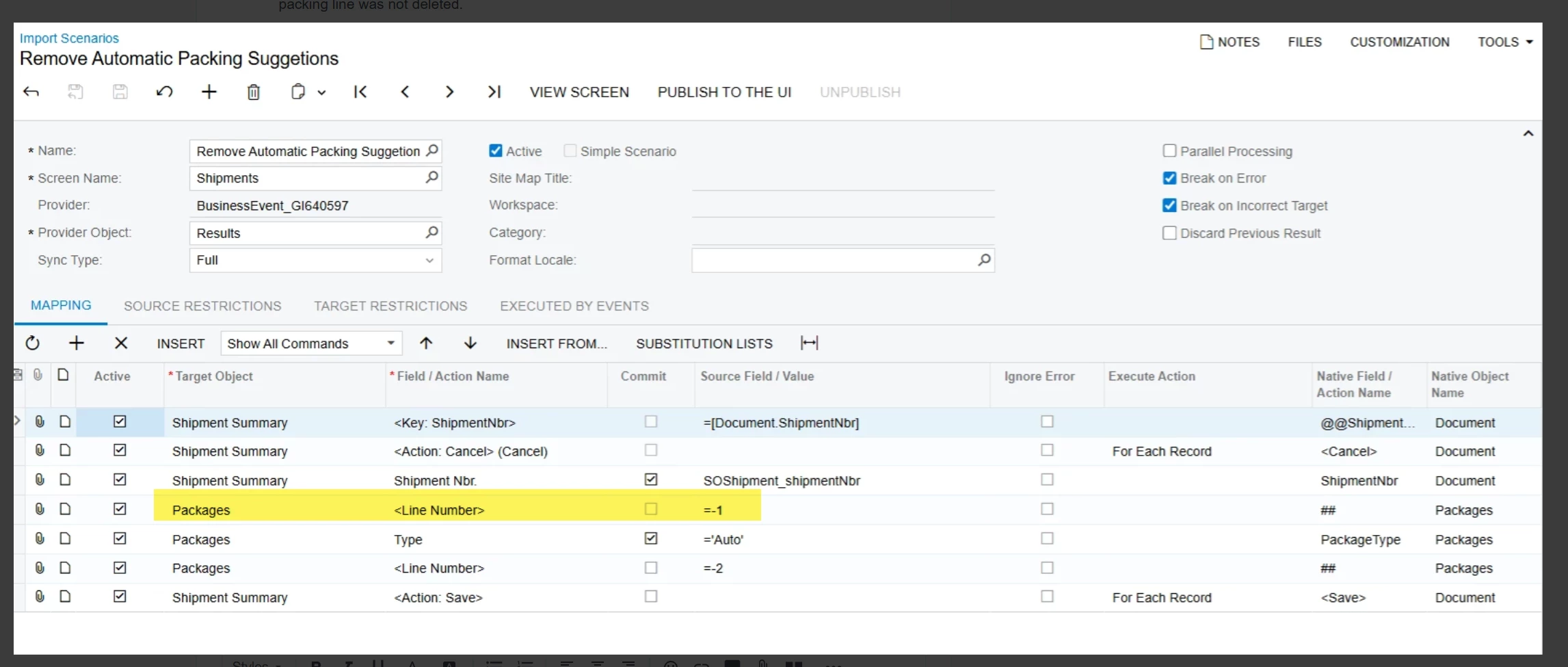
Yes, there is an issue with the import scenario.
Line = -1 inserts a new line and line nbr = -2 deletes the line. What this import scenario is doing is attempting to create a new line and then removing that same line.
The -1 line should be disabled to prevent the new record creation.
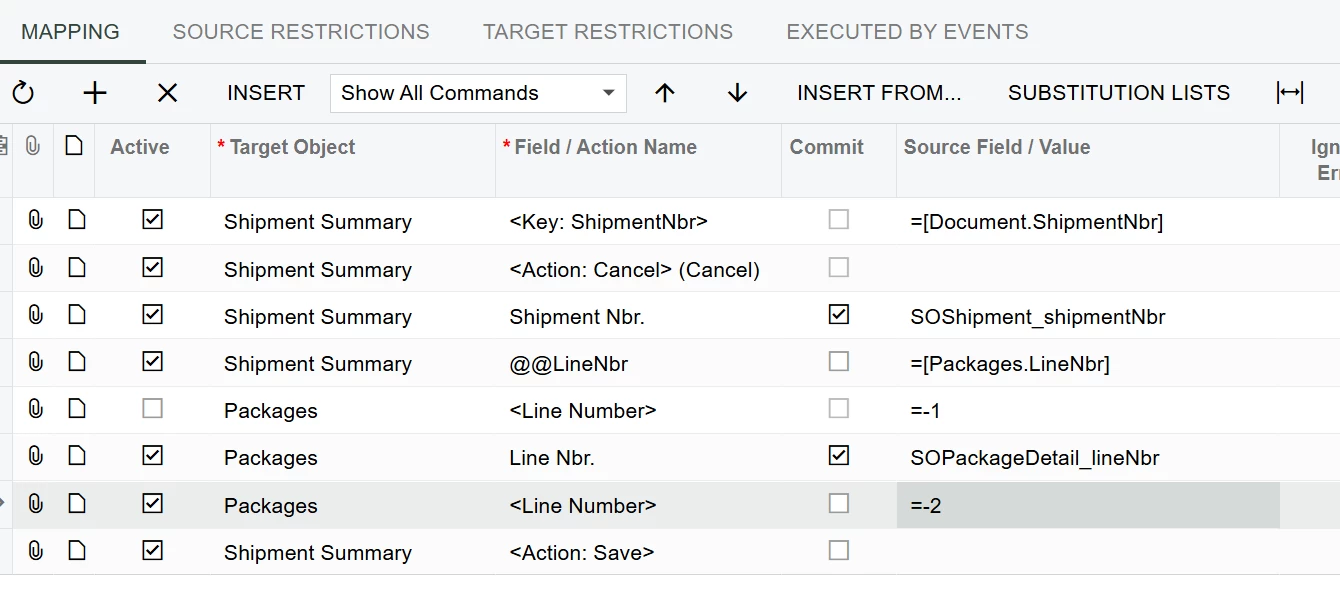
You also need to define a key field using the @@ function. You can use any field as a key field, but it’s important to use a key that is unique to the line. If you chose to use @@PackageType = “Auto”, then you will delete the first record with the package type of Auto. It will not delete all records with that value.
For this import scenario, you will want to use package line nbr. It’s a unique value for each line and will delete all records in your list.
This is why your list/GI should only contain “Auto” lines.
The goal of scheduled business event is to have a list that should always be empty. You don’t want records to show in your GI for more than the length of time your schedule runs. So if your schedule is set to run every 5 minutes, then the records will not show in the list for more than 5 minutes because the BE removes them from the list.
This is why you need a unique GI specific for the BE so that you can tailor the conditions to update and then tailor the conditions to not update indefinitely.
This would need to be a customization, but you could also handle with a business event.
The business event would be to delete the packages off the shipment after shipment creation. I’ve had to do a similar business event to delete the package from the shipment and then re-add the package so that the package type = manual. I believe there is an issue with the pick pack ship screen and “auto” type packages and for some reason we can’t update that field.
In your case, you would create a GI to show all “auto” type packages where the customer is associated with this class/type. You would then create the business event (trigger by schedule is best) to trigger the import scenario to remove the auto packages.
As per what you suggested, when we delete the created packaging lines through Business Event how can we make sure we are deleting the automatic packaging lines. Lets assume we are processing the shipment on the same time and we might enter manual packaging lines too.
Further, in my scenario there could be more than one line under packaging as there could be multiple boxes/packages combination.
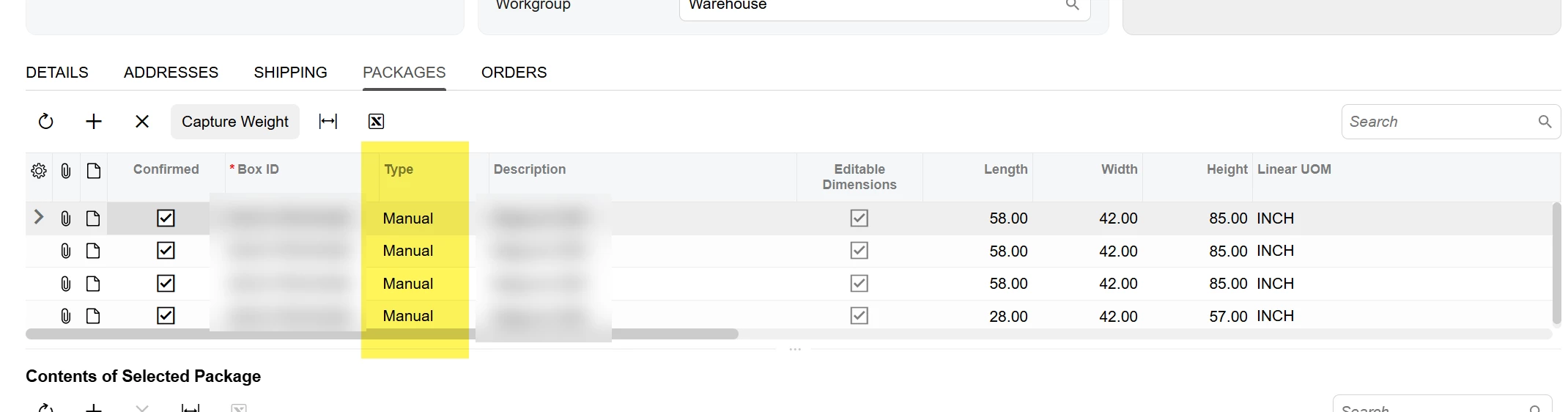
When a package is added through auto-pack the type field on the package says “Auto.” Your GI to run the business event would have a condition where the package type = Auto
Line = -1 inserts a new line and line nbr = -2 deletes the line. What this import scenario is doing is attempting to create a new line and then removing that same line.
The -1 line should be disabled to prevent the new record creation.
You also need to define a key field using the @@ function. You can use any field as a key field, but it’s important to use a key that is unique to the line. If you chose to use @@PackageType = “Auto”, then you will delete the first record with the package type of Auto. It will not delete all records with that value.
For this import scenario, you will want to use package line nbr. It’s a unique value for each line and will delete all records in your list.
This is why your list/GI should only contain “Auto” lines.
The goal of scheduled business event is to have a list that should always be empty. You don’t want records to show in your GI for more than the length of time your schedule runs. So if your schedule is set to run every 5 minutes, then the records will not show in the list for more than 5 minutes because the BE removes them from the list.
This is why you need a unique GI specific for the BE so that you can tailor the conditions to update and then tailor the conditions to not update indefinitely.