Answer

How to Flag International Shipments on Pick Lists?

  • October 1, 2025
  • 6 replies
  • 92 views

Forum|alt.badge.img

We’re struggling with visibility around international shipments in our Distribution Center. Right now, both the supervisor creating the pick lists and the pickers themselves often don’t realize an order is international until it’s too late. As a result, shipments sometimes leave without the proper customs paperwork.

Most of the time, our pickup drivers are good at catching this when they load their trucks, but I’d like to eliminate the risk before it gets that far.

What I’d like to do is:

  • On the Create Pick Lists screen: make international shipments stand out more clearly (e.g., highlight the line a different color or display an icon/flag).
  • On the Pick List report: add a bold header message like “INTERNATIONAL SHIPMENT--CUSTOMS PAPERWORK REQUIRED” that only appears when applicable.

I’m not sure if this is best handled through Report Designer (and if so, which field to pull from--Ship-To Country?) or if there’s another way to flag international shipments directly in the screen.

Has anyone implemented something similar or found a good way to make these orders impossible to miss?
Best answer by kyle90

We’ve done almost exactly what ​@bwhite49 suggests


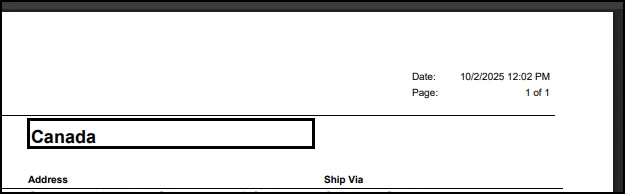
On the header of the pick list we’ve added two large text boxes - one for the ship-to country if it doesn’t equal the US and another for certain expedited shipping methods,

The text boxes are large, bold and outlined, but most importantly - not printed at all when shipping to the US - which catches the eye very effectively! 


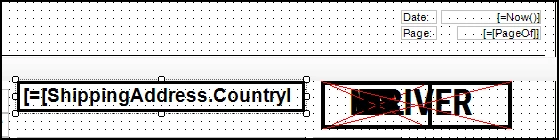
In report designer you’d add the boxes like this

For the international address, I added =[ShippingAddress.CountryID]<>'US' under VisibileExp

I think that’s the most important bit - if you print the country on every pick list, the eye moves right past it. But if you only print when it’s not the US, it really jumps out at you 


--

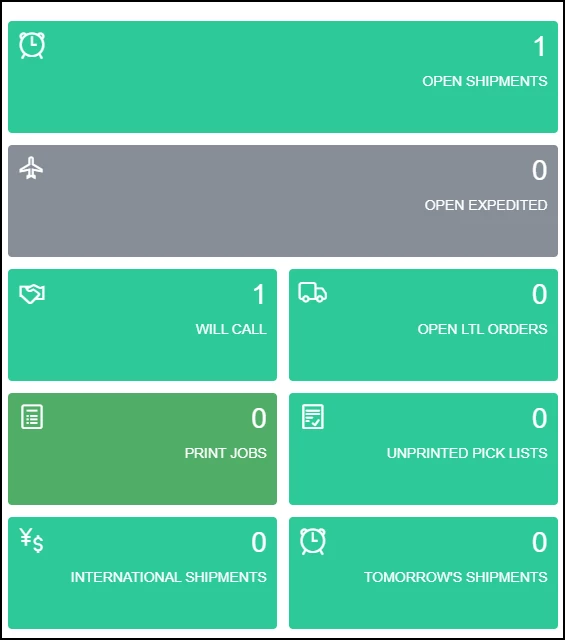
Another helpful tip - get your team using dashboards and add a widget for open non-US shipments (or any special use case).

Here’s a sample of the widgets our fulfillment team is looking at daily


6 replies

bwhite49
Captain II
Forum|alt.badge.img+10
  • Captain II
  • October 1, 2025

For the pick list form, you can connect the ship to address to the form and do something like this in a text box...

IIF([Address.Country]<>’US’, ‘INTERNATIONAL SHIPMENT--CUSTOMS PAPERWORK REQUIRED.’ ‘’)

This would be a pretty easy form change. Changing the processing screen for printing pick lists unfortunately would be a customization.


Neil Cantral
Jr Varsity I
Forum|alt.badge.img+3
  • Jr Varsity I
  • October 1, 2025

We tried to rely on the country code in the address, but some of our customers also use freight forwarders that might have a US address.

Later we added two customer attributes to help: a Commercial Invoice checkbox and BOL Special Instructions. This allows us to tag customers that always need the additional paperwork or to print additional information on the shipping documents. We've had several iterations, but we use the attributes to conditionally show/hide sections of our normal reports (origin, HTS code, etc.) or to include a subreport.


Forum|alt.badge.img+2
  • Captain II
  • Answer
  • October 2, 2025

We’ve done almost exactly what ​@bwhite49 suggests


On the header of the pick list we’ve added two large text boxes - one for the ship-to country if it doesn’t equal the US and another for certain expedited shipping methods,

The text boxes are large, bold and outlined, but most importantly - not printed at all when shipping to the US - which catches the eye very effectively! 


In report designer you’d add the boxes like this

For the international address, I added =[ShippingAddress.CountryID]<>'US' under VisibileExp

I think that’s the most important bit - if you print the country on every pick list, the eye moves right past it. But if you only print when it’s not the US, it really jumps out at you 


--

Another helpful tip - get your team using dashboards and add a widget for open non-US shipments (or any special use case).

Here’s a sample of the widgets our fulfillment team is looking at daily


Dana Moffat
Community Manager
Forum|alt.badge.img+2
  • Community Manager
  • October 7, 2025

Thank you for sharing - some really great ideas here that i will add to the Product Roadmap.


Dana Moffat
Community Manager
Forum|alt.badge.img+2
  • Community Manager
  • October 9, 2025

@jsiburt , am hoping you could provide more information about your comment “We’re struggling with visibility around international shipments in our Distribution Center. Right now, both the supervisor creating the pick lists and the pickers themselves often don’t realize an order is international until it’s too late. As a result, shipments sometimes leave without the proper customs paperwork.”

Are you using a shipping carrier integration?  The shipping paperwork can be automatically generated .

If you like, i can send you a teams invite with date/time options to meet to discuss further.  

-Dana


Forum|alt.badge.img
  • Author
  • Jr Varsity II
  • October 9, 2025

@Dana Moffat,

Yes, we’re using the EasyPost FedEx carrier integration. Currently, our Shipping Manager generates the customs paperwork after the shipment has been invoiced, and our shipping team then attaches it to the shipment.

We’d definitely be interested in a meeting to review how automatic customs paperwork generation works and explore ways to streamline our international shipping process.

Thank you!

Jaline