Solved

How to convert non-expiration date capture items to expiration date capture items?

  • December 12, 2025
  • 2 replies
  • 29 views

Forum|alt.badge.img+6

     Our company plans to set some items to capture expiration dates upon receipt. However, these items are frequently used, and it’s impossible to wait until the inventory is exhausted before replenishing. In other words, there is always an on-hand quantity in stock. I noticed that when I try to modify the lot serial class, items that are in use (which should mean having an on-hand quantity) do not allow me to switch from the default class to the expiration date track class.
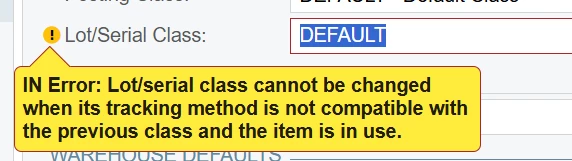

How can this problem be solved? What is the best approach. Please advise.

Best answer by nhatnghetinh

Hi ​@ray20 

Try adjusting the quantity of these items to 0 (using the Issues screen). Then you can modify the lot serial class of these items. After that, adjust the quantity of these items back to their original level (using the Receipts screen).


Best Regards,

NNT

2 replies

nhatnghetinh
Captain II
Forum|alt.badge.img+11
  • Captain II
  • Answer
  • December 12, 2025

Hi ​@ray20 

Try adjusting the quantity of these items to 0 (using the Issues screen). Then you can modify the lot serial class of these items. After that, adjust the quantity of these items back to their original level (using the Receipts screen).


Best Regards,

NNT


  • Acumatica Employee
  • December 12, 2025

Hey ​@ray20 !

@nhatnghetinh is correct, you cannot change the Lot/Serial Class if an item exists on hand/is in use. 

However, I want to note that the item should not be in use in other areas as well (Sales Order, Production Order, etc.)

Essentially a “clean break" is needed to change the Lot/Serial Class.

This is another similar post! 

Change the Lot/Serial Class of an item to any other lot/serial class with different Tracking Method.  | Community