Question

Generic Inquiry Data Source No Results

  • February 9, 2026
  • 7 replies
  • 70 views

Hi all,

I recently created 2 separate Generic Inquiries for my company. One is Inventory with Sales/Margin/Margin % info. The other is inventory with units by location by warehouse.

My goal is to combine these 2 GIs into one master GI to avoid having to switch between different reports when viewing sales and inventory information.

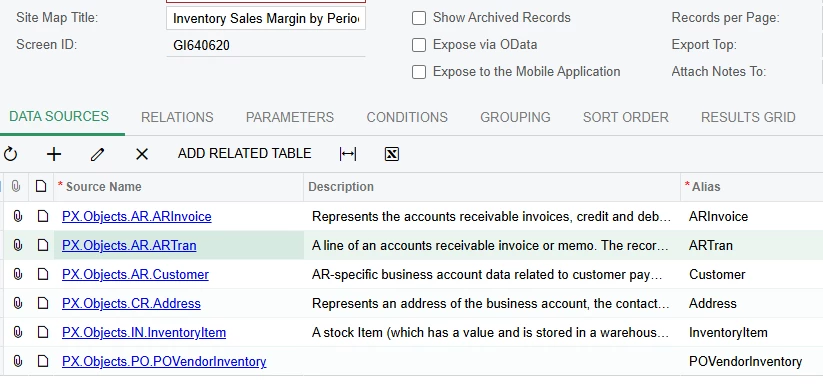
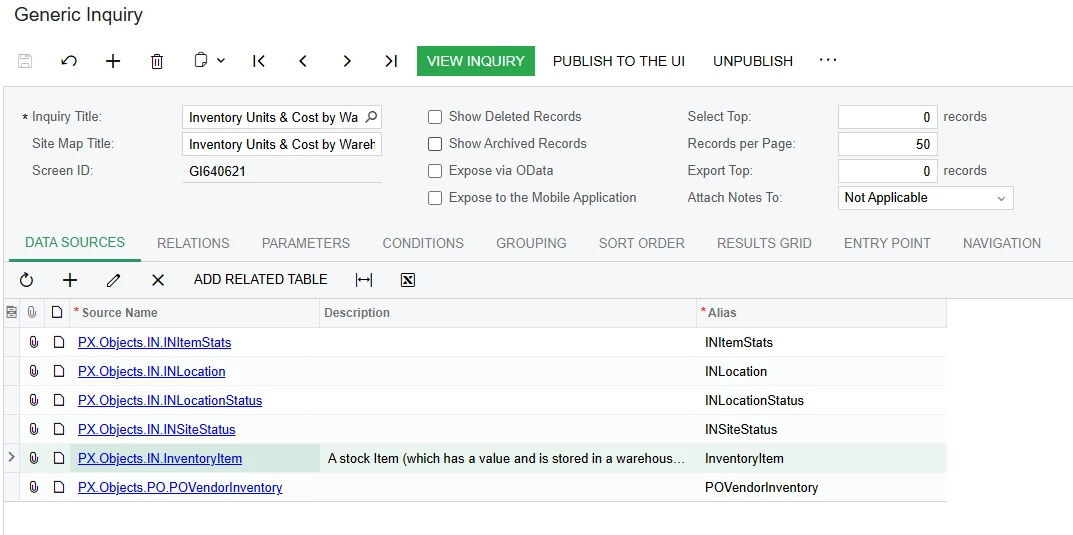
Below are the data sources for the FIRST Generic Inquiry: Inventory Units & Cost by Warehouse.

When I use this GI as a data source for a new GI, NO fields show up even after selecting them in the results field. I have not joined anything to this in the new GI yet, so I doubt it’s a data relation mapping issue.

Conversely, when I use the other GI - Inventory by Sales/Margin/Margin % - as a data source, all records populate when I show them in the results field. 

Both individual data source tabs are shown below.

thanks all!

Joseph
 

7 replies

dhuynh75
Freshman I
Forum|alt.badge.img
  • Freshman I
  • February 9, 2026

hi ​@JHuang ,

It would be great if you can clarify what you did when you mentioned

I use this GI as a data source for a new GI”

If you have not joined anything yet then you should check

  • Relation: I did not see relation in your 2nd so I am not sure if anything can be changed there, join conditions could let wrong mapping
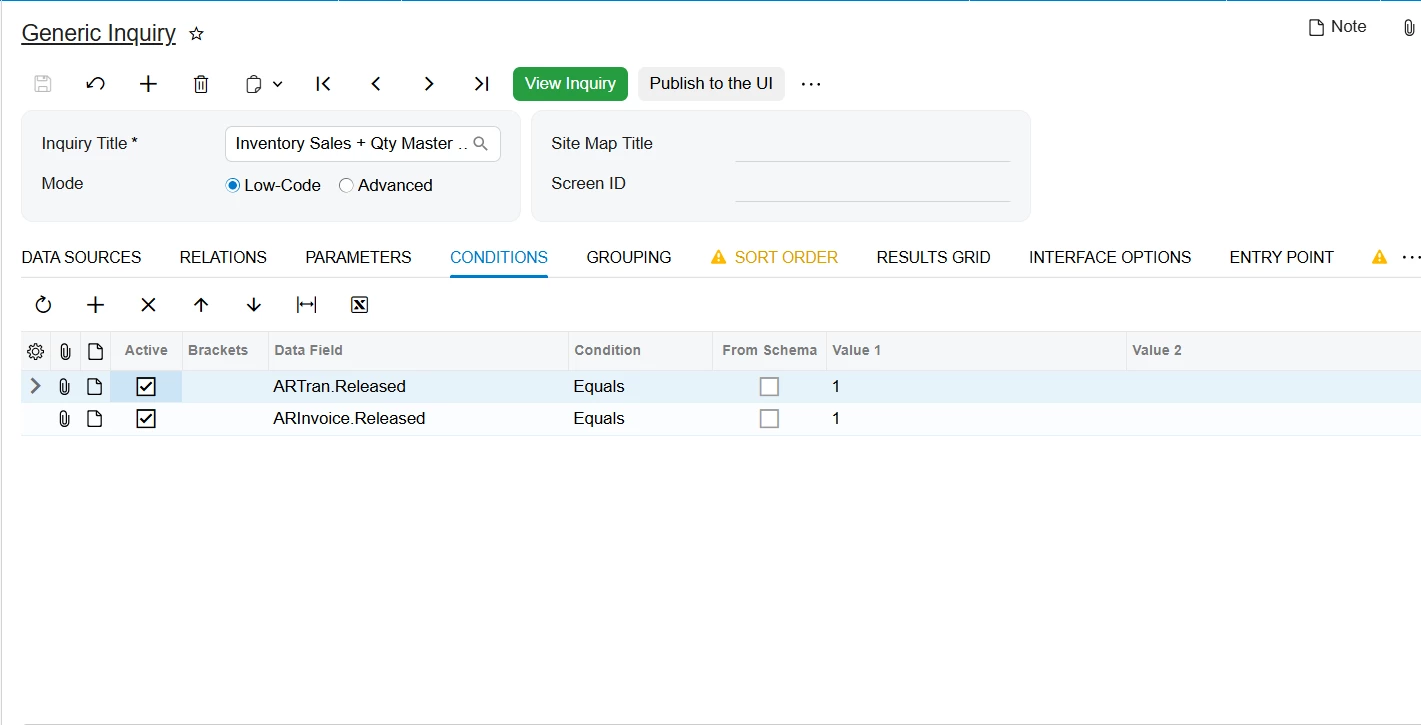
  • Condition: check if you have any condition pre-defined or not.
  • Result column: check if any column added in Result tab?

That all I can suggest, hope it help.


  • Author
  • Freshman I
  • February 10, 2026

Hi ​@dhuynh75 I simply added the first GI as a data source and put a few fields in the results tab. Nothing showed up.

What is odd is that I created a completely new GI that was an exact replica of the original one. I can use that as a data source and see the fields show up.

do you know why this would be?

thank you!

Joseph


aryanjadhav50
Jr Varsity I
Forum|alt.badge.img
  • Jr Varsity I
  • February 10, 2026

Hi ​@JHuang,

Understanding the issue with combining the two Generic Inquiries

I created two separate Generic Inquiries in Acumatica:

  1. One Generic Inquiry shows inventory quantities by warehouse/location.
    This inquiry is built using inventory status tables such as warehouse or location status.

  2. The other Generic Inquiry shows sales, margin, and margin percentage by inventory item.
    This inquiry is built using sales transaction tables.

When I tried to use the inventory quantity inquiry as a data source inside another Generic Inquiry, no records appeared, even though the fields were selectable. However, when I used the sales/margin inquiry as a data source, it worked correctly.

This difference happens because of how Acumatica treats different types of tables.

Why the inventory inquiry does not return data as a data source

Inventory quantity inquiries usually rely on inventory status tables. These tables are system-maintained summaries that already store calculated totals (such as quantity on hand by warehouse or location). They are not transactional row-by-row data.

Because of this, Acumatica cannot reuse them as a nested data source inside another Generic Inquiry. When selected as a source, the structure exists, but the system does not return rows.

Sales inquiries behave differently because they are based on transactional tables that contain real records with unique keys. These tables can be reused safely in other inquiries.

The correct way to combine sales and inventory information

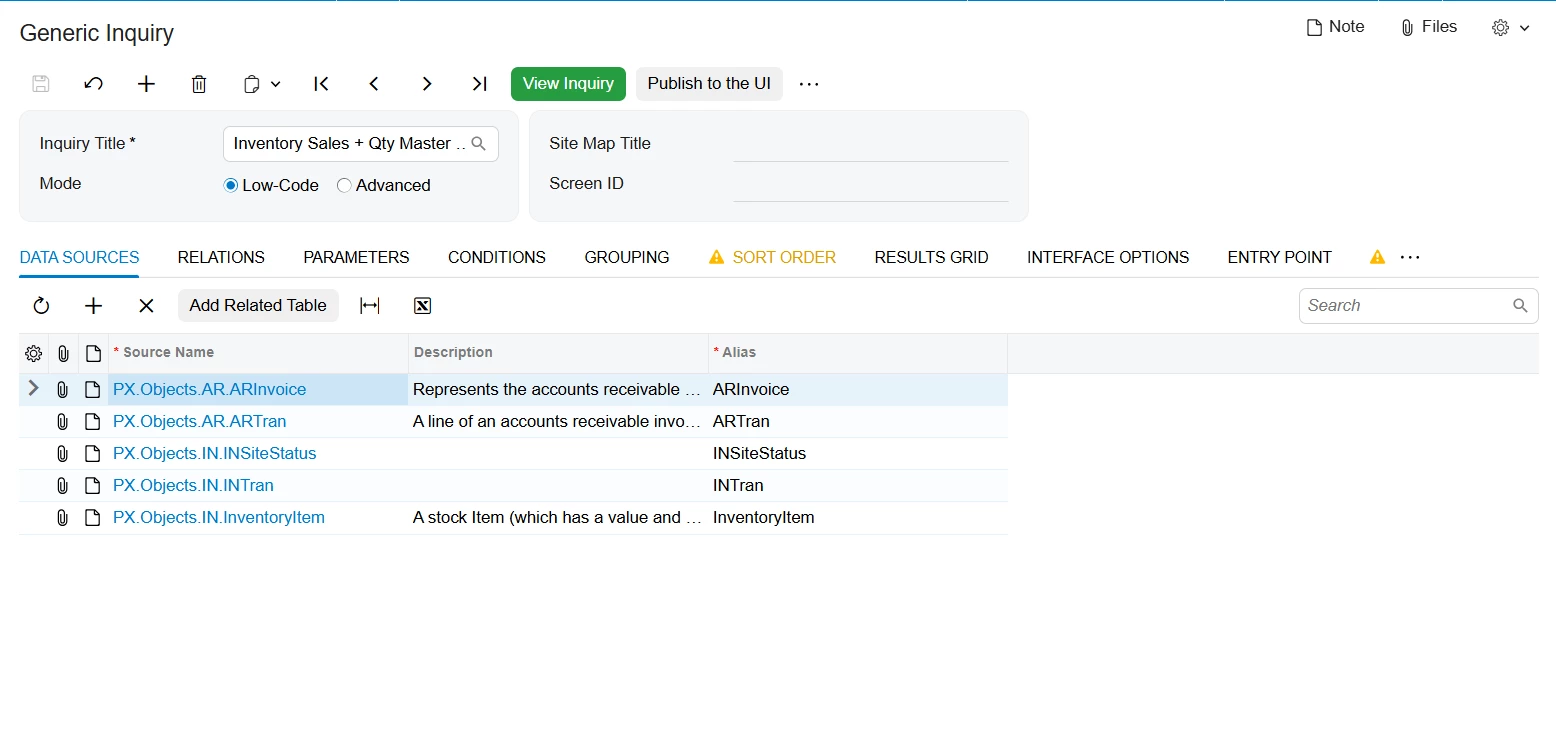
Instead of combining two existing Generic Inquiries, the correct approach is to build one master Generic Inquiry directly from base tables.

Each table contributes a specific type of information:

  • InventoryItem defines which item the row represents.

  • INSiteStatus provides quantity on hand by warehouse.

  • ARTran provides sales quantity and sales amount.

  • ARInvoice provides document date, financial period, and released status.

  • INTran provides the actual inventory cost.

This approach allows all required data to be available in one inquiry without relying on nested Generic Inquiries.

How cost and margin are calculated

In many Acumatica systems, sales transactions do not store cost directly in AR tables. Instead, cost is recorded in inventory transactions.

Because of this:

  • Sales value comes from ARTran.

  • Cost comes from INTran.

Margin is calculated using:

  • Margin = Sales Amount − Inventory Cost

  • Margin % = Margin ÷ Sales Amount

This method ensures the values match inventory and general ledger posting.

Where aggregation and calculations are handled

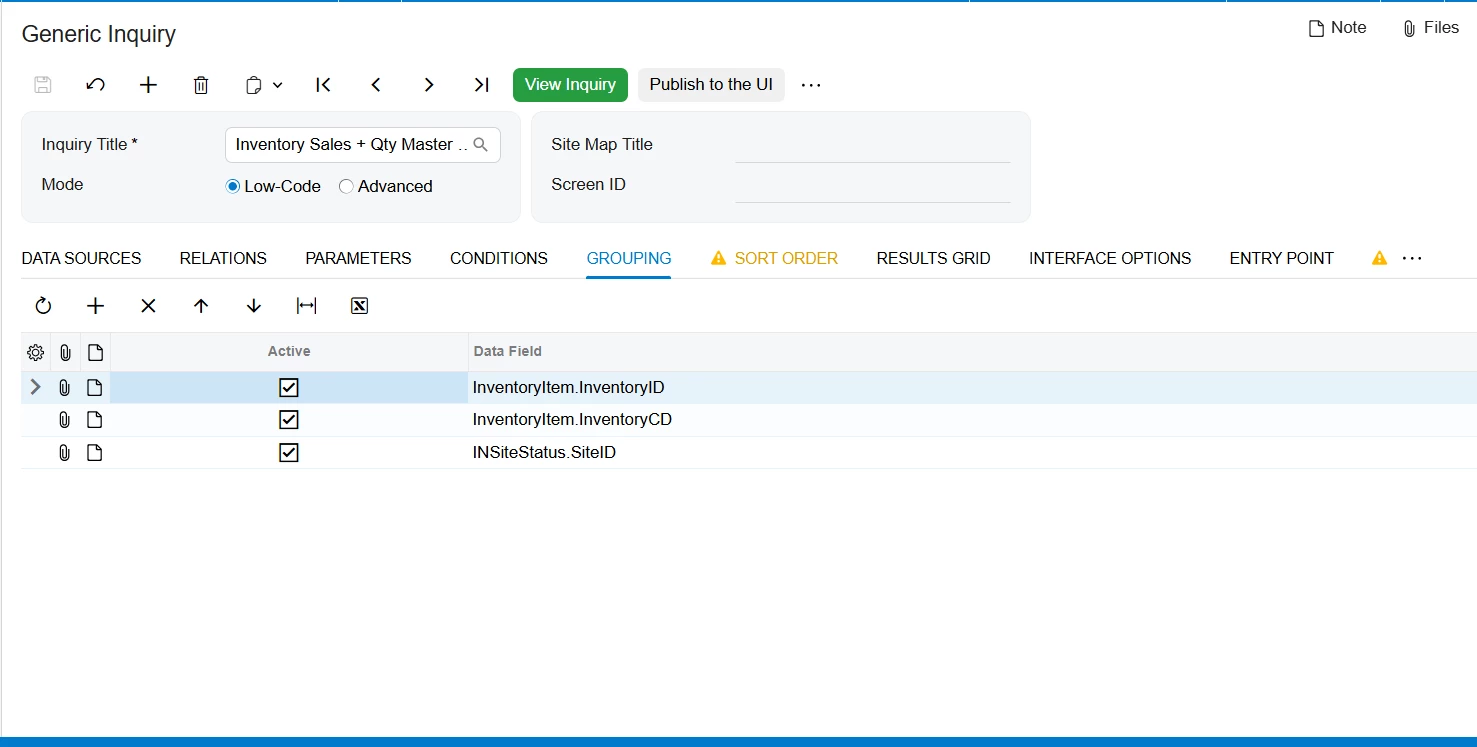
All totals such as sales amount, cost, quantity sold, and quantity on hand are calculated using the Grouping tab of the Generic Inquiry.

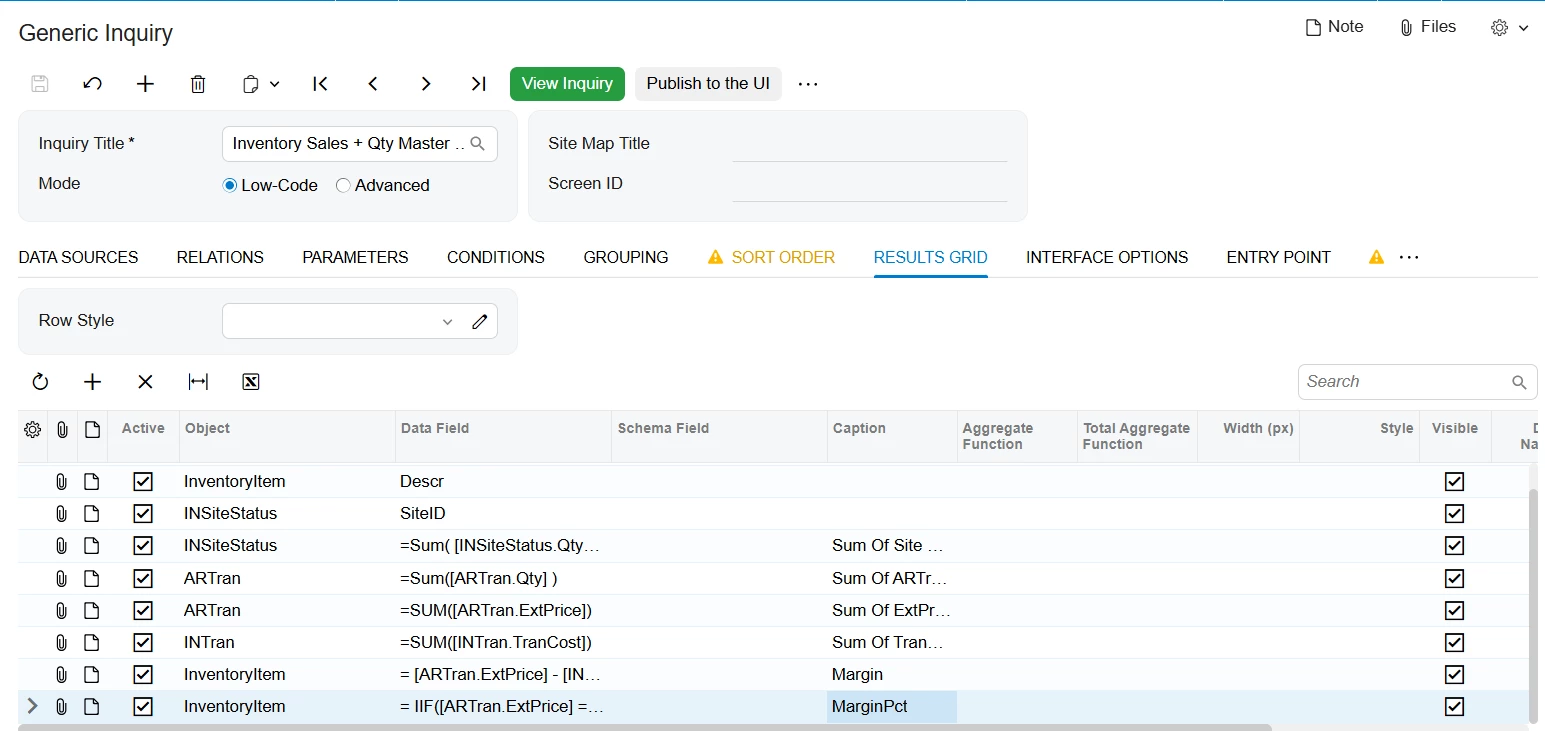
Calculated fields such as Margin and Margin % are created in the Results Grid, and they are assigned to the InventoryItem object, since each result row represents an inventory item (and warehouse).

Final conclusion

The issue was not a configuration error. It happens because inventory status-based Generic Inquiries cannot be reused as data sources. The correct and supported solution is to build a single master Generic Inquiry using base tables, aggregate the data in the Grouping tab, and calculate margin using sales transactions for revenue and inventory transactions for cost. This approach is accurate, stable, and easy to maintain.

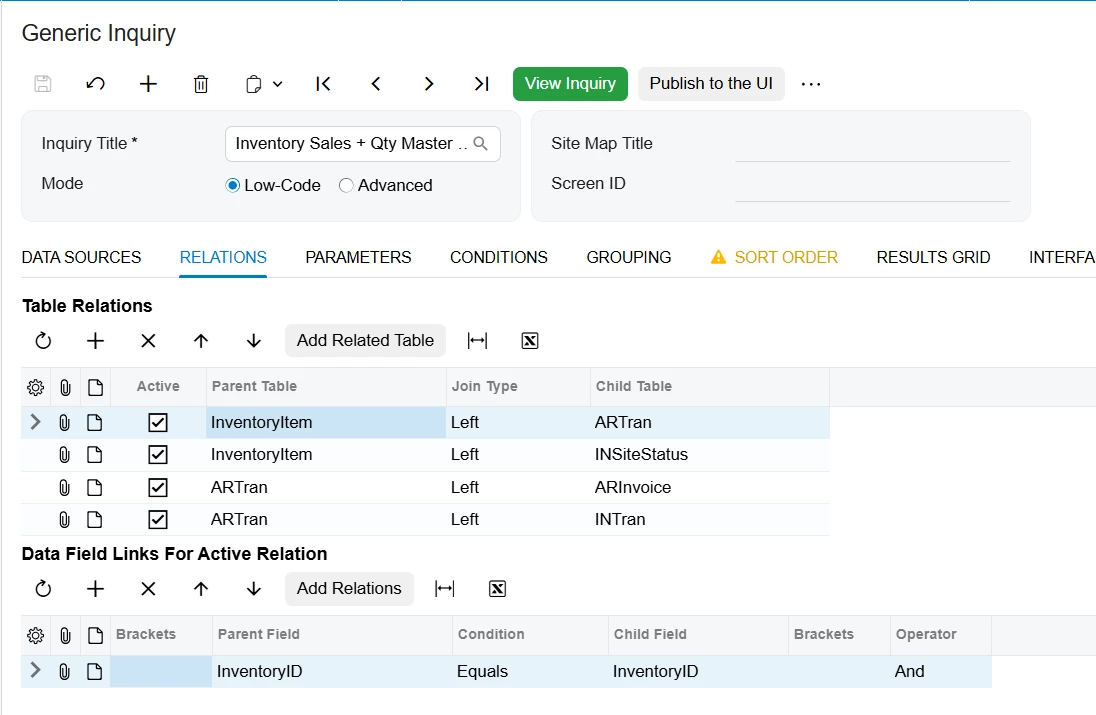
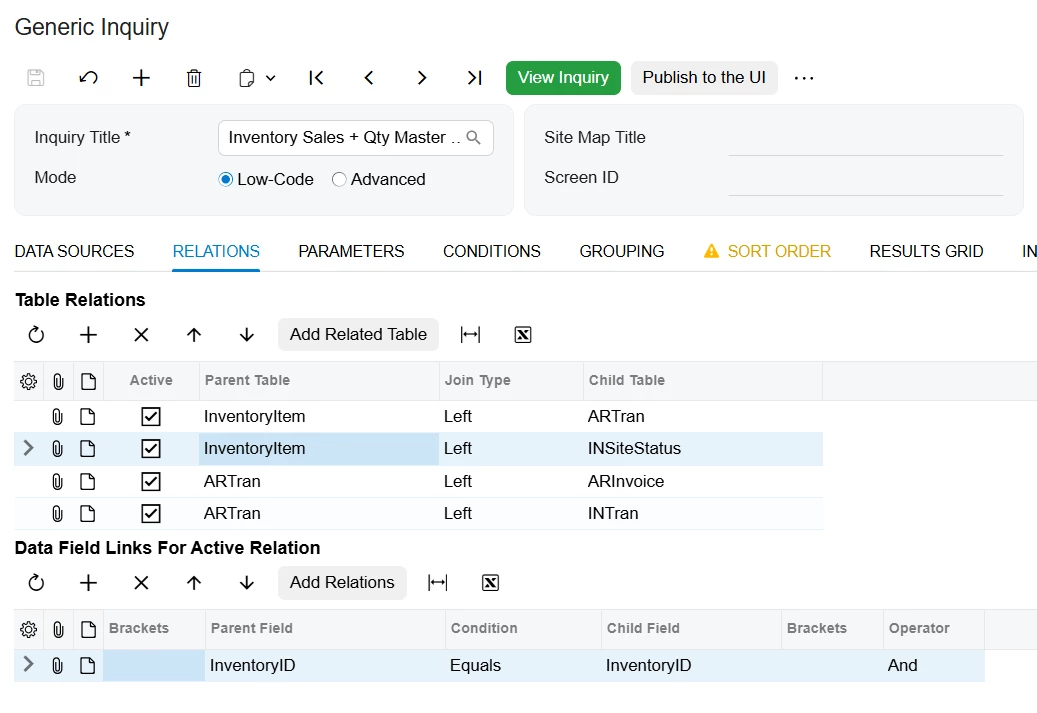
Please look the following screenshot for creating the combine GI :-

1.Data Sources Tab

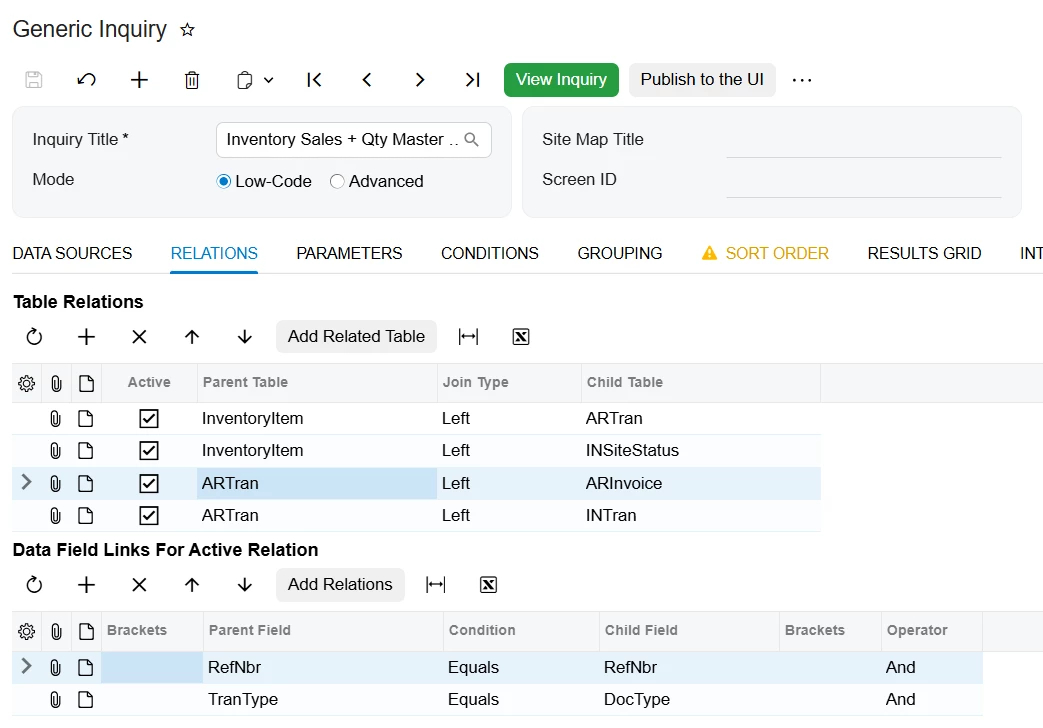
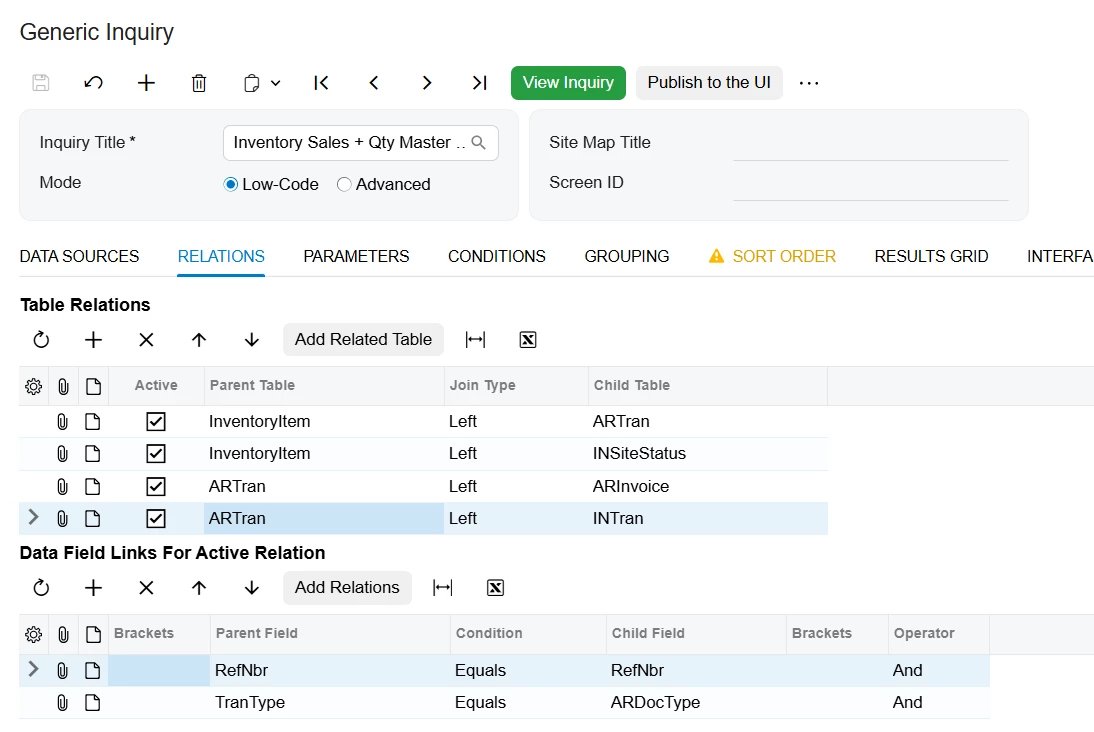
2. Relation Tab

2.1

2.2

2.3

2.4

  1. Condition Tab


  1. Grouping Tab


  1. Result Grid Tab


In the last Screenshot in Data Field column just click on pencil sign and add the Aggregate function accordingly.
Please let me know if anything more required.


dhuynh75
Freshman I
Forum|alt.badge.img
  • Freshman I
  • February 10, 2026

Hi ​@dhuynh75 I simply added the first GI as a data source and put a few fields in the results tab. Nothing showed up.

What is odd is that I created a completely new GI that was an exact replica of the original one. I can use that as a data source and see the fields show up.

do you know why this would be?

thank you!

Joseph

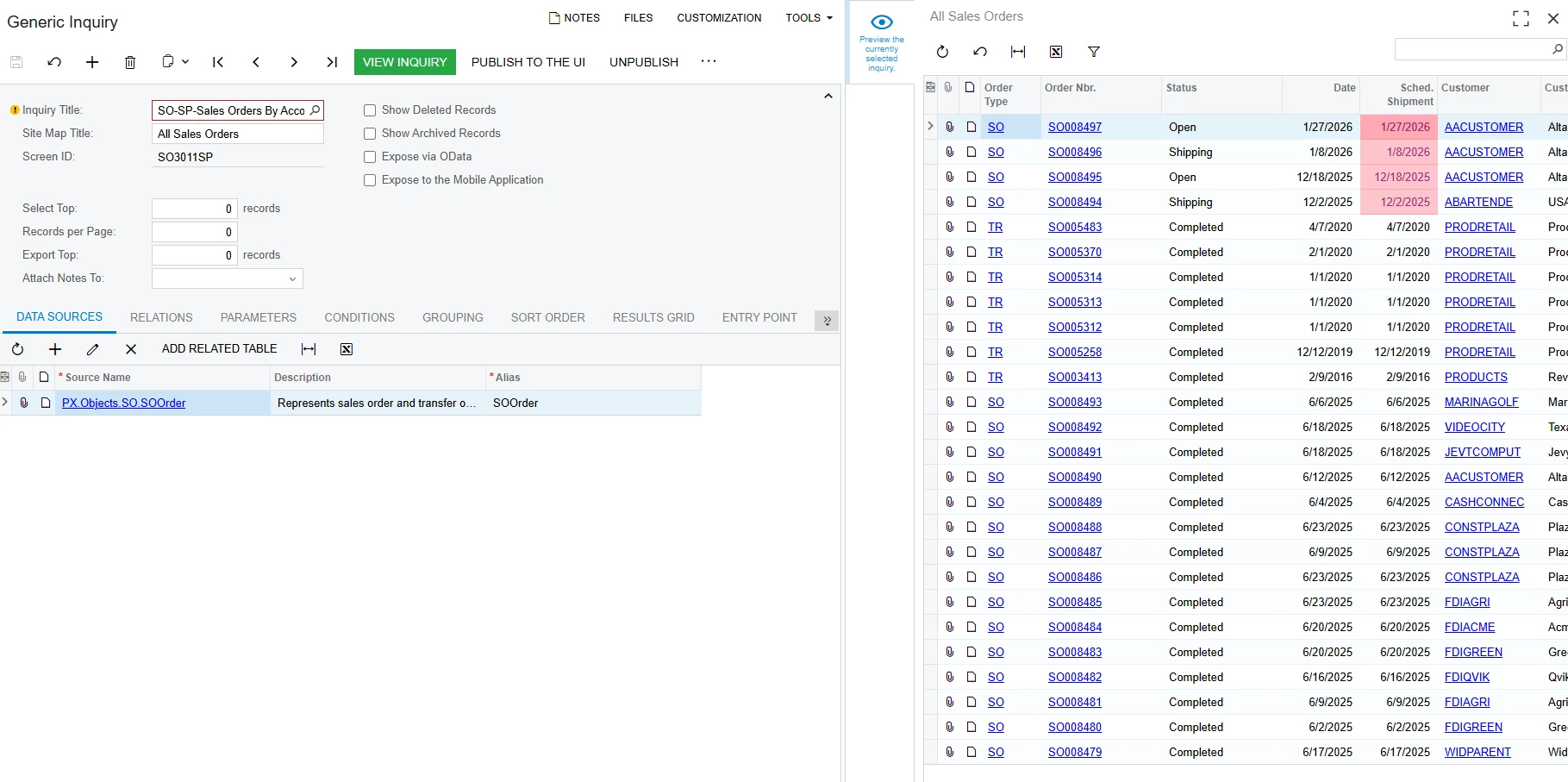
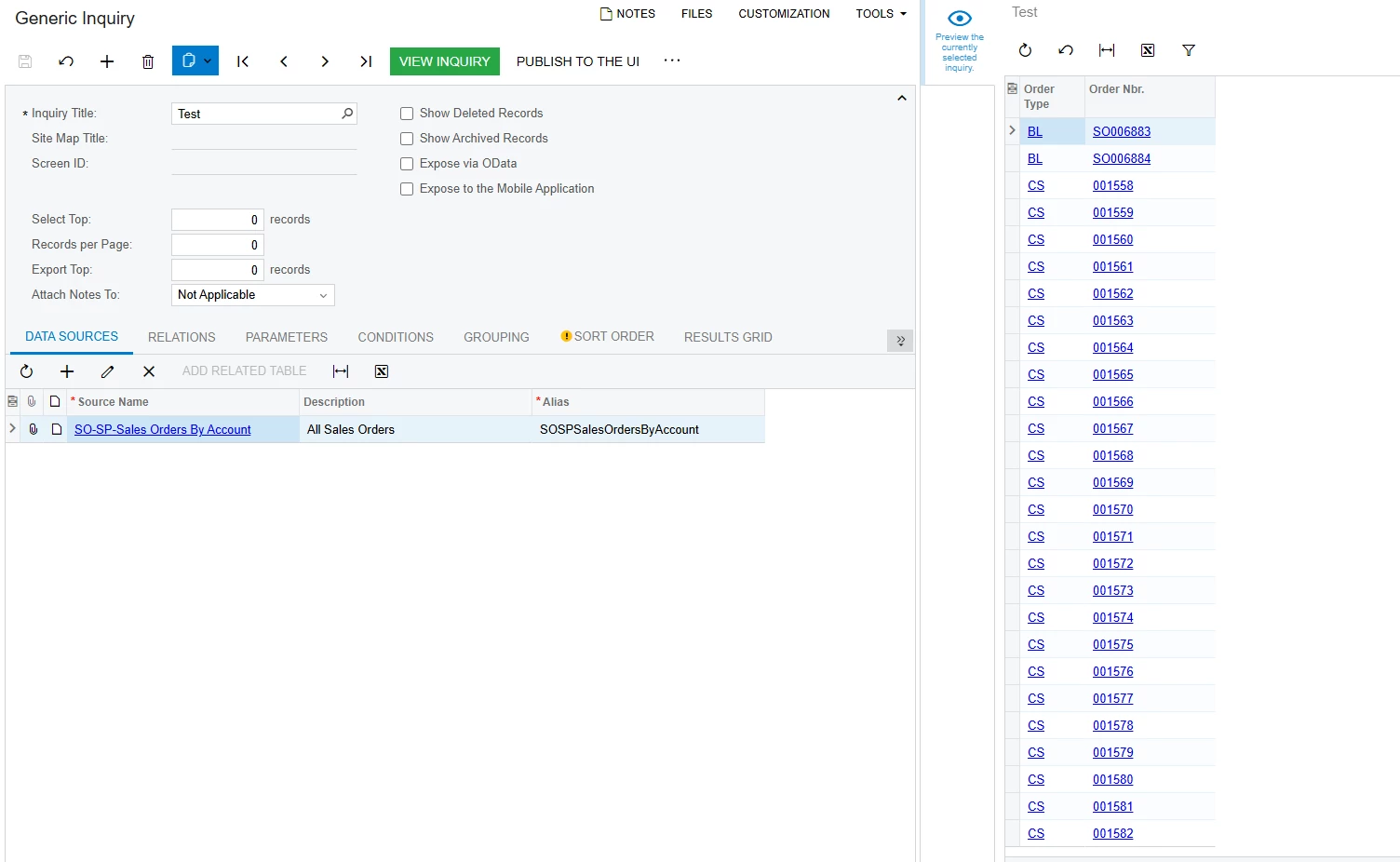
From my understanding, are you adding first GI in Data Source Tab then try to pull the data but no result, meaning you need to check your first GI, if it required parameter or not. 


I tried with sample Sales Demo data, I hope it can help you with this.

  1. This is my first GI
  1. This is my 2nd GI using previous one as data source 


  • Author
  • Freshman I
  • February 10, 2026

@aryanjadhav50 thanks for the really detailed reply. I’ll try it out.

What is odd though, is I had created another inventory GI with the same info and it linked just fine as a data source. but your solution is simpler. thank you!


  • Author
  • Freshman I
  • February 10, 2026

Hi ​@dhuynh75 I simply added the first GI as a data source and put a few fields in the results tab. Nothing showed up.

What is odd is that I created a completely new GI that was an exact replica of the original one. I can use that as a data source and see the fields show up.

do you know why this would be?

thank you!

Joseph

From my understanding, are you adding first GI in Data Source Tab then try to pull the data but no result, meaning you need to check your first GI, if it required parameter or not. 


I tried with sample Sales Demo data, I hope it can help you with this.

  1. This is my first GI
  1. This is my 2nd GI using previous one as data source 


Thanks ​@dhuynh75 


  • Author
  • Freshman I
  • February 10, 2026

Hi ​@JHuang,

Understanding the issue with combining the two Generic Inquiries

I created two separate Generic Inquiries in Acumatica:

  1. One Generic Inquiry shows inventory quantities by warehouse/location.
    This inquiry is built using inventory status tables such as warehouse or location status.

  2. The other Generic Inquiry shows sales, margin, and margin percentage by inventory item.
    This inquiry is built using sales transaction tables.

When I tried to use the inventory quantity inquiry as a data source inside another Generic Inquiry, no records appeared, even though the fields were selectable. However, when I used the sales/margin inquiry as a data source, it worked correctly.

This difference happens because of how Acumatica treats different types of tables.

Why the inventory inquiry does not return data as a data source

Inventory quantity inquiries usually rely on inventory status tables. These tables are system-maintained summaries that already store calculated totals (such as quantity on hand by warehouse or location). They are not transactional row-by-row data.

Because of this, Acumatica cannot reuse them as a nested data source inside another Generic Inquiry. When selected as a source, the structure exists, but the system does not return rows.

Sales inquiries behave differently because they are based on transactional tables that contain real records with unique keys. These tables can be reused safely in other inquiries.

The correct way to combine sales and inventory information

Instead of combining two existing Generic Inquiries, the correct approach is to build one master Generic Inquiry directly from base tables.

Each table contributes a specific type of information:

  • InventoryItem defines which item the row represents.

  • INSiteStatus provides quantity on hand by warehouse.

  • ARTran provides sales quantity and sales amount.

  • ARInvoice provides document date, financial period, and released status.

  • INTran provides the actual inventory cost.

This approach allows all required data to be available in one inquiry without relying on nested Generic Inquiries.

How cost and margin are calculated

In many Acumatica systems, sales transactions do not store cost directly in AR tables. Instead, cost is recorded in inventory transactions.

Because of this:

  • Sales value comes from ARTran.

  • Cost comes from INTran.

Margin is calculated using:

  • Margin = Sales Amount − Inventory Cost

  • Margin % = Margin ÷ Sales Amount

This method ensures the values match inventory and general ledger posting.

Where aggregation and calculations are handled

All totals such as sales amount, cost, quantity sold, and quantity on hand are calculated using the Grouping tab of the Generic Inquiry.

Calculated fields such as Margin and Margin % are created in the Results Grid, and they are assigned to the InventoryItem object, since each result row represents an inventory item (and warehouse).

Final conclusion

The issue was not a configuration error. It happens because inventory status-based Generic Inquiries cannot be reused as data sources. The correct and supported solution is to build a single master Generic Inquiry using base tables, aggregate the data in the Grouping tab, and calculate margin using sales transactions for revenue and inventory transactions for cost. This approach is accurate, stable, and easy to maintain.

Please look the following screenshot for creating the combine GI :-

1.Data Sources Tab

2. Relation Tab

2.1

2.2

2.3

2.4

  1. Condition Tab


  1. Grouping Tab


  1. Result Grid Tab


In the last Screenshot in Data Field column just click on pencil sign and add the Aggregate function accordingly.
Please let me know if anything more required.
 

Hi ​@aryanjadhav50 

Is there any way to use this report to show current on hand units by warehouse?

Joseph