

Question

Facing an issue with the popup when we copy paste the order

  • December 10, 2025
  • 5 replies
  • 42 views

Forum|alt.badge.img

We have a customization that displays a warning popup with Yes/No buttons when an item is added to a Sales Order with a unit price of 0 or 999.99.

  • If the user selects Yes, they can proceed with the line item at 0 or 999.99 and save it.
  • If the user selects No, the system cancels the added line.

This functionality works correctly when users manually add or update items.

However, when we copy and paste a Sales Order that includes items with a 0 or 999.99 unit price, the system displays a browser-level alert (with only an “OK” button) instead of the expected Yes/No confirmation popup.
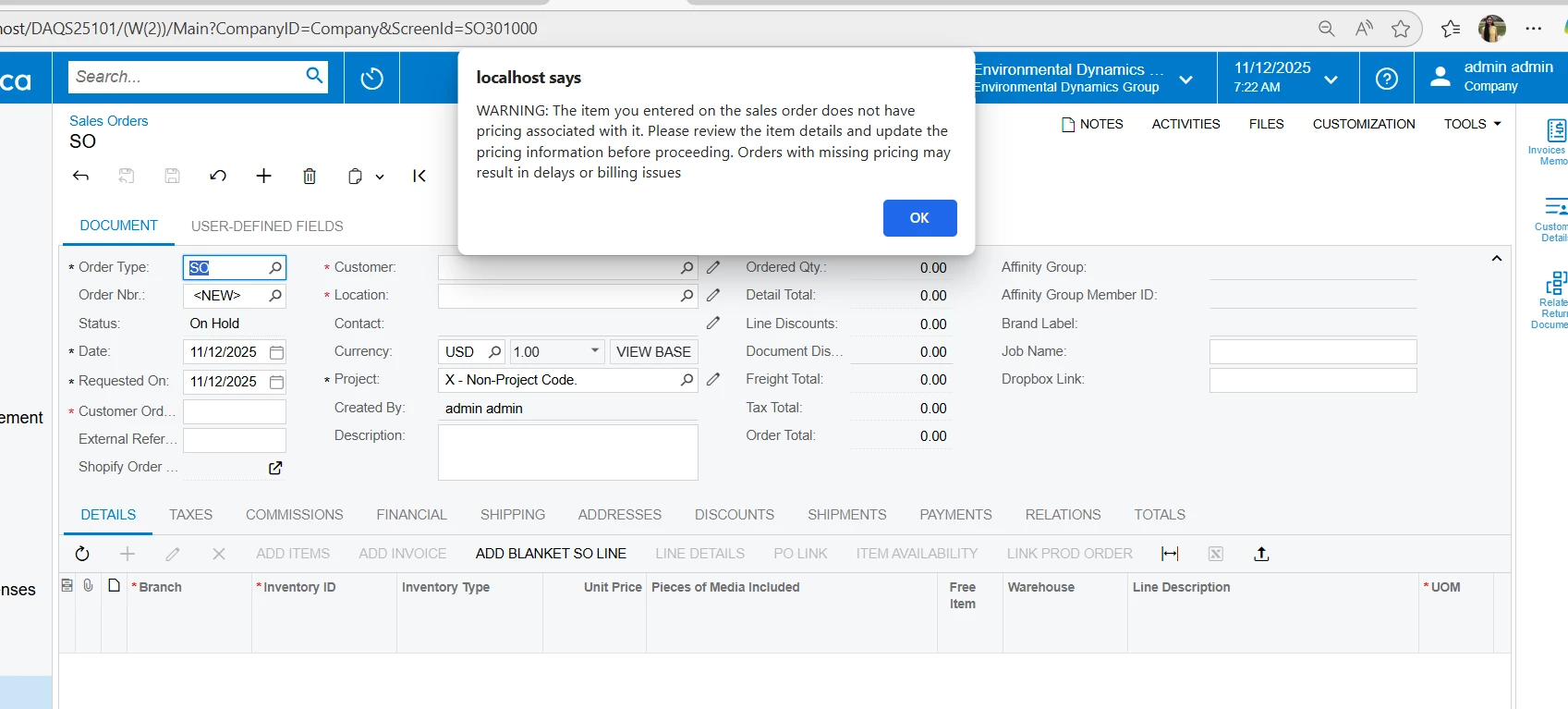
Could you please help us achieve the same Yes/No confirmation behavior when an order is copied or pasted?

5 replies

Forum|alt.badge.img
  • Author
  • Freshman I
  • December 11, 2025

Hi Team,

Could you please suggest any one on this


DrewNisley
Pro I
Forum|alt.badge.img+3
  • Pro I
  • December 11, 2025

@swathia00 I’m not sure what triggers your popup to show, but I would start with attempting to override the row inserted event. I believe when detail lines are copied and pasted, they are inserted with all the data at once, so you could attempt to only trigger the popup if the inventory ID is not null and the price is 0 or 999.99 (that way it doesn’t trigger on pressing the plus button). If that doesn’t work, you might have to try overriding the copy/paste function. The only thing to be aware of, is that they won’t know what line it is triggering from because it could trigger from multiple lines. 


Forum|alt.badge.img
  • Author
  • Freshman I
  • December 11, 2025

Hi ​@DrewNisley,

Thanks for your response and suggestion.
I also tried overriding the Copy/Paste function, but the popup appears repeatedly in a nested loop. Below is the code I used. Please suggest if I am missing anything or if there is a better approach.

public OverrideCopyPasteAction CopyPaste;

public class OverrideCopyPasteAction : PXCopyPasteAction<SOOrder>
{
    public OverrideCopyPasteAction(PXGraph graph, string name) : base(graph, name)
    {
    }

    [PXUIField(DisplayName = "", MapEnableRights = PXCacheRights.Select)]
    [PXButton(ImageKey = "Copy", Tooltip = "Clipboard", SpecialType = PXSpecialButtonType.CopyPaste,
        CommitChanges = false, IsLockedOnToolbar = true)]
    protected override IEnumerable Handler(PXAdapter adapter)
    {
        if (adapter.Menu != "PasteDocument")
            return base.Handler(adapter);

        var graph = (SOOrderEntry)Graph;

        IEnumerable res = base.Handler(adapter);

        foreach (SOLine line in graph.Transactions.Cache.Inserted.RowCast<SOLine>())
        {
            if (line.CuryUnitPrice == Convert.ToDecimal(NAWMeassagesSoupDAQS.CuryUnitPriceWithZero) ||
                line.CuryUnitPrice == Convert.ToDecimal(NAWMeassagesSoupDAQS.CuryUnitPriceWithValue))
            {

                WebDialogResult result2 = graph.Transactions.View.Ask("",
                    NAWMeassagesSoupDAQS.UnitPriceWarning,
                    MessageButtons.YesNo);
                if (result2 == WebDialogResult.Yes)
                {
                }
                else
                {
                    graph.Transactions.Cache.Delete(line);
                    graph.Transactions.View.RequestRefresh();
                }
            }
        }

        return res;
    }


DrewNisley
Pro I
Forum|alt.badge.img+3
  • Pro I
  • December 11, 2025

@swathia00 That’s the route I would’ve gone as well. The only thing that I could guess would be the RequestRefresh causing issues, maybe try without that? Everything else seems like it should function. To be fair, I have never tried overriding a Copy/Paste before, so I could be missing something here.


Forum|alt.badge.img
  • Author
  • Freshman I
  • December 12, 2025

Hi ​@DrewNisley ,

Thanks for the suggestion.

I also tried it without using RequestRefresh, but I am still getting the same nested loop issue with the popup.

Could you please suggest any other approach to achieve this?


