Answer

Disable scan serial number at picking

  • August 4, 2025
  • 3 replies
  • 76 views

Forum|alt.badge.img

Does anyone know if it’s possible to disable scanning of serial numbers during the picking process? Our client is also prompted to scan the serial numbers at the packing process, which is preferable, but it is duplicative work to also be required to scan during picking.

If not, does anyone have any workarounds or solutions? Ideally our client can still pick using scanners but just not be required to scan serial numbers at that time.


Best answer by aiwan

@michaelho 


From what I have read, this could be why, because the system assigns the Lot/Serial nbr when the item is picked rather than when it is received into stock.

3 replies

Forum|alt.badge.img+8
  • Captain II
  • August 26, 2025

@michaelho 


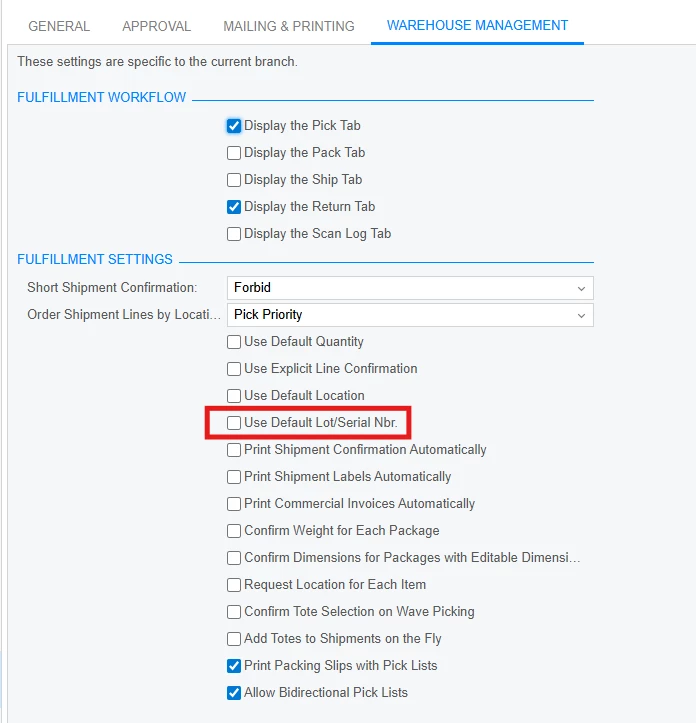
When you mark this field, it should skip it.


Forum|alt.badge.img
  • Author
  • Semi-Pro II
  • August 26, 2025

@aiwan I just tried that and it still prompted me to scan the serial number during the pick process.

And to clarify, in case it matters, these items are set to a lot/serial class with the Assignment Method = When Used.

Any other suggestions?


Forum|alt.badge.img+8
  • Captain II
  • Answer
  • August 27, 2025

@michaelho 


From what I have read, this could be why, because the system assigns the Lot/Serial nbr when the item is picked rather than when it is received into stock.