Solved

Default Unit Price for 2-Step (Warehouse to Warehouse) Transfers

  • May 15, 2023
  • 9 replies
  • 106 views

Michaelh
Pro III
Forum|alt.badge.img+2

What field defines the default Unit Price for a STOCK ITEM on a 2-STEP Transfer? Doing international transfers and customs needs to know a value. It’s not a price worksheet (this is a warehouse, not a customer) and “Default Price” doesn’t seem to come over when making a new Sales Order of type TR.

I can code around this (if price = 0, then get Default Price from Stock item), but if something already exists, I’d like to leverage that instead of attaching my Mickey Mouse code to the report.


Thanks Everyone!

Best answer by Michaelh

I made a custom report like you’re saying. It also solved some other issues (like bringing in the HTS codes, applying duty, grabbing buyer commissions, etc.)

9 replies

Isharam
Freshman I
Forum|alt.badge.img
  • Freshman I
  • October 16, 2025

Hi ​@Michaelh 

Were you able to find any other solution? We are facing the same issue when doing Transfer orders due to custom requirements we need to have pricing. I am leaning towards editing report so it will pick prices from Sales Price tables. 


Thank you!

Ishara


Michaelh
Pro III
Forum|alt.badge.img+2
  • Author
  • Pro III
  • Answer
  • October 16, 2025

I made a custom report like you’re saying. It also solved some other issues (like bringing in the HTS codes, applying duty, grabbing buyer commissions, etc.)


Isharam
Freshman I
Forum|alt.badge.img
  • Freshman I
  • October 20, 2025

Thank you ​@Michaelh ! 


  • Freshman I
  • April 14, 2026

I am trying to understand the solution here , is the solution regarding Custom Report to a Project? ​@Michaelh . Do you mind sharing some screenshot for understanding , thank you !!


Michaelh
Pro III
Forum|alt.badge.img+2
  • Author
  • Pro III
  • April 14, 2026

The problem was that Customs needed to know what the cost of the item was for DUTY calculations. A Sales Order of type TR does not hold that value. So you can’t just grab the data nicely.

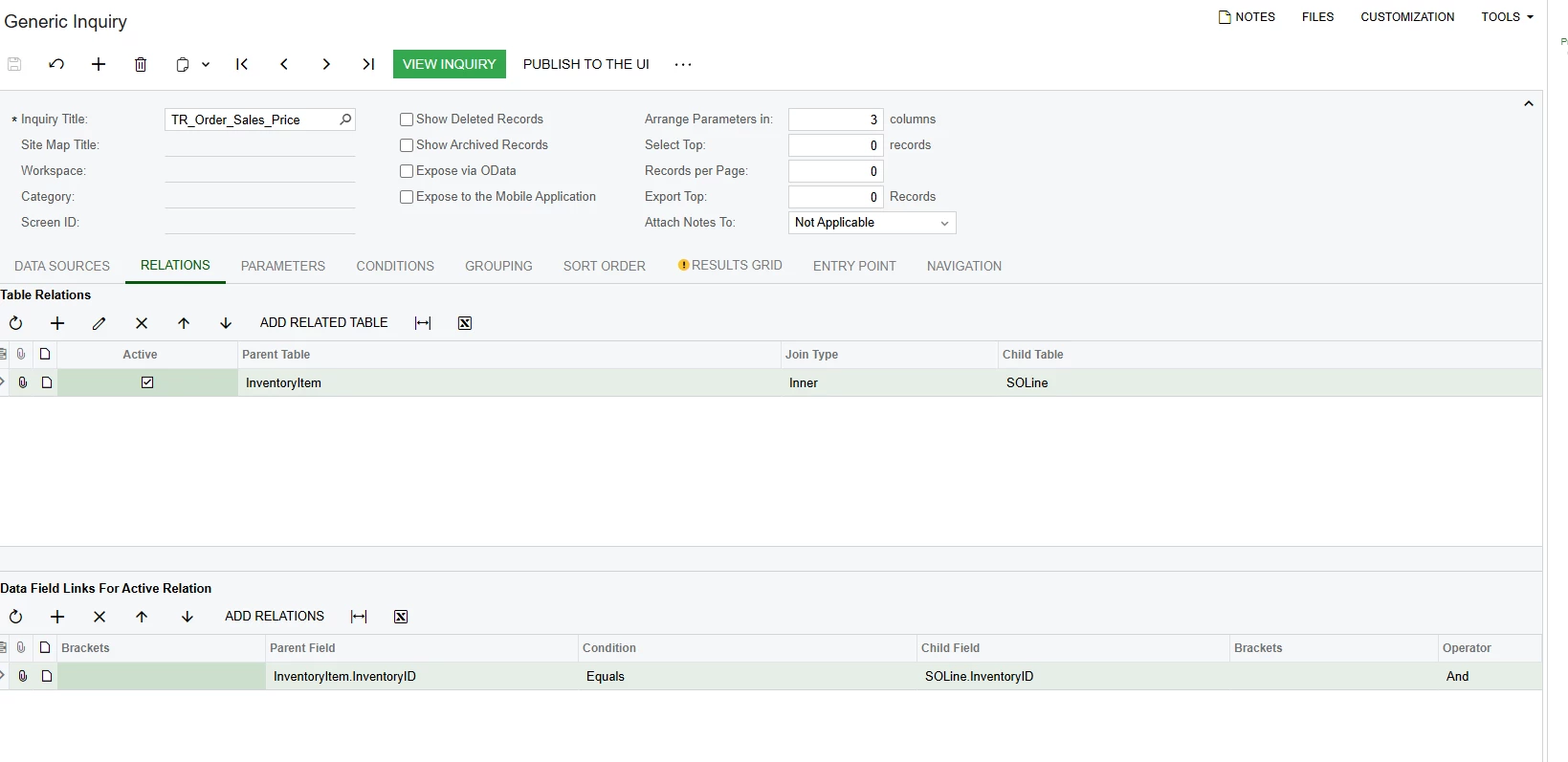
The solution (for me) was to bind the Sales Order Lines (SOLine) InventoryID’s to the Stock Items (InventoryItem), which hold my current costs that Customs needs. 


  • Freshman I
  • April 15, 2026

HI  ​@Michaelh  , by saying bind the Sales Order Lines (SOLine) InventoryID’s to the Stock Items (InventoryItem), are you referring to GI ? I tried but no result on TR


Michaelh
Pro III
Forum|alt.badge.img+2
  • Author
  • Pro III
  • April 15, 2026

Sorry, I wasn’t clear in the exact solution. I bound to my inventory Item to get things like my HTS Code which I store as an attribute.


Option A (Your vendor costs are semi-static):

To get the last known Vendor Cost, you can bind to this table: InventoryItemCurySettings this has a field called LastStdCost and this holds the last known vendor cost for the item. I will warn you though, that this can give you bad information as it is possible your company has changing costs with the vendor (if the cost has changed between applying duty and purchasing).

Option B (always right, but you likely need a helper field):

If you have moving vendor costs, your best bet is to tie back to the Purchase Order “PO” as this is ALWAYS correct. You would need an identifier to know which PO this is. So maybe have your team store the PO Number or some other identifier on the header of the Sales Order (SO of type TR). You can make a User Defined Field (UDF) for this. Now you would be able to bind to the Purchase Order Lines (POLine) using the PO Number and the Inventory ID. The POLine holds the unit cost that is always right, but it is a bit more work to track because you would need a UDF built and maintained by your staff.


My Specific Scenario (just in case this is what you’re needing):

I did mine in Report Designer so I could pull in sub-totals etc. We track duties by the Shipping Container so my use-case is rather complex since I am accounting for multiple PO’s on a single shipping container and need to know the duty applied per container. We store the Container number on our PO’s and on our SO’s of type TR, which is the identifier I use for linking. We also have multiple lines with the same item on a PO (each line representing a different customer’s supply), so I had to use grouping and aggregates. None of these play very nicely in GI’s, which is why I used the report designer for my solution. This method requires multiple UDF’s to be maintained.


  • Freshman I
  • April 16, 2026

Thank you ​@Michaelh  for the explanation. The goal of finding a solution is to avoid manual entry for our team on SO Type TR for inter‑warehouse transfers. While the solution you shared is helpful, I believe it may not be applicable in this case. It appears that addressing this requirement would require additional implementation through coding. 


Michaelh
Pro III
Forum|alt.badge.img+2
  • Author
  • Pro III
  • April 16, 2026

Yeah this area still needs work from the Acumatica Devs. The first method doesn’t require any extra maintenance/fields, but does have the risk that your pricing changed from the time of purchase to the time of applying duty.


You are not alone in grumbling at this one my friend!