Solved

Creating 1 PO from multiple Drop Ship sales orders

  • January 24, 2025
  • 5 replies
  • 125 views

claudematherne24
Varsity I
Forum|alt.badge.img

I’ve been looking around and see that it should be possible to use the Create Purchase Order screen to create 1 PO from multiple Sales Orders lines.  But when I click the POs I want to combine, it creates multiple POs.  Is there a flag or setting somewhere that I may be missing.  The POs are for the same item and same vendor

Best answer by nazarpshyk

@claudematherne24 

After testing this scenario in the 25R2 version, I concluded that in a Drop-Ship scenario the system does not group multiple Sales Orders into a single Purchase Order.

I tested several Sales Orders with identical parameters, including SO Type, Customer, Customer Location, Product, and all other relevant attributes. However, when processing them through the Create Purchase Orders processing screen, the system generated separate Purchase Orders for each Sales Order.

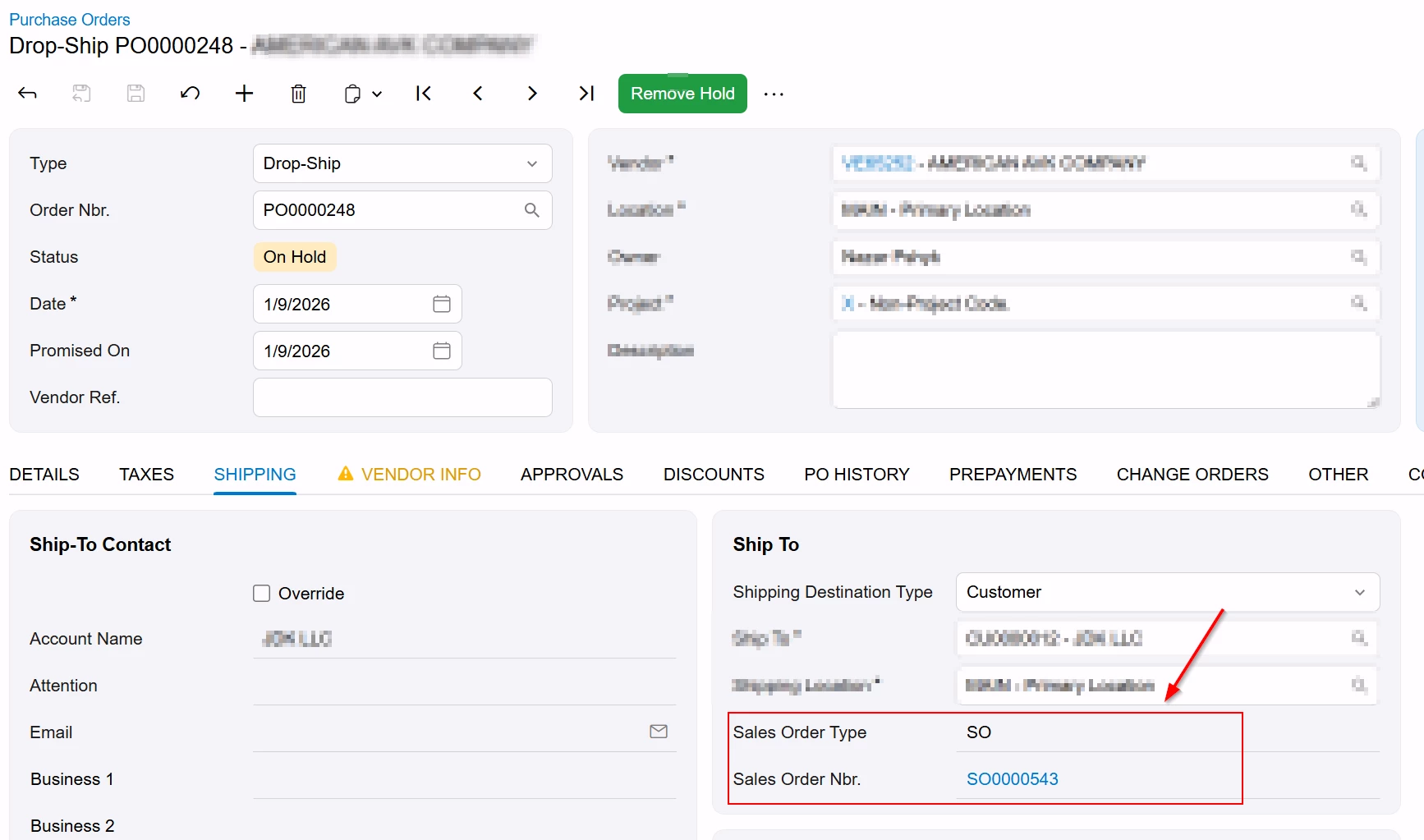
I believe this behavior is due to the system enforcing a direct one-to-one relationship when creating a Purchase Order from a Sales Order. Specifically, the Sales Order Type and Sales Order Nbr. fields on the PO > Shipping tab can only store a single Sales Order reference and do not support multiple values (e.g., via delimiters).
For this reason, I do not believe the out-of-the-box functionality supports grouping multiple Sales Orders into a single Purchase Order for Drop-Ship scenarios when processed via the Create Purchase Orders screen.

5 replies

Forum|alt.badge.img+2
  • Jr Varsity III
  • January 24, 2025

The standard functionality is to combine the lines into one on the PO.

You will see the lines listed individually on the Create Purchase Orders screen, if you select all the lines to process, a single line will be generated on the purchase order for the total quantity.


claudematherne24
Varsity I
Forum|alt.badge.img

Yeah, that’s what is supposed to do….but I’m not getting that result.


Forum|alt.badge.img+2
  • Jr Varsity III
  • January 24, 2025

What version are you using?  Are there any customizations?


Chris Hackett
Community Manager
Forum|alt.badge.img
  • Acumatica Community Manager
  • April 24, 2025

Hi ​@claudematherne24 were you able to find a solution? Thank you!


  • Freshman III
  • Answer
  • January 9, 2026

@claudematherne24 

After testing this scenario in the 25R2 version, I concluded that in a Drop-Ship scenario the system does not group multiple Sales Orders into a single Purchase Order.

I tested several Sales Orders with identical parameters, including SO Type, Customer, Customer Location, Product, and all other relevant attributes. However, when processing them through the Create Purchase Orders processing screen, the system generated separate Purchase Orders for each Sales Order.

I believe this behavior is due to the system enforcing a direct one-to-one relationship when creating a Purchase Order from a Sales Order. Specifically, the Sales Order Type and Sales Order Nbr. fields on the PO > Shipping tab can only store a single Sales Order reference and do not support multiple values (e.g., via delimiters).

For this reason, I do not believe the out-of-the-box functionality supports grouping multiple Sales Orders into a single Purchase Order for Drop-Ship scenarios when processed via the Create Purchase Orders screen.

