

I’ve been looking around and see that it should be possible to use the Create Purchase Order screen to create 1 PO from multiple Sales Orders lines. But when I click the POs I want to combine, it creates multiple POs. Is there a flag or setting somewhere that I may be missing. The POs are for the same item and same vendor
Solved
Creating 1 PO from multiple Drop Ship sales orders



Best answer by nazarpshyk
After testing this scenario in the 25R2 version, I concluded that in a Drop-Ship scenario the system does not group multiple Sales Orders into a single Purchase Order.
I tested several Sales Orders with identical parameters, including SO Type, Customer, Customer Location, Product, and all other relevant attributes. However, when processing them through the Create Purchase Orders processing screen, the system generated separate Purchase Orders for each Sales Order.
I believe this behavior is due to the system enforcing a direct one-to-one relationship when creating a Purchase Order from a Sales Order. Specifically, the Sales Order Type and Sales Order Nbr. fields on the PO > Shipping tab can only store a single Sales Order reference and do not support multiple values (e.g., via delimiters).
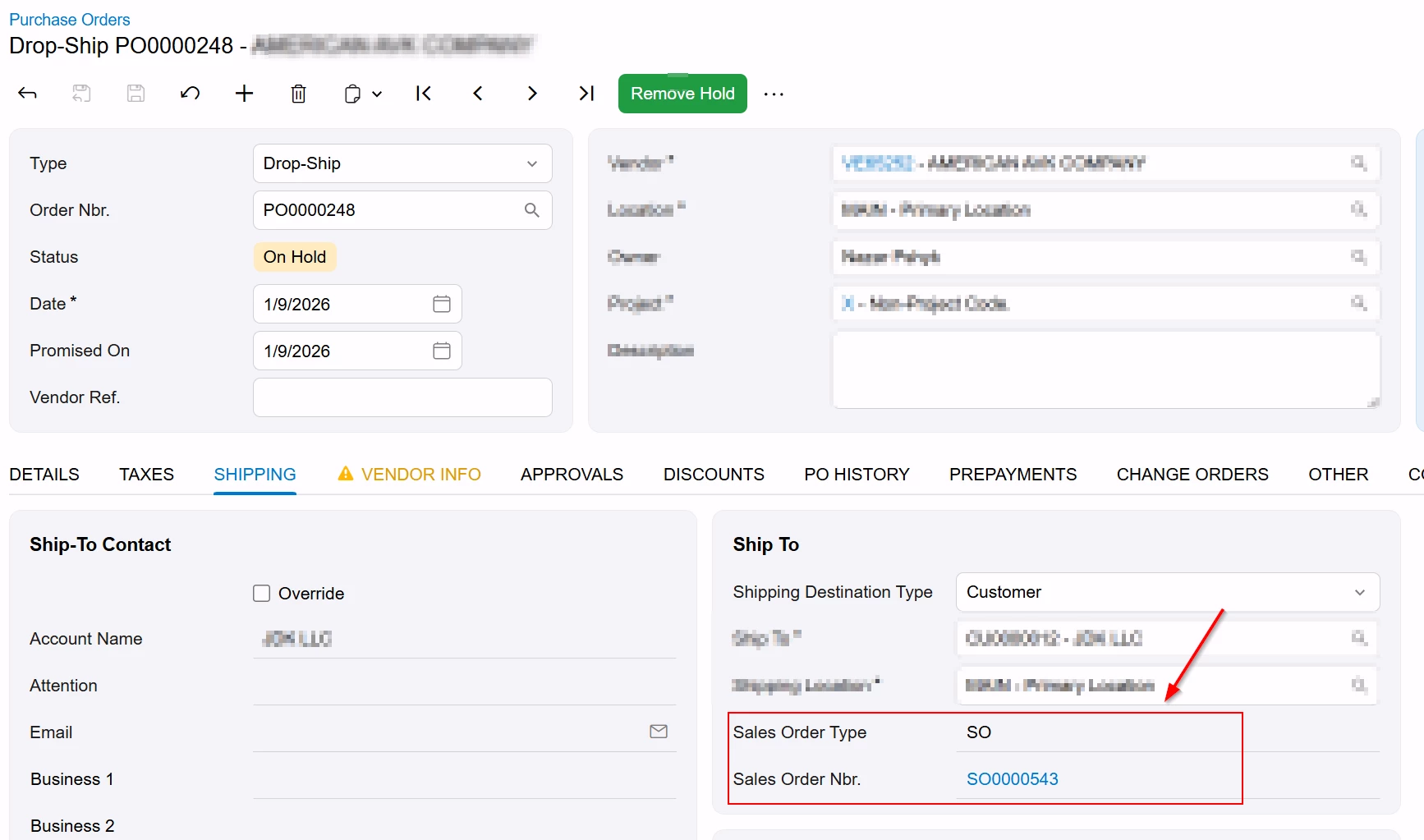
For this reason, I do not believe the out-of-the-box functionality supports grouping multiple Sales Orders into a single Purchase Order for Drop-Ship scenarios when processed via the Create Purchase Orders screen.




Enter your E-mail address. We'll send you an e-mail with instructions to reset your password.