Answer

Create Custom field PXSelector retrieve data from Attribute - CS205000

  • October 21, 2025
  • 7 replies
  • 125 views

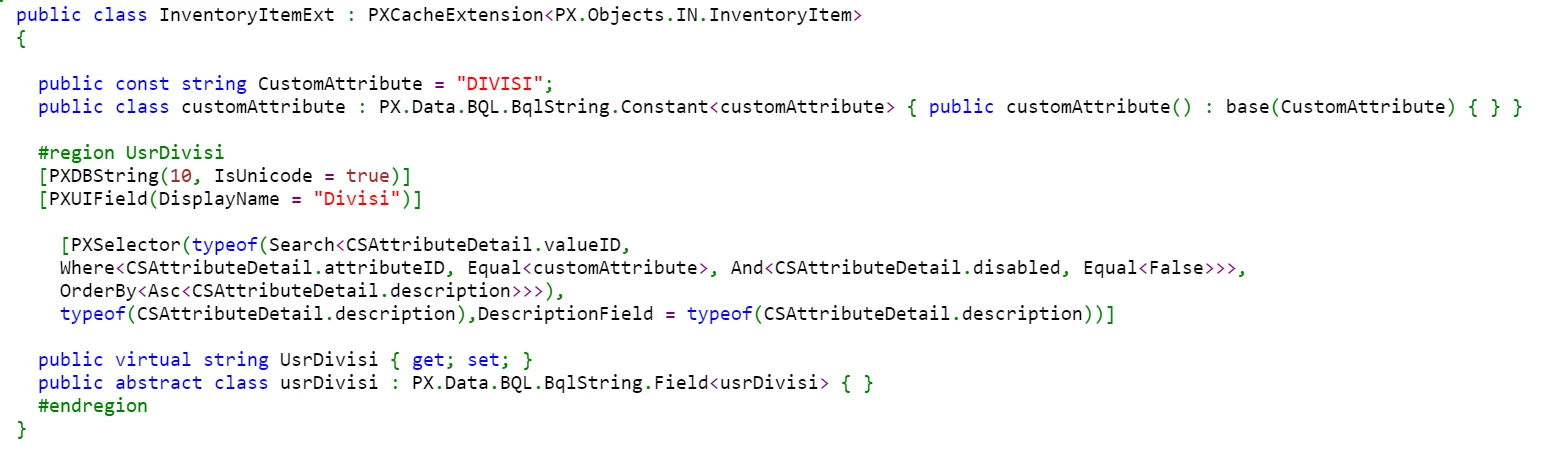
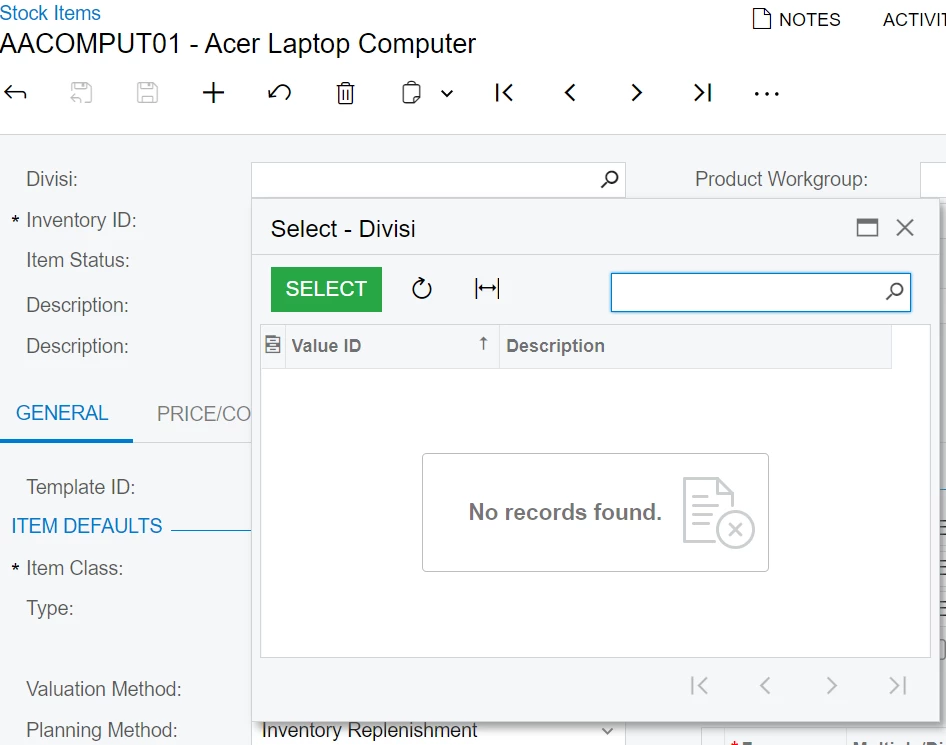
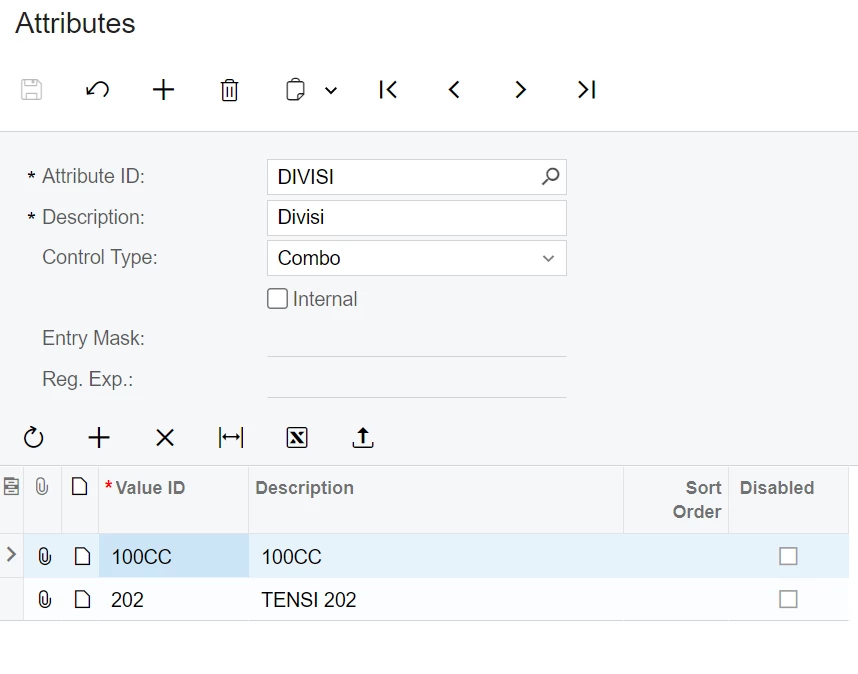
Hi, Can anyone help me, I have created custom field in Stock Item - IN202500 and retrieve data from from Attribute - CS205000. but, not showing data. bellow screen capture in stock item screen and my DAC


Best answer by DipakNilkanth

Hi ​@mujib,

Please use the code snippet below.
Make sure to replace your attribute name with colorAttribute and Color with DIVISI.(Confirm Attribute name from attributes screen)
 

#region UsrColor
[PXDBString(50)]
[PXUIField(DisplayName = "Color")]
[PXSelector(
typeof(Search<CSAttributeDetail.valueID,
Where<CSAttributeDetail.attributeID, Equal<colorAttribute>>>),
typeof(CSAttributeDetail.valueID),
typeof(CSAttributeDetail.description),
DescriptionField = typeof(CSAttributeDetail.description)
)]
public virtual string UsrColor { get; set; }
public abstract class usrColor : PX.Data.BQL.BqlString.Field<usrColor> { }
#endregion
}


public class colorAttribute : PX.Data.BQL.BqlString.Constant<colorAttribute>
{
public colorAttribute() : base("COLOR") { }
}

Hope, it helps!

7 replies

DipakNilkanth
Pro III
Forum|alt.badge.img+13
  • Pro III
  • Answer
  • October 21, 2025

Hi ​@mujib,

Please use the code snippet below.
Make sure to replace your attribute name with colorAttribute and Color with DIVISI.(Confirm Attribute name from attributes screen)
 

#region UsrColor
[PXDBString(50)]
[PXUIField(DisplayName = "Color")]
[PXSelector(
typeof(Search<CSAttributeDetail.valueID,
Where<CSAttributeDetail.attributeID, Equal<colorAttribute>>>),
typeof(CSAttributeDetail.valueID),
typeof(CSAttributeDetail.description),
DescriptionField = typeof(CSAttributeDetail.description)
)]
public virtual string UsrColor { get; set; }
public abstract class usrColor : PX.Data.BQL.BqlString.Field<usrColor> { }
#endregion
}


public class colorAttribute : PX.Data.BQL.BqlString.Constant<colorAttribute>
{
public colorAttribute() : base("COLOR") { }
}

Hope, it helps!


  • Author
  • Freshman I
  • October 22, 2025

Hi ​@DipakNilkanth Thanks for your response. Bellow I've changed my code, but still not showing value attribute detail in stock item screen.

public class InventoryItemExt : PXCacheExtension<PX.Objects.IN.InventoryItem>
{

#region UsrDivisi
[PXDBString(10)]
[PXUIField(DisplayName = "Divisi")]

[PXSelector(typeof(Search<CSAttributeDetail.valueID,
Where<CSAttributeDetail.attributeID, Equal<divisiAttribute>>>),
typeof(CSAttributeDetail.valueID),
typeof(CSAttributeDetail.description),
DescriptionField = typeof(CSAttributeDetail.description)
)]

public virtual string UsrDivisi { get; set; }
public abstract class usrDivisi : PX.Data.BQL.BqlString.Field<usrDivisi> { }
#endregion
}

public class divisiAttribute : PX.Data.BQL.BqlString.Constant<divisiAttribute> {
public divisiAttribute() : base("DIVISI") { }
}


Forum|alt.badge.img+3

It seems like your code should work. I’ve tried using the same selector on my instance, and it works fine.

To identify the issue in your system, I’d recommend testing each small part of the code step by step to locate the problematic one. I’d start with the Where clause in the selector. Could you try commenting out that line and see if the selector returns any values?

It's also worth checking the using directives — a wrong could be the reason. You can also share the code snippet with usings.


darylbowman
Captain II
Forum|alt.badge.img+15

Try restarting the application from the Apply Updates screen.


  • Author
  • Freshman I
  • October 23, 2025

Hi ​@darylbowman , Thank you for the advice, the problem has been solved 👍


darylbowman
Captain II
Forum|alt.badge.img+15

Please mark ​@DipakNilkanth's answer as the 'answer' since his code worked for you instead of your own post. That's where we get points.


Chris Hackett
Community Manager
Forum|alt.badge.img
  • Acumatica Community Manager
  • October 23, 2025

Hi ​@mujib - Glad you were able to use ​@DipakNilkanth ‘s response as a solution. I have marked as such.