Answer

Company related information on Customers form.

  • November 26, 2024
  • 5 replies
  • 68 views

Forum|alt.badge.img

Hello!


We are operating in few different companies which has different rules and regulations to be followed. All these companies are configured in one tenant and has a same Customer and Vendor base. 

Access of users will be restricted to the companies. 

When all the companies using the same customer, it is required to change Customer Tax Zone, each time at the transaction because there is no option to set up tax information company wise. 

Is there any option to follow or workaround for this?

Amanda 

Best answer by apallawala21

Hi ​@Chris Hackett 

We are currently maintaining Company specific information under locations of Customers.

We created a Business Event to automatically create different locations for companies upon customer creation to avoid users creating locations manually. 

And to restrict the locations from other company users we enter the company/branch on the “Default Location” 

This does not prevent users from viewing company related information on the Customers form, but in transactions form other company locations are not available as users are not given access to that company. 

But this also does not work for some transaction forms such as Customer Contracts, Deferred Expenses, Requisitions and Create Purchase Orders. 

Amanda! 

5 replies

Laura03
Captain II
Forum|alt.badge.img+19
  • Captain II
  • November 26, 2024

Hello,

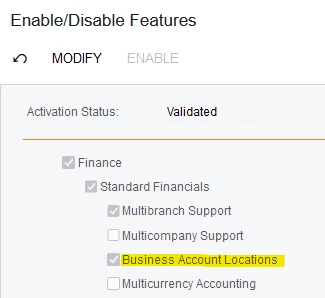
Verify Customer Locations feature is on, and then add a location to the Customer for each of your companies.

Enable Business Account Locations feature
Add Customer Location for each Company with Different Tax Zone
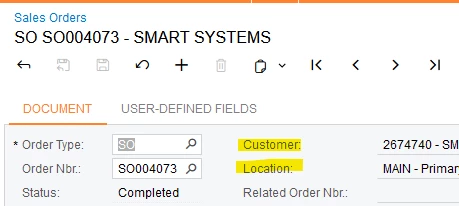
On each Sales order or Invoice, add proper Customer Location

Laura


Forum|alt.badge.img
  • Author
  • Jr Varsity II
  • November 26, 2024

Hi ​@Laura02 

We tried the same thing, but since the “Main” is the default location, it picks up automatically. 

So, we tried to add a Default Branch to each location. Since users has no access to other branches, customer locations get restricted for Sales Orders and Invoices. But there are other forms which this restriction doesn’t work. 

Also, when there are multiple branches on a company, they will have to select the correct location as well as the branch. It’s like entering same information twice. 

And for the Vendors also, this location restriction does not work for every form for an example “Create Purchase Orders”

Amanda 


debbiereed72
Varsity I
Forum|alt.badge.img
  • Varsity I
  • November 27, 2024

Hello ​@apallawala21 - we must be working on the same thing at the same time!  I just posted the same question!  I didn’t find your post before I posted mine (but I did try looking for this subject first).  Here’s the link to my post for you to follow, in case I get answers/ideas:  Sales Tax in multi company environment | Community


Chris Hackett
Community Manager
Forum|alt.badge.img
  • Acumatica Community Manager
  • January 23, 2025

Hi ​@apallawala21 were you able to find a solution? Thank you!


Forum|alt.badge.img
  • Author
  • Jr Varsity II
  • Answer
  • February 1, 2025

Hi ​@Chris Hackett 

We are currently maintaining Company specific information under locations of Customers.

We created a Business Event to automatically create different locations for companies upon customer creation to avoid users creating locations manually. 

And to restrict the locations from other company users we enter the company/branch on the “Default Location” 

This does not prevent users from viewing company related information on the Customers form, but in transactions form other company locations are not available as users are not given access to that company. 

But this also does not work for some transaction forms such as Customer Contracts, Deferred Expenses, Requisitions and Create Purchase Orders. 

Amanda!