

Answer

Changing Lot/Serial Class on a few stock items from LOTTRACKED to USER

  • September 30, 2025
  • 4 replies
  • 63 views

Forum|alt.badge.img

I’m trying to change the Lot/Serial Class on a few stock items from LOTTRACKED to USER.

When the items are allocated on Sales Orders, I get the expected error message:

“IN Error: The lot/serial class of the xyz item cannot be changed because this item is allocated in the Sales Order SO1234 document.”

After I deallocate the xyz item from all Sales Orders, I get a different message saying the Lot/Serial Class cannot be changed because the item has inventory.

I went a step further and cleared out all the inventory, but the system still won’t let me change the Lot/Serial Class. My understanding is that once there are completed transactions (receipts, issues, shipments, etc.), Acumatica “freezes” the Lot/Serial Class to preserve transaction history.

Before I commit to a solution, can anyone confirm if:

  • This really means the Lot/Serial Class is locked forever once transactions exist, even if inventory = 0.
  • The only supported approach is to create a new stock items with the desired Lot/Serial Class going forward.

I have four products in this situation and want to make sure I’m following the correct process before I start creating new items unnecessarily.

Best answer by meganfriesen37

Hi,

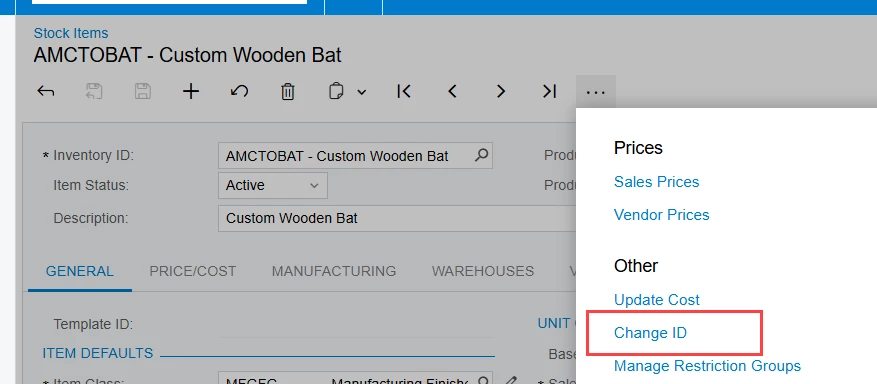
This feature has been available for as long as I’ve worked with the system (2018R1) and probably longer than that.  


4 replies

Forum|alt.badge.img
  • Author
  • Jr Varsity II
  • September 30, 2025

We did find a preventative solution--updating the Item Class Preferences so that any new stock items default to the correct Lot/Serial Class. That should stop this issue from happening again.

The question that remains is whether there’s any way to change the Lot/Serial Class on existing active items that already have transactions. Recreating the stock item under new names isn’t an option for us, so right now we’re leaning towards just leaving the few oddballs as LOTTRACKED.

If anyone has experience with a workaround--even if it means a VAR or Acumatica support stepping in on the back end--I’d really appreciate your input.


meganfriesen37
Captain II
Forum|alt.badge.img+12

I feel like I have done this before for another customer and you’re on the right track to remove all the inventory (i.e. via an issue or adjustment) to so do.  But this was a couple years ago, so things may have changed between versions (or I could just have misremembered what we did, maybe they didn’t have transactions?)

With your comment that recreating the items under new item names isn’t an option, have you considered using the “Change ID” function on the “incorrect” items and mark them as inactive and then set up new items with the same inventory ID as the old ones?


Forum|alt.badge.img
  • Author
  • Jr Varsity II
  • October 1, 2025

I feel like I have done this before for another customer and you’re on the right track to remove all the inventory (i.e. via an issue or adjustment) to so do.  But this was a couple years ago, so things may have changed between versions (or I could just have misremembered what we did, maybe they didn’t have transactions?)

With your comment that recreating the items under new item names isn’t an option, have you considered using the “Change ID” function on the “incorrect” items and mark them as inactive and then set up new items with the same inventory ID as the old ones?

I’m not familiar with the Change ID function you mentioned. Where exactly is that located?

We’re currently on 2024 R2 and planning to move to 2025 R1 soon, so if that feature is version-specific it would be good to know whether it’s available to us now or something to look forward too. :) 


meganfriesen37
Captain II
Forum|alt.badge.img+12
  • Captain II
  • Answer
  • October 16, 2025

Hi,

This feature has been available for as long as I’ve worked with the system (2018R1) and probably longer than that.
