Answer

Change Item ID. How are related transactions updated with the new ID

  • June 23, 2025
  • 2 replies
  • 65 views

Phocas is an Integration Partner with Acumatica.
Using Odata - GI and DACs to retrieve data

incrementally based on date last modified.

I have a customer who has changed the InventoryID of an Item

I see that the related Sales invoices also reflect this change. (not sure if this occurs due to a trigger or if the transactions actually map to a hidden Key (other than InventoryID)

Unfortunately since the transactional Sales data is load incrementally into Phocos it still contains the old InventoryID. Causing problems.

The mitigation for us is to FULLY re load Transaction history but this is not ideal as it increases the server load and time to fetch information.

I wonder if there is a non volitile hidden Key for Inventory that I could use Instead of a volotile (renamable) field InventoryID appears to be.

Is there a way i can track inventory ID changes to handle the scenario of updating the Historical Transactions we store in Phocas

   

Best answer by meganfriesen37

Hello,

In the system DAC’s there’s often 2 different ID fields.  One that will be the “ID” which is a system integer number that is constant and another one that is the “CD” which is the “user friendly” version that the user can update to change the ID (i.e. for Inventory IDs, Project IDs, customer IDs etc.).  When a user change the Inventory ID in the system they are changing the InventoryItem.InventoryCD field (but the InventoryItem.InventoryID field stays constant).

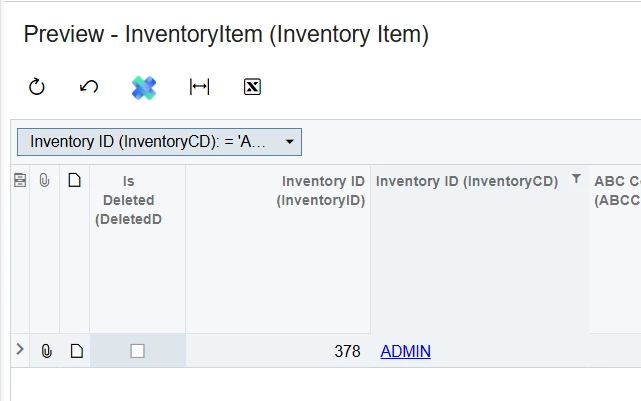
In my system the ADMIN inventory item is actually Inventory ID 378.


2 replies

meganfriesen37
Captain II
Forum|alt.badge.img+12

Hello,

In the system DAC’s there’s often 2 different ID fields.  One that will be the “ID” which is a system integer number that is constant and another one that is the “CD” which is the “user friendly” version that the user can update to change the ID (i.e. for Inventory IDs, Project IDs, customer IDs etc.).  When a user change the Inventory ID in the system they are changing the InventoryItem.InventoryCD field (but the InventoryItem.InventoryID field stays constant).

In my system the ADMIN inventory item is actually Inventory ID 378.


  • Author
  • Freshman I
  • June 24, 2025

This makes sense. I am grateful to know that underlying id’s dont change.

The thing that caught me out was this .
In a GI when I include the field InventoryID it actually returns the InventoryCD
i dont know why this is . But in order to get the actual InventoryID (an Integer)
I replace InventoryID with =[Lines.InventoryID]  and it works.
