

Answer

Automatically calculating Price Class amounts from Default Price or MSRP

  • May 7, 2025
  • 6 replies
  • 133 views

Client is migrating from Microsoft Dynamics GP to Acumatica, and we are trying to find the best approach for maintaining pricing. Dynamics GP isn’t particularly powerful when it comes to pricing, but it has a feature wherein it will calculate the selling price as a “percent of list price”. 

Each custom is assigned a “price level” (similar to a customer price class in Acumatica), and each “price level” is assigned a percentage for each item.
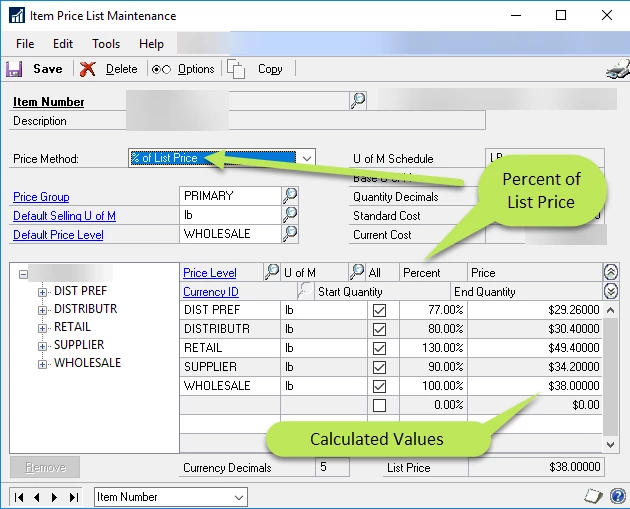
Clearly, this functionality can be achieved with Price Worksheets, but that involves some additional work, and it would not reflect a change of “default price” real-time. 

Has anyone encountered this scenario and solved it with base Acumatica functionality? We are trying to avoid Price Worksheet updates (a lot of room for error), ISV solutions, and customizations.

Additionally, we need the Unit Price to be set to the correct amount. A “line discount” is not desirable for several reasons, mostly focused on the user experience in the SO screen.


Best answer by plambert

Certainly; every situation has its own requirements. One big trade between Price Lists and Discounts is the level of maintenance. Whenever the undiscounted price changes you have to update every other customer-specific price list for that item as well and - the catch - there’s no place in the Price Lists to store the business logic of what that percentage discount should be. Just be mindful to handle when prices change that you have to remake the related price list prices almost from scratch.

We have way too many products and too many customers with too many pricing rules to maintain those lists. Our customers also like to see that they are getting a 35% discount

6 replies

Forum|alt.badge.img+1
  • May 12, 2025

You can use business events for this. It’s not ideal, but a good workaround.


  • Author
  • Freshman I
  • May 12, 2025

You can use business events for this. It’s not ideal, but a good workaround.
 

My general dislike for business events caused me to not even think of that idea. I agree that it could work; I also agree that it isn’t ideal. I’ll keep that in my back pocket as we move forward. Thanks a bunch!


plambert
Semi-Pro I
Forum|alt.badge.img+2
  • Semi-Pro I
  • May 13, 2025

I think that the Discount code/sequence module is the best you’re going to get in Acumatica to recreate percentage based pricing. A Discount Code of type ‘line’ and for Customer Price Class - Item will allow you to create all the percentage pricing rules you have now as Discount Sequences. 

I’m not sure what user experience issues you are encountering, since those discounts can be configured to be either automatic or manually applied and, when automatic, can be removed as needed. It takes a bit of work to set up properly depending on how many different items and percentages you have, but after that it’s very hands-off.


  • Author
  • Freshman I
  • May 13, 2025

I think that the Discount code/sequence module is the best you’re going to get in Acumatica to recreate percentage based pricing. A Discount Code of type ‘line’ and for Customer Price Class - Item will allow you to create all the percentage pricing rules you have now as Discount Sequences. 

I’m not sure what user experience issues you are encountering, since those discounts can be configured to be either automatic or manually applied and, when automatic, can be removed as needed. It takes a bit of work to set up properly depending on how many different items and percentages you have, but after that it’s very hands-off.

Thanks for replying and confirming that there aren’t other options.

The UX issue I’m referring to is a bit specific to this environment. If the Acumatica customer is configured for a 27% discount because they are a distributor, Acumatica will show the original unit price of $100, and the updated “discount unit price” of $73. If the salesperson wants to sell the item for $65 for whatever reason, they would need to delete the discount code, and then they could override the normal Unit Price. That isn’t what I’d call “tragic”, but it is a lot less obvious than having a Unit Price that is the exact right price in all cases.

I do like Acumatica’s solution of pricing worksheets. It gives the user the ability to define prices however they’d like. It will be a bit of training for this company, but that is okay. Thanks a bunch!


plambert
Semi-Pro I
Forum|alt.badge.img+2
  • Semi-Pro I
  • Answer
  • May 13, 2025

Certainly; every situation has its own requirements. One big trade between Price Lists and Discounts is the level of maintenance. Whenever the undiscounted price changes you have to update every other customer-specific price list for that item as well and - the catch - there’s no place in the Price Lists to store the business logic of what that percentage discount should be. Just be mindful to handle when prices change that you have to remake the related price list prices almost from scratch.

We have way too many products and too many customers with too many pricing rules to maintain those lists. Our customers also like to see that they are getting a 35% discount


Forum|alt.badge.img+1
  • May 13, 2025

Agreed. In our business, it is often similar, but based on cost.
See here for details: Customer Price Tab Idea - Dynamic pricing based on cost | Community
