Solved

AR Invoice Average Days Paid GI

  • February 24, 2026
  • 2 replies
  • 23 views

Is there a way to add the date the invoice was paid in a GI with the invoice number and the date the invoice was generated? I am trying to show in the system the average date an invoice it paid in correlation to the customers terms. Are the customers paying late or on time?

Best answer by craig2

Hi ​@tpittman,

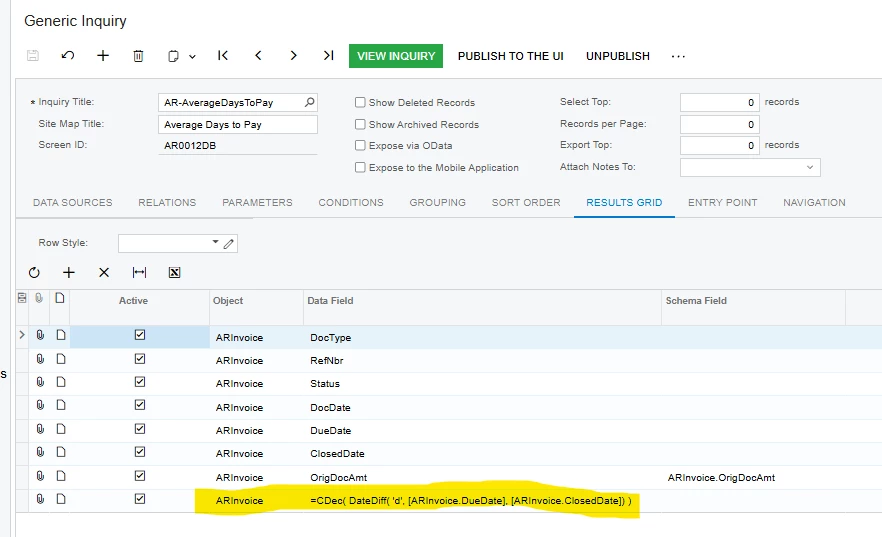
A couple of options here.  Depending on what version you’re on, there is a native GI “AR-AverageDaysToPay” (I’m on 25R1 currently).  That GI uses just the ARInvoice table, and has a “Days to Pay” calculation.  Unfortunately, it calculates the days between the Due Date and the Invoice Closed Date, which technically isn’t Days to Pay but Days Past/Before Due.  I personally would change Due Date to Doc Date to get Days to Pay:


Another (maybe older?) method that I’ve used is to join ARInvoice, ARAdjust, and ARPayment:
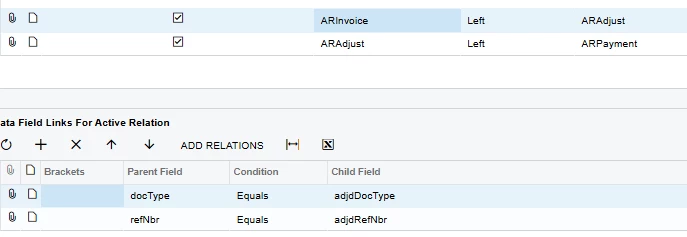


From there, do a DateDiff like the first GI above, do a Group based on Customer/Location, and set your aggregation to AVG.

Days to Pay is a handy, and also a REALLY deep rabbit hole if you keep digging on it.  I would encourage you to be really transparent with stakeholders on how these calculations are happening.

2 replies

craig2
Pro I
Forum|alt.badge.img+4
  • Pro I
  • Answer
  • February 24, 2026

Hi ​@tpittman,

A couple of options here.  Depending on what version you’re on, there is a native GI “AR-AverageDaysToPay” (I’m on 25R1 currently).  That GI uses just the ARInvoice table, and has a “Days to Pay” calculation.  Unfortunately, it calculates the days between the Due Date and the Invoice Closed Date, which technically isn’t Days to Pay but Days Past/Before Due.  I personally would change Due Date to Doc Date to get Days to Pay:


Another (maybe older?) method that I’ve used is to join ARInvoice, ARAdjust, and ARPayment:
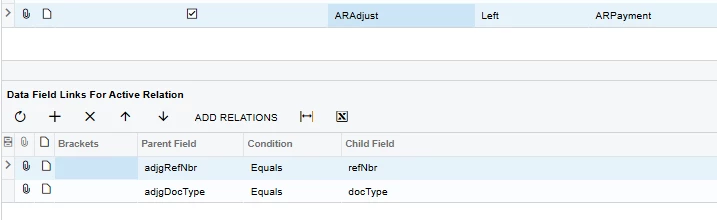


From there, do a DateDiff like the first GI above, do a Group based on Customer/Location, and set your aggregation to AVG.

Days to Pay is a handy, and also a REALLY deep rabbit hole if you keep digging on it.  I would encourage you to be really transparent with stakeholders on how these calculations are happening.



nhatnghetinh
Captain II
Forum|alt.badge.img+13
  • Captain II
  • February 25, 2026

Hi ​@tpittman 

I created a new DAC using Customization. This new DAC includes a "Payment Date" field, which is the most recent payment date of the Invoice. From there, I can calculate other information fields as you mentioned.


Best Regards,

NNT