

Answer

Adding AR Contact Table to the SO-Invoice GI Inquiry

  • November 19, 2024
  • 4 replies
  • 53 views

Forum|alt.badge.img

Hello,

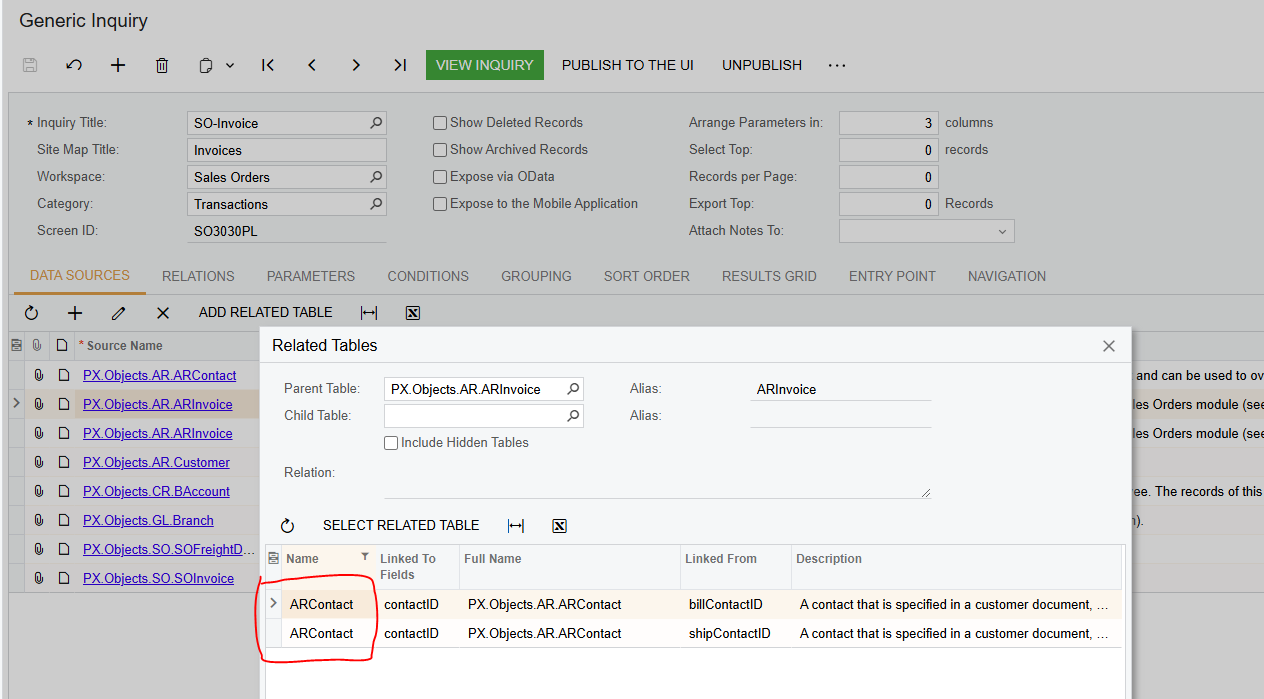
Is there any way to add both of these tables (ARContact) to the SO.Invoice GI Inquiry? I added them, but I don't see two tables on the Result Grid tab to choose a field from. I previously added ARContact for shipping, and I don't see any value on the inquiry page after I added the second one. I had to delete the ARContacte for billing in order that ARContact for shipping should work.

 

Best answer by Dawood

@Chris Hackett  Yes.

You can not add both tables in a inquiry as they are both AR Contacts. You have the option to add one of them in a inquiry table.

4 replies

josborn02
Varsity III
Forum|alt.badge.img+1
  • Varsity III
  • November 19, 2024

You need to add those tables to the Data Sources tab first.  Click ‘Select Related Table’ before you click OK.  You can then select any fields from the ARContact table in the Results Grid.


Forum|alt.badge.img
  • Author
  • Jr Varsity III
  • November 20, 2024

Hello ​@josborn02 ,

As I mentioned in my inquiry, I added both of these tables to the Data Sources, and unfortunately, I don't have two different tables in the Results Grid to choose a field from.

Also, after I added the second table (ARContact for billing), the fields that I added from the first table (ARContact for shipping) disappeared on the inquiry page (SO3030PL screen).


Chris Hackett
Community Manager
Forum|alt.badge.img
  • Acumatica Community Manager
  • January 23, 2025

Hi ​@Dawood were you able to find a solution? Thank you!


Forum|alt.badge.img
  • Author
  • Jr Varsity III
  • Answer
  • March 17, 2025

@Chris Hackett  Yes.

You can not add both tables in a inquiry as they are both AR Contacts. You have the option to add one of them in a inquiry table.

