

Answer

Webhook works on local but not on production

  • September 16, 2025
  • 5 replies
  • 98 views

Forum|alt.badge.img

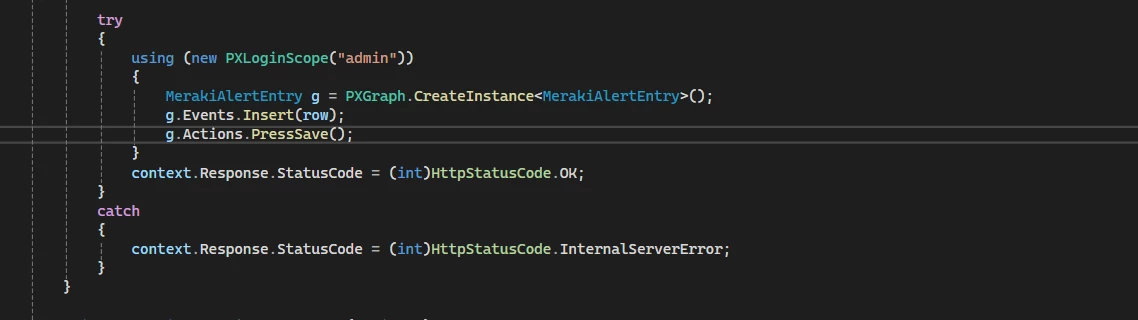
I am trying to add record through a webhook, it works on my local but on production it gives me 500 internal server error.

Best answer by aleksejslusar19

Hi ​@ron 

Webhook Handler Works Locally but Fails Silently in Production? Check for Async Violations

I recently ran into an issue where a webhook handler worked flawlessly in my local environment, but silently failed in production — no logs, no exceptions, no status codes other than a silent timeout.

After some digging, the root cause was simple — but easy to overlook:
A synchronous method call inside an async handler.

---

❌ Problem Code

Here's the relevant piece of code I had inside the `IWebhookHandler.HandleAsync` method:

var res = SaveRequestResult(result); // ⚠ Sync call inside async method

Even though the method `SaveRequestResult()` didn’t do anything obviously blocking, calling it like this violated async execution flow, which seems to be tolerated locally but not in production (due to hosting environment or synchronization context).

---

✅ Fixed Version

The fix was straightforward — wrap the call in `Task.Run(...)` and `await` it:

var res = await Task.Run(() => SaveRequestResult(result));

After this change, the webhook started working reliably in production.

---

🧠 Key Takeaway

Even internal method calls inside an async handler must not block. If you're not using `await`, you're probably doing it wrong. Treat your webhook handler as fully async, including all operations inside it — especially if it's processing IO, parsing payloads, or writing data.

---

💬 Real-World Example

public async Task HandleAsync(WebhookContext context, CancellationToken cancellation)
{
var requestUri = new WWWebhookContentHelper(context).GetRequestUri();

using (var scope = GetAdminScope())
{
if (_authenticator == null || !_authenticator.Authenticate(requestUri))
{
context.Response.StatusCode = StatusCodes.Status401Unauthorized;
return;
}

using (var result = new JsonTextReader(context.Request.CreateTextReader()))
{
// ✅ Async-safe method call
var res = await Task.Run(() => SaveRequestResult(result));
context.Response.StatusCode = res
? StatusCodes.Status202Accepted
: StatusCodes.Status406NotAcceptable;
}
}
}

---

Hope this helps you avoid hours of silent debugging.

5 replies

RohitRattan88
Acumatica Moderator
Forum|alt.badge.img+4
  • Acumatica Moderator
  • September 16, 2025

Hello ​@ron,

Are there multiple companies/tenants, branches etc. if so, you might have to provide full contextual information for webhook. In my experience, more user context you provide for webhook, better are the chances of functionality and data acuracy.

did you test with the same database/dataset locally as production?


Forum|alt.badge.img
  • Author
  • Varsity I
  • September 16, 2025

Hi ​@RohitRattan88 
We have multiple branches on both my local and production but production also has 2 tenants, but i am using the webhook either tenant and it gives same error. what else user context do in need to provide?


Dmitrii Naumov
Acumatica Moderator
Forum|alt.badge.img+7
  • Acumatica Moderator
  • September 16, 2025

@ron  

Just a general recommendation regarding your code. 

you catch any exceptions and return ‘500 - Internal server error’ for all of them. 

It’s not a good practice, since you lose all information about the error.


I’d suggest you rewriting the catch part and write at least the error message from the exception to the response. 


It’ll also give you some pointers towards the reason it does not work in production. 


Forum|alt.badge.img+1
  • Jr Varsity III
  • Answer
  • September 16, 2025

Hi ​@ron 

Webhook Handler Works Locally but Fails Silently in Production? Check for Async Violations

I recently ran into an issue where a webhook handler worked flawlessly in my local environment, but silently failed in production — no logs, no exceptions, no status codes other than a silent timeout.

After some digging, the root cause was simple — but easy to overlook:
A synchronous method call inside an async handler.

---

❌ Problem Code

Here's the relevant piece of code I had inside the `IWebhookHandler.HandleAsync` method:

var res = SaveRequestResult(result); // ⚠ Sync call inside async method

Even though the method `SaveRequestResult()` didn’t do anything obviously blocking, calling it like this violated async execution flow, which seems to be tolerated locally but not in production (due to hosting environment or synchronization context).

---

✅ Fixed Version

The fix was straightforward — wrap the call in `Task.Run(...)` and `await` it:

var res = await Task.Run(() => SaveRequestResult(result));

After this change, the webhook started working reliably in production.

---

🧠 Key Takeaway

Even internal method calls inside an async handler must not block. If you're not using `await`, you're probably doing it wrong. Treat your webhook handler as fully async, including all operations inside it — especially if it's processing IO, parsing payloads, or writing data.

---

💬 Real-World Example

public async Task HandleAsync(WebhookContext context, CancellationToken cancellation)
{
var requestUri = new WWWebhookContentHelper(context).GetRequestUri();

using (var scope = GetAdminScope())
{
if (_authenticator == null || !_authenticator.Authenticate(requestUri))
{
context.Response.StatusCode = StatusCodes.Status401Unauthorized;
return;
}

using (var result = new JsonTextReader(context.Request.CreateTextReader()))
{
// ✅ Async-safe method call
var res = await Task.Run(() => SaveRequestResult(result));
context.Response.StatusCode = res
? StatusCodes.Status202Accepted
: StatusCodes.Status406NotAcceptable;
}
}
}

---

Hope this helps you avoid hours of silent debugging.


RohitRattan88
Acumatica Moderator
Forum|alt.badge.img+4
  • Acumatica Moderator
  • September 17, 2025

Hi ​@RohitRattan88 
 what else user context do in need to provide?

@ron I remember I had to set Branch, ScreenID for an instance i was working on in order to have acurate/proper functionality. not sure it or other context is required for your specific use case


