


Solved

Update Project Task [Ready To Invoice] Field

  • October 14, 2023
  • 2 replies
  • 71 views

Driss
Jr Varsity III
Forum|alt.badge.img

Hey Everyone 


Hope everything is good,


I’m Creating Project Tasks Through API and once the Task is Created i want to update this Field 

“Ready To Invoice”
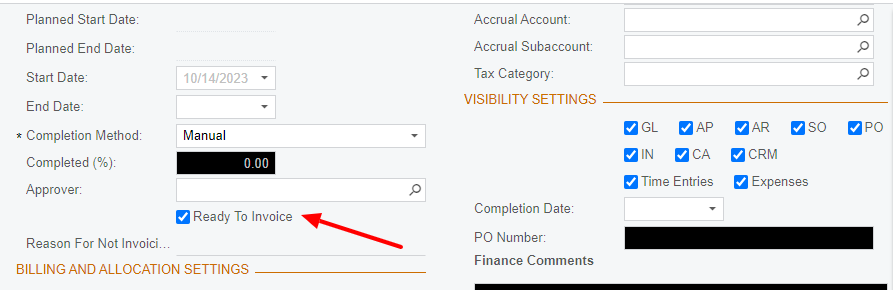
 

Becasue when i checked OpenAPI i didn’t find that field here 


 "Properties": {
"Approver": {
"value": "ex",
"error": "incididunt"
},
"Completed": {
"value": {
"value": "<Error: Too many levels of nesting to fake this schema>"
},
"error": {
"value": "<Error: Too many levels of nesting to fake this schema>"
}
},
"CompletionMethod": {
"value": "pariatur consequat officia",
"error": "dolore magna ad sed"
},
"EndDate": {
"value": "1998-03-27T15:33:59.146Z",
"error": "magna dolore occaecat sunt"
},
"PlannedEndDate": {
"value": "2007-04-05T21:05:03.186Z",
"error": "mollit"
},
"PlannedStartDate": {
"value": "2010-12-17T01:03:26.456Z",
"error": "sit"
},
"StartDate": {
"value": "1951-03-29T03:17:05.278Z",
"error": "aute Lorem velit nulla sit"
}
}


is there a way to include it?


Thank you
 

Best answer by Laura03

Hello @Driss ,

I’m not a developer so I may not have a full answer for you, but I do have some ideas.

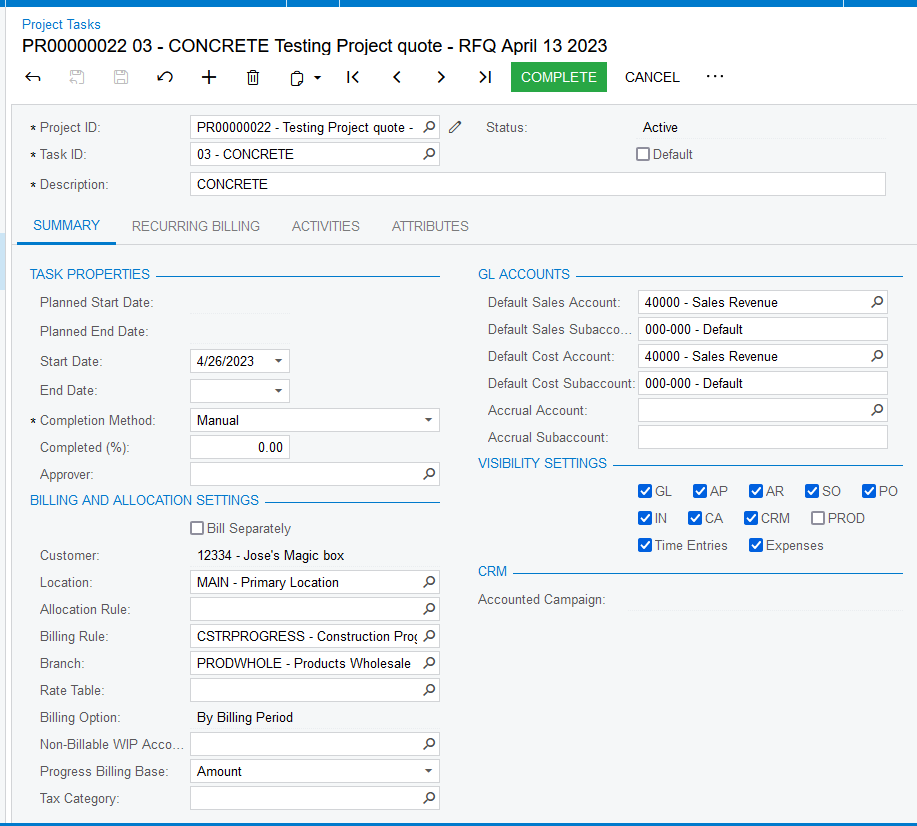
I compared your screenshot above to my demo and I think your “Ready to Invoice” field is Custom. After creating a custom field on Project-Tasks screen, is what extra steps do developers need to take, to make their new field available in OpenAPI?

Sales Demo has no Ready to Invoice field in Project-Task screen.

  This previous post answered by Brian Stevens mentions adding custom fields to endpoints:

I hope this helps you.


Laura

2 replies

Laura03
Captain II
Forum|alt.badge.img+19
  • Captain II
  • Answer
  • October 14, 2023

Hello @Driss ,

I’m not a developer so I may not have a full answer for you, but I do have some ideas.

I compared your screenshot above to my demo and I think your “Ready to Invoice” field is Custom. After creating a custom field on Project-Tasks screen, is what extra steps do developers need to take, to make their new field available in OpenAPI?

Sales Demo has no Ready to Invoice field in Project-Task screen.

  This previous post answered by Brian Stevens mentions adding custom fields to endpoints:

I hope this helps you.


Laura


jinin
Pro I
Forum|alt.badge.img+11
  • Pro I
  • October 16, 2023

Hi @Driss ,

As mentioned by @Laura02 , the field is a custom field. To update the field, you need to extend the endpoint and add the field to the Project Task entity.

Please refer to the document below for instructions on extending the endpoint.

Extending Acumatica Web Service Endpoints | Acumatica Cloud ERP


