Question

trouble updating and adding allocations to a shipment detail via REST

  • May 28, 2025
  • 1 reply
  • 61 views

I am having trouble updating and adding allocations on a shipment detail.  For simple cases, everything is working fine.  I am building an integration to a warehouse system, so I am trying to update the shipment with details from the warehouse system about shipped quantities and packages.

I have a detail line that is a kit, so it already has the 3 components connected to it for allocations.  If everything shipped in 1 package, then I can update those 3 allocations with the quantity shipped for each, no problem.  However, when a line like that is shipped in multiple packages, I need to expand the allocation entries to have 1 for each combination of SKU and package, with the quantity shipped in that specific package.

When I attempt this, the response I get back has more allocation entries in it than what I sent in.  If originally there was 3 allocation entries, and I try to update those 3 and add 5 more (total of 8), I get back a response with 11 allocation entries and an error that “the quantity shipped is greater than the quantity allocated”.

I have tried sending in the 8 entries multiple ways:

  • without any ids for the allocations
  • with ids for the original 3, and no ids for the new 5
  • with ids for the original 3 (put those), and then a separate put with the new 5

I am always sending in the InventoryID (SKU), LotSerialNbr, Qty, and UOM.  What is the proper way to send complex allocations like this, so that it will update the appropriate allocations, and add the rest?  See below for the body sent.


Jim


{
  "Details": [
    {
      "id": "fa94770e-d434-f011-8426-120e4ffdb993",
      "Allocations": [
        {
          "id": "5ab8ad81-a6bf-4302-b0e7-60f53421ffd0",
          "InventoryID": {
            "value": "SL-10-10"
          },
          "LotSerialNbr": {
            
          },
          "Qty": {
            "value": 1
          },
          "UOM": {
            "value": "EA"
          }
        },
        {
          "InventoryID": {
            "value": "SL-10-10"
          },
          "LotSerialNbr": {
            
          },
          "Qty": {
            "value": 2
          },
          "UOM": {
            "value": "EA"
          }
        },
        {
          "id": "522db2bd-2ccd-4d88-8698-e338fffc5ebf",
          "InventoryID": {
            "value": "SL-20-10"
          },
          "LotSerialNbr": {
            
          },
          "Qty": {
            "value": 1
          },
          "UOM": {
            "value": "EA"
          }
        },
        {
          "InventoryID": {
            "value": "SL-20-10"
          },
          "LotSerialNbr": {
            
          },
          "Qty": {
            "value": 1
          },
          "UOM": {
            "value": "EA"
          }
        },
        {
          "InventoryID": {
            "value": "SL-20-10"
          },
          "LotSerialNbr": {
            
          },
          "Qty": {
            "value": 1
          },
          "UOM": {
            "value": "EA"
          }
        },
        {
          "id": "a91d1de5-fa6b-4638-beae-682f47947419",
          "InventoryID": {
            "value": "SL-10-20-HT"
          },
          "LotSerialNbr": {
            
          },
          "Qty": {
            "value": 2
          },
          "UOM": {
            "value": "EA"
          }
        },
        {
          "InventoryID": {
            "value": "SL-10-20-HT"
          },
          "LotSerialNbr": {
            
          },
          "Qty": {
            "value": 2
          },
          "UOM": {
            "value": "EA"
          }
        },
        {
          "InventoryID": {
            "value": "SL-10-20-HT"
          },
          "LotSerialNbr": {
            
          },
          "Qty": {
            "value": 2
          },
          "UOM": {
            "value": "EA"
          }
        }
      ]
    }
  ],
  "ShipmentNbr": {
    "value": "025477"
  }
}
1 reply

brothe58
Jr Varsity II
Forum|alt.badge.img
  • Jr Varsity II
  • December 6, 2025

@CSync – I had a similar problem and after some trial-and-error, I've found a solution. It may help you.

Out-of-the-box (at least in 24R2), the Shipment endpoint does NOT include the fields necessary for updating an existing allocation if the allocation GUID (id) has changed. It seems to change for me if a new API user session is started. For my use case, pickers and packers are different users, and they will interact with a given shipment at different times of day. API user sessions are always changing.

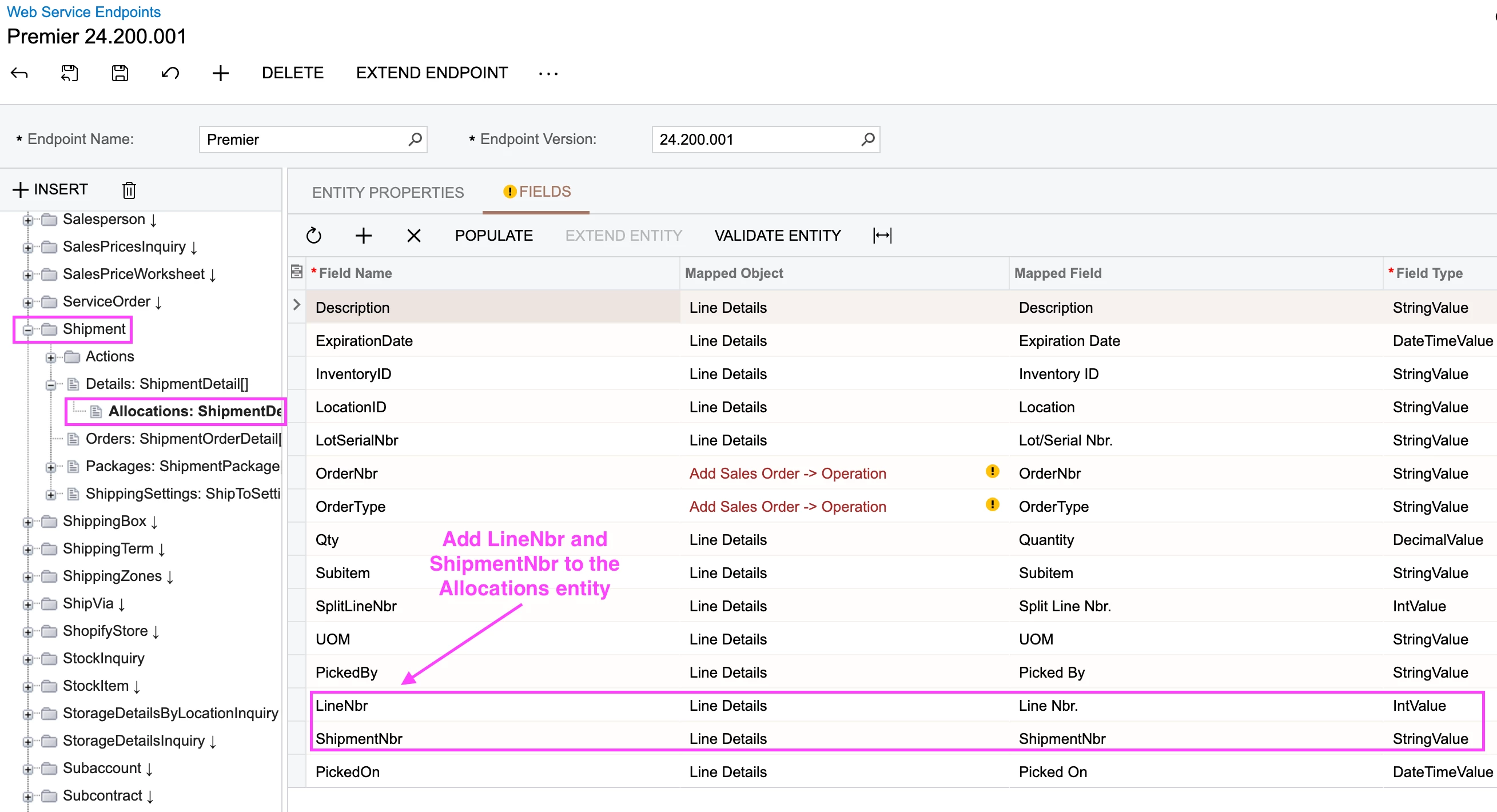
To update an existing allocation without a GUID, we need to add a few fields to the Shipment endpoint. Specifically, extend the Allocations entity and populate from the Line Details object. Add the fields for LineNbr and ShipmentNbr. With these two fields, as well as the existing SplitLineNbr field, you have the compound primary key for a given row in SOShipLineSplit.

Extend the Shipment > Allocations entity

Now you can update the Allocations element without a GUID. Just make sure to include these primary key fields along with any other fields you want to update in your PUT call. Otherwise you'll end up INSERTing, which is why I think you had 11 entries instead of the 8 you were expecting.

{
    "id": "da8fb44d-8199-f011-a83e-000d3a90ca4c",
    "Details": [
        {
            "id": "e68fb44d-8199-f011-a83e-000d3a90ca4c",
            "Allocations": [
                {
                    "LineNbr": { "value": 3 },
                    "ShipmentNbr": { "value": "01780196" },
                    "SplitLineNbr": { "value": 4 },
                    "Qty": { "value": 1.000000 }
                },
                {
                    "LineNbr": { "value": 3 },
                    "ShipmentNbr": { "value": "01780196" },
                    "SplitLineNbr": { "value": 5 },
                    "Qty": { "value": 2.000000 }
                }
            ]
        }
    ]
}