Solved

SOAP API for Invoices and Memos in Receivables

  • June 24, 2025
  • 4 replies
  • 133 views

Forum|alt.badge.img

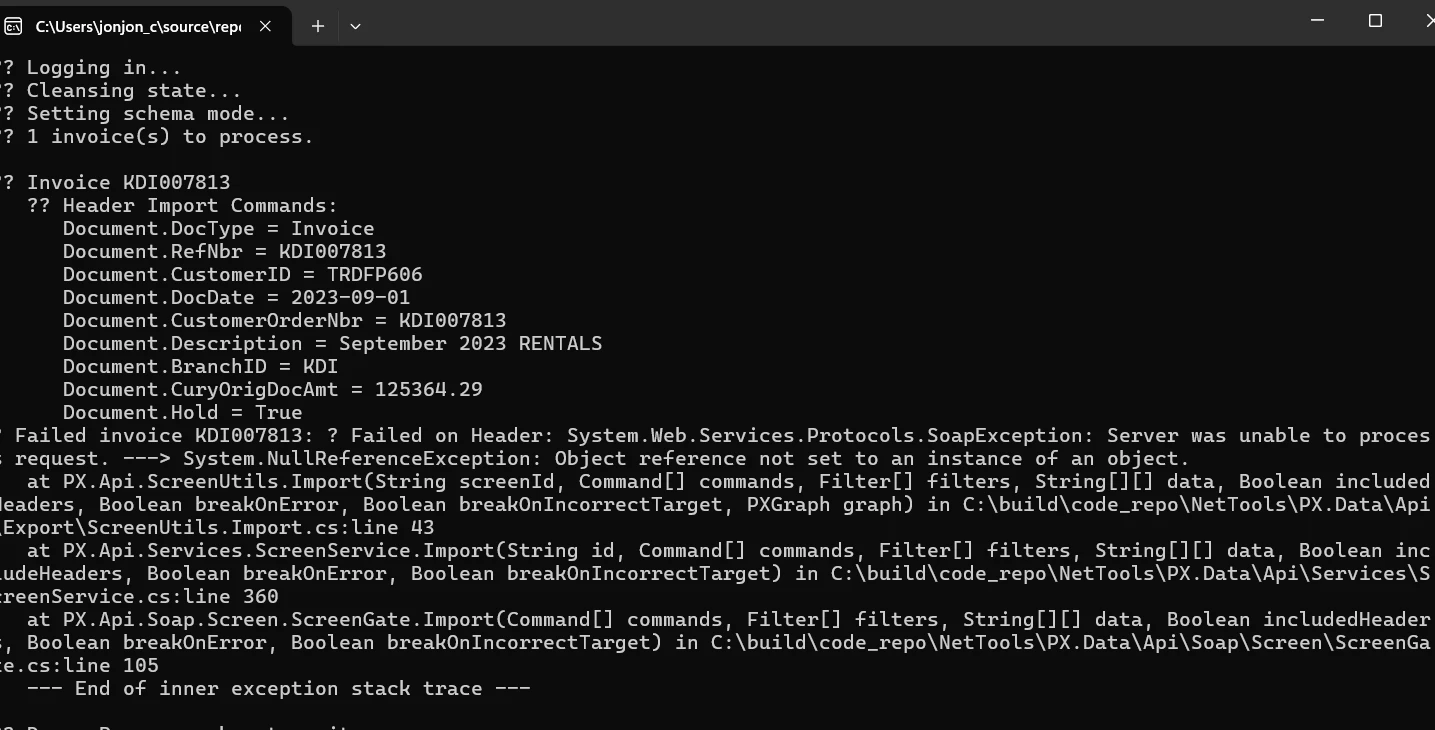
Does anyone have experience creating an API to insert records from SQL Server into Acumatica? I’m currently working on building an integration that transfers data from a SQL Server database into Acumatica using the SOAP API, specifically for the Receivables module (Invoices and Memos screen). Any guidance or examples would be appreciated!

Im stuck 😞 

What i started
 

using System;
using System.Collections.Generic;
using System.Data.SqlClient;
using System.Linq;
using System.Web.Services;
using AcumaticaClientLib.AcumaticaDefault24;
using AcumaticaInvoiceClientLib.Models;

namespace AcumaticaInvoiceClientLib.Services
{
    public class InvoiceUploader
    {
        private readonly Screen _client;
        private readonly string _connectionString;

        public InvoiceUploader(Screen client, string sqlConnectionString)
        {
            _client = client;
            _connectionString = sqlConnectionString;
        }

        public void UploadFromSql()
        {
            Console.WriteLine("🔄 Cleansing state...");
            _client.AR301000Clear();

            Console.WriteLine("🔍 Setting schema mode...");
            _client.SetSchemaMode(SchemaMode.Detailed);

            var invoices = LoadInvoices();
            Console.WriteLine($"📦 {invoices.Count} invoice(s) to process.");

            foreach (var group in invoices)
            {
                string invoiceId = group.Key;
                var lines = group.Value;

                try
                {
                    Console.WriteLine($"\n🧾 Invoice {invoiceId}");
                    SubmitInvoice(lines);
                    MarkAsPosted(invoiceId, 1);
                }
                catch (Exception ex)
                {
                    MarkAsPosted(invoiceId, 0);
                    Console.WriteLine($"❌ Failed invoice {invoiceId}: {ex.GetBaseException().Message}");
                }
            }
        }

        private Dictionary<string, List<InvoiceLine>> LoadInvoices()
        {
            var map = new Dictionary<string, List<InvoiceLine>>();
            using (var conn = new SqlConnection(_connectionString))
            using (var cmd = conn.CreateCommand())
            {
                conn.Open();
                cmd.CommandText = @"
                    SELECT ExtSerial, [Date], CustomerRefNbr, [Description], Customer,
                           AQ_Branch, InventoryID, LineQuantity, LineUnitPrice,
                           LineDescription, LineSubAccount, AQ_COA, Amount
                    FROM AH_ODS_DB.dbo.KDI_Vigi_InvoiceDetails
                    WHERE AQ_PostStatus IS NULL
                    ORDER BY ExtSerial, LineNbr";

                using (var rdr = cmd.ExecuteReader())
                {
                    while (rdr.Read())
                    {
                        var id = rdr["ExtSerial"].ToString();
                        if (!map.ContainsKey(id))
                            map[id] = new List<InvoiceLine>();

                        map[id].Add(new InvoiceLine
                        {
                            InvoiceID = id,
                            Date = Convert.ToDateTime(rdr["Date"]),
                            CustomerRefNbr = rdr["CustomerRefNbr"].ToString(),
                            Description = rdr["Description"].ToString(),
                            CustomerID = rdr["Customer"].ToString(),
                            Branch = rdr["AQ_Branch"].ToString(),
                            InventoryID = rdr["InventoryID"].ToString(),
                            Quantity = rdr["LineQuantity"].ToString(),
                            UnitPrice = rdr["LineUnitPrice"].ToString(),
                            LineDescription = rdr["LineDescription"].ToString(),
                            SubAccount = rdr["LineSubAccount"].ToString(),
                            AccountID = rdr["AQ_COA"].ToString(),
                            Amount = rdr["Amount"].ToString()
                        });
                    }
                }
            }
            return map;
        }

        private void SubmitInvoice(List<InvoiceLine> lines)
        {
            var hdr = lines.First();

            // HEADER SECTION
            try
            {
                var headerCommands = new[]
                {
            Cmd("Document", "DocType", "Invoice"),
            Cmd("Document", "RefNbr", hdr.InvoiceID),                  // ExtSerial
            Cmd("Document", "CustomerID", hdr.CustomerID),
            Cmd("Document", "DocDate", hdr.Date.ToString("yyyy-MM-dd")),
            Cmd("Document", "CustomerOrderNbr", hdr.CustomerRefNbr),
            Cmd("Document", "Description", hdr.Description),
            Cmd("Document", "BranchID", hdr.Branch),
            Cmd("Document", "CuryOrigDocAmt", hdr.Amount),
            Cmd("Document", "Hold", "True")
        };

                DebugCommands(headerCommands, "Header Import");
                _client.AR301000Import(headerCommands, null, null, true, true, true);
                _client.AR301000Submit(new Command[0]);
                Console.WriteLine("   ✔ Header Saved");
            }
            catch (Exception ex)
            {
                throw new Exception($"❌ Failed on Header: {ex.GetBaseException().Message}");
            }

            // TRANSACTIONS SECTION
            try
            {
                foreach (var line in lines)
                {
                    Console.WriteLine($"  ➤ Line {line.InventoryID}");

                    var addRow = new[] { Cmd("Transactions", "AddNewLine", "True") };
                    _client.AR301000Import(addRow, null, null, true, true, true);

                    var lineCmds = new List<Command>
            {
                Cmd("Transactions", "InventoryID", line.InventoryID),
                Cmd("Transactions", "Quantity", line.Quantity),
                Cmd("Transactions", "UnitPrice", line.UnitPrice),
                Cmd("Transactions", "TranDesc", line.LineDescription)
            };

                    if (!string.IsNullOrWhiteSpace(line.SubAccount))
                        lineCmds.Add(Cmd("Transactions", "SubID", line.SubAccount));
                    if (!string.IsNullOrWhiteSpace(line.AccountID))
                        lineCmds.Add(Cmd("Transactions", "AccountID", line.AccountID));

                    DebugCommands(lineCmds.ToArray(), "Line Import");
                    _client.AR301000Import(lineCmds.ToArray(), null, null, true, true, true);
                    _client.AR301000Submit(new Command[0]);
                    Console.WriteLine("   ✔ Line Saved");
                }
            }
            catch (Exception ex)
            {
                throw new Exception($"❌ Failed on Transactions: {ex.GetBaseException().Message}");
            }

            // RELEASE SECTION
            try
            {
                var releaseCommands = new[]
                {
            Cmd("Document", "Hold", "False"),
            Cmd("Document", "Action", "Save"),
            Cmd("Document", "Action", "Release")
        };

                DebugCommands(releaseCommands, "Release");
                _client.AR301000Submit(releaseCommands);
                Console.WriteLine($"✅ Invoice {hdr.InvoiceID} successfully uploaded");
            }
            catch (Exception ex)
            {
                throw new Exception($"❌ Failed on Release: {ex.GetBaseException().Message}");
            }
        }

        private void MarkAsPosted(string invoiceId, int status)
        {
            using (var conn = new SqlConnection(_connectionString))
            using (var cmd = conn.CreateCommand())
            {
                conn.Open();
                cmd.CommandText = @"
                    UPDATE AH_ODS_DB.dbo.KDI_Vigi_InvoiceDetails
                    SET AQ_PostStatus = @status, AQ_StatusDate = GETDATE()
                    WHERE ExtSerial = @id";
                cmd.Parameters.AddWithValue("@status", status);
                cmd.Parameters.AddWithValue("@id", invoiceId);
                cmd.ExecuteNonQuery();
            }
        }

        private Command Cmd(string objectName, string fieldName, string value)
            => new Command { ObjectName = objectName, FieldName = fieldName, Value = value };

        private void DebugCommands(Command[] commands, string stage)
        {
            Console.WriteLine($"   🧪 {stage} Commands:");
            foreach (var c in commands)
                Console.WriteLine($"     • {c.ObjectName}.{c.FieldName} = {c.Value}");
        }

        private class InvoiceLine
        {
            public string InvoiceID, CustomerID, CustomerRefNbr, Description, Branch;
            public string InventoryID, Quantity, UnitPrice, LineDescription, SubAccount, AccountID, Amount;
            public DateTime Date;
        }
    }
}


Best answer by Rakshanda

HI ​@saintsin ,

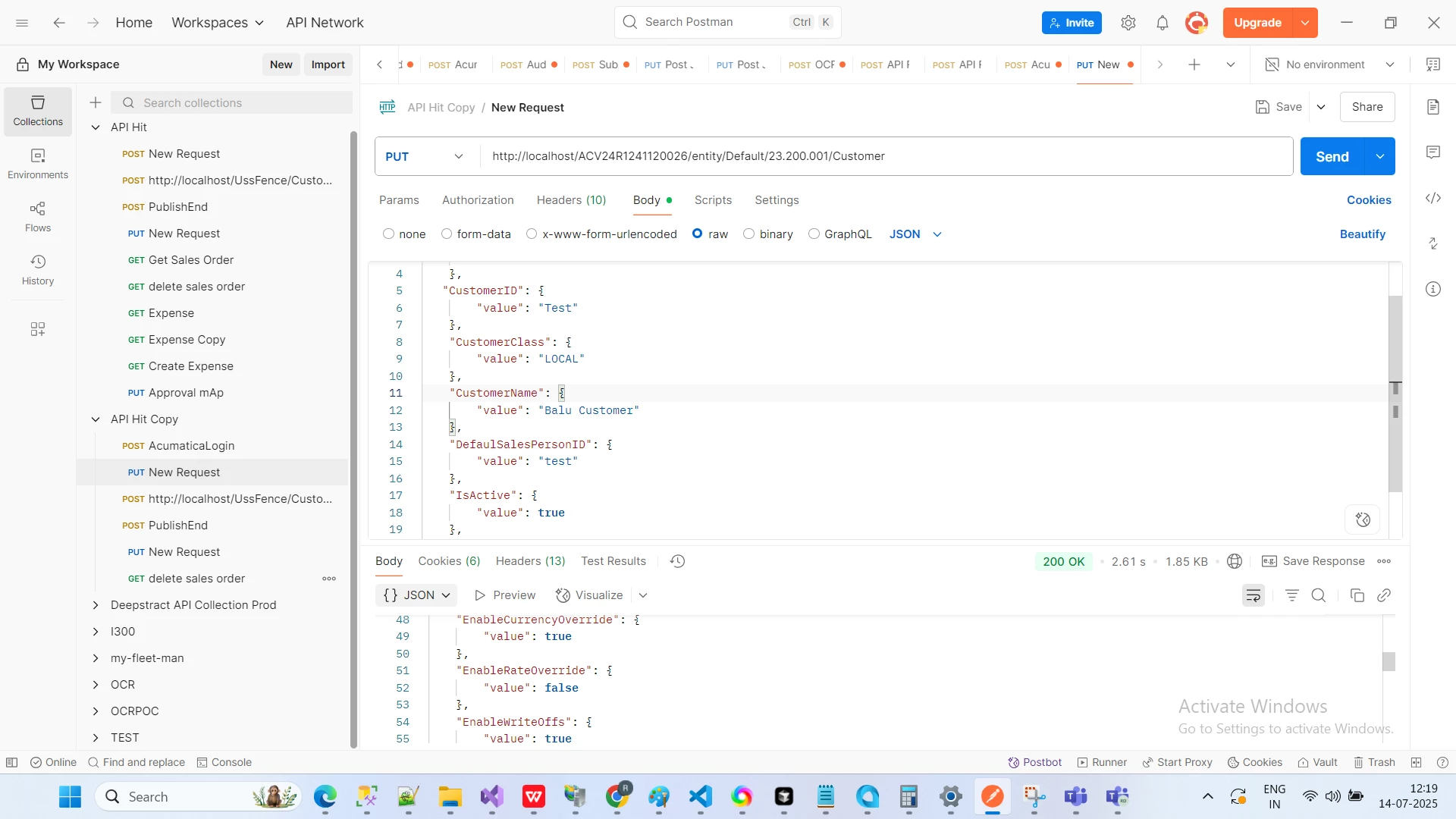
You can use the REST API — if you're able to insert the refNbr manually, then it's also possible to pass it through the REST API.
 

Please find below URL for your reference
URL- Postman
Hope above helps!!

4 replies

Forum|alt.badge.img+8
  • Captain II
  • June 24, 2025

The first thing is that you shouldn’t use the SOAP interface. It’s being depreciated. Use the REST Api. Then you don’t need to worry about models - just create a JSon payload and send it to the correct endpoint.

The other observation is around the dates of your transaction and that you’re supplying a RefNbr for the document. Are you able to enter this transaction manually in Acumatica without errors?


Forum|alt.badge.img
  • Author
  • Jr Varsity III
  • June 24, 2025

could you help me with a step-by-step outline or best practices for submitting this type of transaction via the REST API


Forum|alt.badge.img+3
  • Jr Varsity II
  • Answer
  • July 14, 2025

HI ​@saintsin ,

You can use the REST API — if you're able to insert the refNbr manually, then it's also possible to pass it through the REST API.
 

Please find below URL for your reference
URL- Postman
Hope above helps!!


Forum|alt.badge.img
  • Author
  • Jr Varsity III
  • July 21, 2025

im using C#