

Answer

REST API: how do I set the Warehouse value for a Sales Price row (AR202000 screen)?

  • July 3, 2024
  • 3 replies
  • 57 views

Forum|alt.badge.img+2

I can create a Sales Price fine using the following PUT method in Postman:

https://sandbox.com/AcumaticaERP/entity/Default/20.200.001/SalesPricesInquiry?$expand=SalesPriceDetails  


However, the Warehouse always shows up blank when I pass in this body:

{

    "SalesPriceDetails": [

    {

        "InventoryID": { "value": "00099-00098" },

        "Warehouse": { "value": "TEST001" },

        "PriceType": { "value": "Customer Price Class" },

        "PriceCode": { "value": "VIP" },

        "UOM": { "value": "EA" },

        "Price": { "value": "149.44" },

        "Currency": { "value": "USD" },

        "EffectiveDate": { "value": "2022-03-01T00:00:00-08:00" }        

     }

]

}
Best answer by jinin

Hi @bpgraves ,

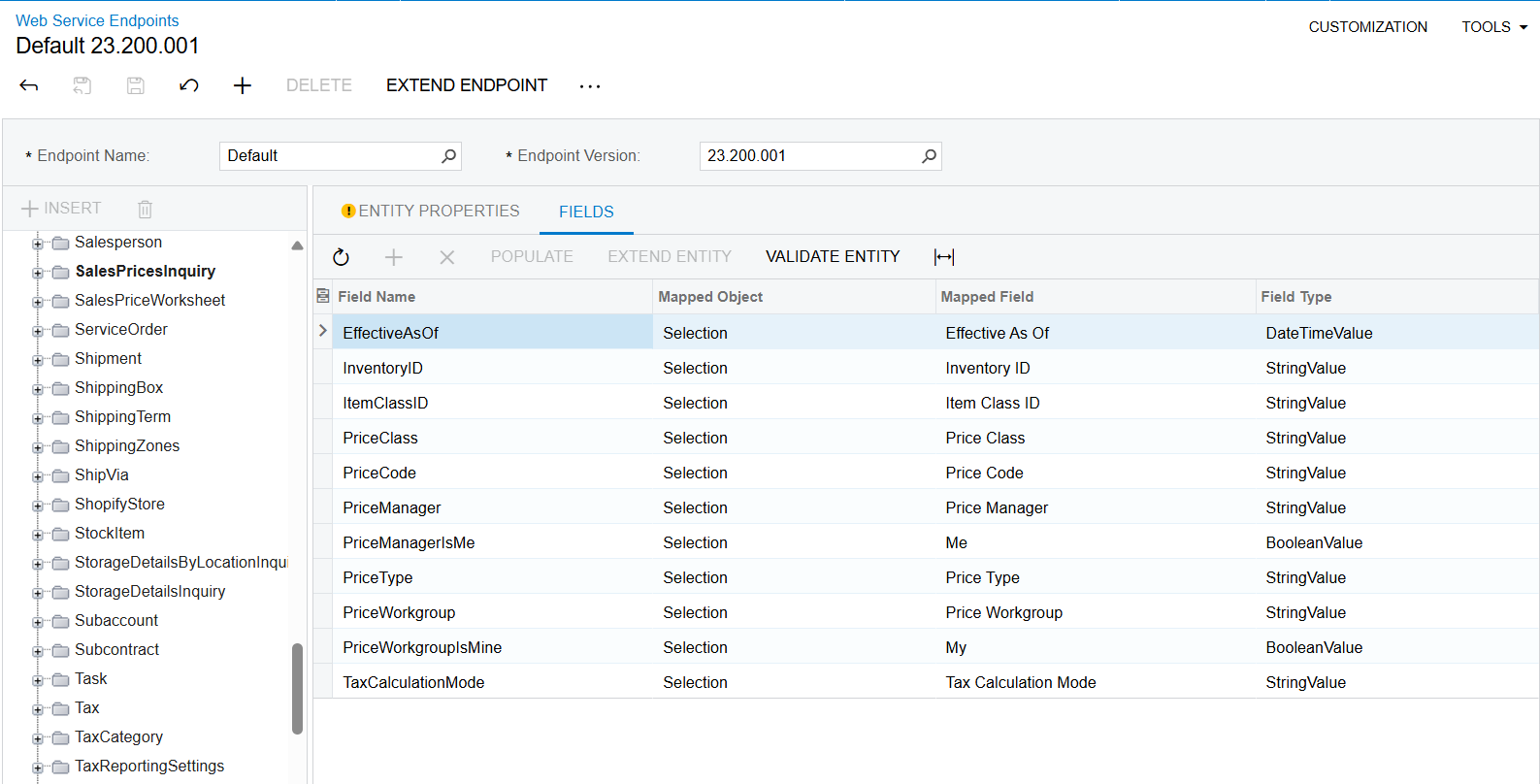
The Warehouse field is currently not accessible in the Default endpoint entity. To address this, you have the option to extend the entity and include the required field. This will enable you to successfully insert the warehouse information as needed.


3 replies

jinin
Pro I
Forum|alt.badge.img+11
  • Pro I
  • Answer
  • July 4, 2024

Hi @bpgraves ,

The Warehouse field is currently not accessible in the Default endpoint entity. To address this, you have the option to extend the entity and include the required field. This will enable you to successfully insert the warehouse information as needed.


Forum|alt.badge.img+2
  • Author
  • Semi-Pro I
  • July 5, 2024

Hi @bpgraves ,

The Warehouse field is currently not accessible in the Default endpoint entity. To address this, you have the option to extend the entity and include the required field. This will enable you to successfully insert the warehouse information as needed.


The EXTEND ENTITY is greyed out (see above screenshot) so it doesn’t allow me to do what you’re suggesting.  I does allow me to EXTEND ENDPOINT but that creates a copy of the ENTIRE Default Endpoint which isn’t what I want.


RohitRattan88
Acumatica Moderator
Forum|alt.badge.img+4
  • Acumatica Moderator
  • July 5, 2024

@bpgraves you cannot modify system Default endpoint.

You will need to extend it, it will make a copy of Default and on that you should be able to make changes to any Entity you wish.

Here’s documentation on extending endpoints: To Extend an Existing Endpoint



