

Solved

REST API: how do I Record CC payment previously done in SOAP

  • May 10, 2024
  • 8 replies
  • 125 views

Forum|alt.badge.img+2

Here’s what I’m doing now in SOAP to Record a CC payment:

            var pymtSchema = _context.AR302000GetSchema();
            _context.AR302000Clear();
            var commands = new List<Command>();
            try
            {
                _context.AR302000Clear();
                commands.Clear();
                commands.Add(new Value { Value = "Payment", LinkedCommand = pymtSchema.PaymentSummary.Type });
                commands.Add(new Value { Value = paymentRefNbr, LinkedCommand = pymtSchema.PaymentSummary.ReferenceNbr });
                commands.Add(new Value { Value = bt_transactiontoken, LinkedCommand = pymtSchema.PaymentSummary.PaymentRef });
                commands.Add(new Value { Value = bt_transactiontoken, LinkedCommand = pymtSchema.RecordCCPaymentCCPaymentData.PCTranNumber });
                commands.Add(new Value { Value = "OK", LinkedCommand = pymtSchema.PaymentSummary.ServiceCommands.DialogAnswer, Commit = true });
                commands.Add(pymtSchema.Actions.RecordCCPayment);

                var pymtResults = _context.AR302000Submit(commands.ToArray());
            }


How do I do this with the REST API?
Best answer by bpgraves

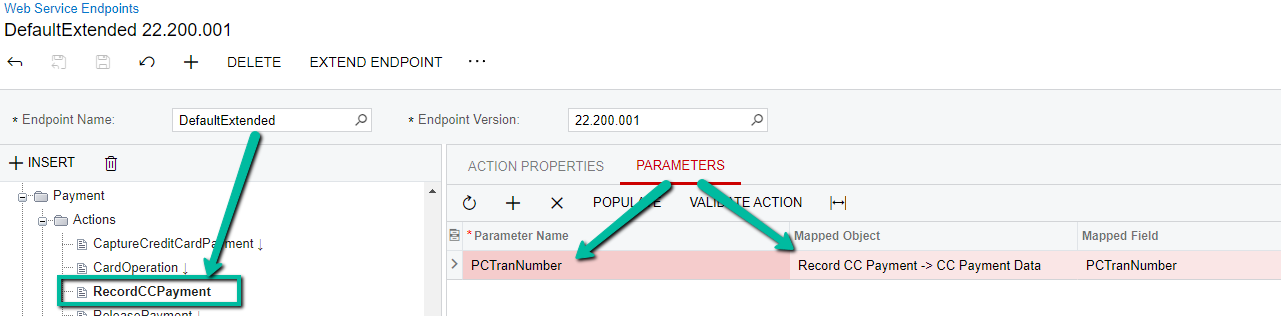
I was able to find a solution by extending the Payment web service endpoint and adding the RecordCCPayment action like this...

I was then able to call the following POST method in Postman:

https://sandbox.com/AcumaticaERP/entity/DefaultExtended/22.200.001/Payment/RecordCCPayment?$PCTranNumber=xxxxxxxx

{

    "entity": {

        "Type": {"value": "Payment"},

        "ReferenceNbr": {"value": "598034"},

        "PaymentRef": {"value": "xxxxxxxx"}

    },

    "parameters": {

        "PCTranNumber": {"value": "xxxxxxxx"}

    }

}

8 replies

Dmitrii Naumov
Acumatica Moderator
Forum|alt.badge.img+7

Here is an example:
 

PUT: Default/23.200.001/Payment

{
"CustomerID": {
"value": "ABARTENDE"
},
"PaymentAmount": {
"value": 123.0000
},
"PaymentMethod": {
"value": "DEMOCC"
},
"CreditCardTransactionInfo": [
{
"TranNbr": {
"value": "11eeebd4c8c9d10ea4d3b823"
},
"TranType": {
"value": "AUT"
},
"NeedsValidation": {
"value": true
},
"AuthNbr": {
"value": "ebd4c8"
}
}
]
}


Forum|alt.badge.img+2
  • Author
  • Semi-Pro I
  • May 13, 2024

Here is an example:
 

PUT: Default/23.200.001/Payment

{
"CustomerID": {
"value": "ABARTENDE"
},
"PaymentAmount": {
"value": 123.0000
},
"PaymentMethod": {
"value": "DEMOCC"
},
"CreditCardTransactionInfo": [
{
"TranNbr": {
"value": "11eeebd4c8c9d10ea4d3b823"
},
"TranType": {
"value": "AUT"
},
"NeedsValidation": {
"value": true
},
"AuthNbr": {
"value": "ebd4c8"
}
}
]
}


This looks like it creates a brand new payment.  I want to Record Card Payment (under Card Processing menu on AR302000 page) using an existing Payment ReferenceNbr and transaction number.  How do I include the ReferenceNbr without creating a brand new Payment?


Dmitrii Naumov
Acumatica Moderator
Forum|alt.badge.img+7

@bpgraves  you do it the same way, just add ID or ReferenceNbr and Type.

E.g.


PUT: Default/23.200.001/Payment

{
"id": "671e3b2c-d87f-e411-beca-00b56d0561c2",
"Type": {
"value": "Payment"
},
"ReferenceNbr": {
"value": "002266"
},
"CreditCardTransactionInfo": [
{
"TranNbr": {
"value": "11eeebd4c8c9d10ea4d3b823"
},
"TranType": {
"value": "AUT"
},
"NeedsValidation": {
"value": true
},
"AuthNbr": {
"value": "ebd4c8"
}
}
]
}


Forum|alt.badge.img+2
  • Author
  • Semi-Pro I
  • May 13, 2024

Thank you.  Getting closer now.  I’m assuming the TranNbr is the PaymentRef but I’m not sure what the AuthNbr is.  If I don’t include it, I just get the same Payment returned.  I tried to locate it using this GET method URL but it just returns the Payment with an empty CreditCardTransactionInfo object:
https://sandbox.com/entity/Default/22.200.001/Payment/Payment/709958?$expand=CreditCardTransactionInfo


Forum|alt.badge.img+2
  • Author
  • Semi-Pro I
  • May 13, 2024

@bpgraves  you do it the same way, just add ID or ReferenceNbr and Type.

E.g.


PUT: Default/23.200.001/Payment

{
"id": "671e3b2c-d87f-e411-beca-00b56d0561c2",
"Type": {
"value": "Payment"
},
"ReferenceNbr": {
"value": "002266"
},
"CreditCardTransactionInfo": [
{
"TranNbr": {
"value": "11eeebd4c8c9d10ea4d3b823"
},
"TranType": {
"value": "AUT"
},
"NeedsValidation": {
"value": true
},
"AuthNbr": {
"value": "ebd4c8"
}
}
]
}


I’m assuming the TranNbr is the PaymentRef but I’m not sure what the AuthNbr is.  What needs to be in AuthNbr?  If I don’t include it, I just get the same Payment object returned.  I tried to locate it using this GET method URL but it just returns the Payment with an empty CreditCardTransactionInfo object:
https://sandbox.com/entity/Default/22.200.001/Payment/Payment/709958?$expand=CreditCardTransactionInfo


Chris Hackett
Community Manager
Forum|alt.badge.img
  • Acumatica Community Manager
  • July 1, 2024

Hi @bpgraves were you able to find a solution? Thank you!


Forum|alt.badge.img+2
  • Author
  • Semi-Pro I
  • Answer
  • August 21, 2024

I was able to find a solution by extending the Payment web service endpoint and adding the RecordCCPayment action like this...

I was then able to call the following POST method in Postman:

https://sandbox.com/AcumaticaERP/entity/DefaultExtended/22.200.001/Payment/RecordCCPayment?$PCTranNumber=xxxxxxxx

{

    "entity": {

        "Type": {"value": "Payment"},

        "ReferenceNbr": {"value": "598034"},

        "PaymentRef": {"value": "xxxxxxxx"}

    },

    "parameters": {

        "PCTranNumber": {"value": "xxxxxxxx"}

    }

}


Chris Hackett
Community Manager
Forum|alt.badge.img
  • Acumatica Community Manager
  • August 21, 2024

Thank you for sharing your solution with the community @bpgraves!

