Answer

REST API: how do I add a new Sales Price row (AR202000 screen)?

  • August 9, 2024
  • 7 replies
  • 96 views

Forum|alt.badge.img+2

I tried using the following PUT method in Postman:

https://sandbox.com/AcumaticaERP/entity/Default/22.200.001/SalesPricesInquiry?$expand=SalesPriceDetails  


However, I have to wait 5 minutes until I get a “Could not get response” message when I use this body:

{

    "SalesPriceDetails": [

    {

        "InventoryID": { "value": "00099-00098" },

        "PriceType": { "value": "Customer Price Class" },

        "PriceCode": { "value": "VIP" },

        "UOM": { "value": "EA" },

        "Price": { "value": "149.44" },

        "Currency": { "value": "USD" },

        "EffectiveDate": { "value": "2022-03-01T00:00:00-08:00" }        

     }

]

}

Best answer by bpgraves

The reason SQL is taking forever is due to that fact that we have millions of Sales Prices rows.  Not including an InventoryID filter in the PUT method body was a HUGE mistake.

I was able to get a response back immediately when I sent this body:

{

    "InventoryID": { "value": "00000-00002" },

    "SalesPriceDetails": [

    {

        "PriceType": { "value": "Customer Price Class" },

        "PriceCode": { "value": "WHOLESALE" },

        "UOM": { "value": "EA" },

        "Price": { "value": "168.60" },

        "EffectiveDate": { "value": "2024-08-01" },

        "ExpirationDate": { "value": "2024-09-30" }

     }

]

}


7 replies

dcomerford
Captain II
Forum|alt.badge.img+15
  • Captain II
  • August 9, 2024

Can you try removing the expand=SalesPriceDetails from the end of your PUT as this would normally only be used with a GET.


jinin
Pro I
Forum|alt.badge.img+11
  • Pro I
  • August 9, 2024

Hi @bpgraves ,

I’ve tried the same request but removed the expand parameter from the URL. It's working as expected. Do you have any customizations on this screen? If so, try unpublishing the package and testing it again.
 

request:
 

{

    "SalesPriceDetails": [

        {

            "InventoryID": {

                "value": "AACOMPUT01"

            },

            "PriceType": {

                "value": "Customer Price Class"

            },

            "PriceCode": {

                "value": "WHOLESALE"

            },

            "UOM": {

                "value": "EA"

            },

            "Price": {

                "value": "149.44"

            },

            "EffectiveDate": {

                "value": "2024-08-01"

            },

             "ExpirationDate": {

                "value": "2024-09-30"

            }

        }

    ]

}

​​​​​​​


Forum|alt.badge.img+2
  • Author
  • Semi-Pro I
  • August 9, 2024

I’ve tried removing the $expand parameter but I still get the same “Could not get response” message after waiting 5 minutes.  I’ve tried using a different Acumatica server instance and I get this error message after 30 seconds:

{

    "message": "An error has occurred.",

    "exceptionMessage": "Execution Timeout Expired.  The timeout period elapsed prior to completion of the operation or the server is not responding.",

    "exceptionType": "PX.Data.PXDatabaseException",

}

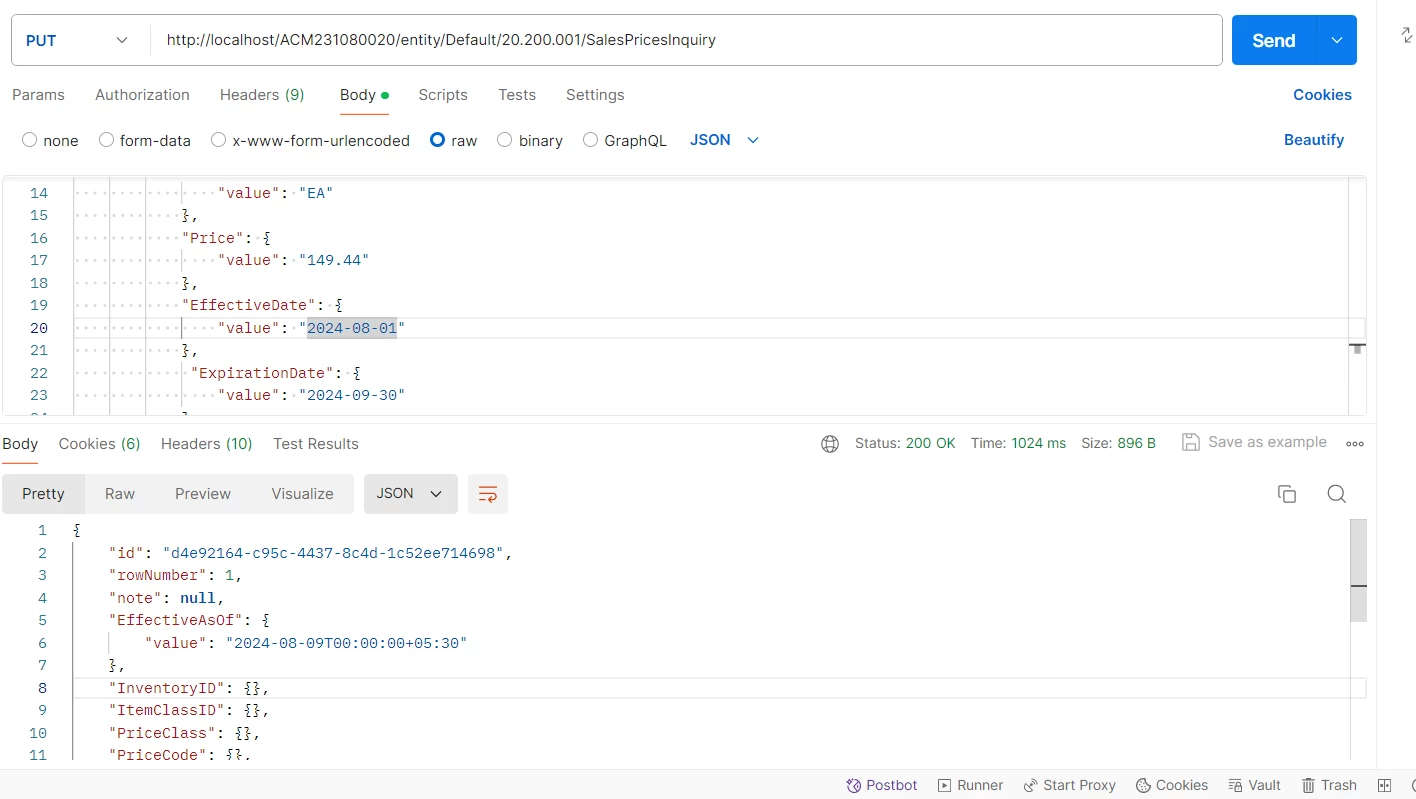
Here’s the PUT method URL I’m using:

https://sandbox.com/AcumaticaERP/entity/Default/20.200.001/SalesPricesInquiry

Here’s the body I’m passing:

{

    "SalesPriceDetails": [

    {

        "InventoryID": { "value": "00000-00002" },

        "PriceType": { "value": "Customer Price Class" },

        "PriceCode": { "value": "WHOLESALE" },

        "UOM": { "value": "EA" },

        "Price": { "value": "168.60" },

        "Currency": { "value": "USD" },

        "EffectiveDate": { "value": "2024-08-01" },

        "ExpirationDate": { "value": "2024-09-30" }

     }

]

}


jinin
Pro I
Forum|alt.badge.img+11
  • Pro I
  • August 9, 2024

Hi @bpgraves ,

Do you have any customizations on the Sales Price screen? If there is any customization related to this screen, please unpublish it and try again.

Also, check the refresh profiler and identify why it is taking time to insert data.


Forum|alt.badge.img+2
  • Author
  • Semi-Pro I
  • August 9, 2024

I installed Acumatica 24R1 on my local machine with no customizations published and got this after 30 seconds of running the same PUT method in Postman:

{

    "message": "An error has occurred.",

    "exceptionMessage": "Execution Timeout Expired.  The timeout period elapsed prior to completion of the operation or the server is not responding.",

    "exceptionType": "PX.Data.PXDatabaseException",

...}

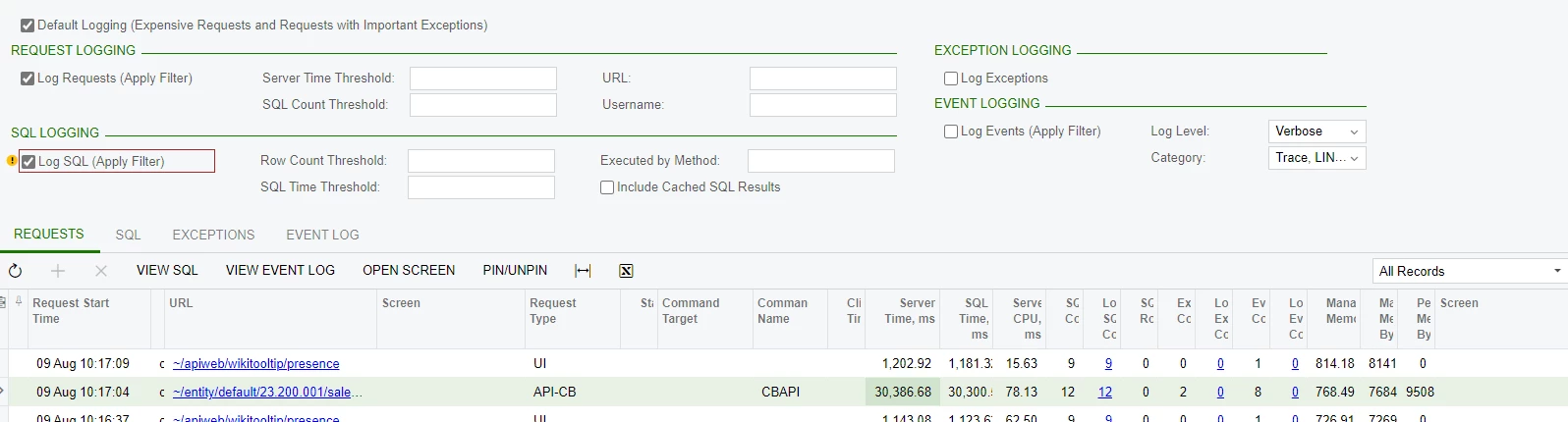
The Request Profiler information isn’t very helpful since it’s just showing that 30 seconds of Server and SQL time were used:

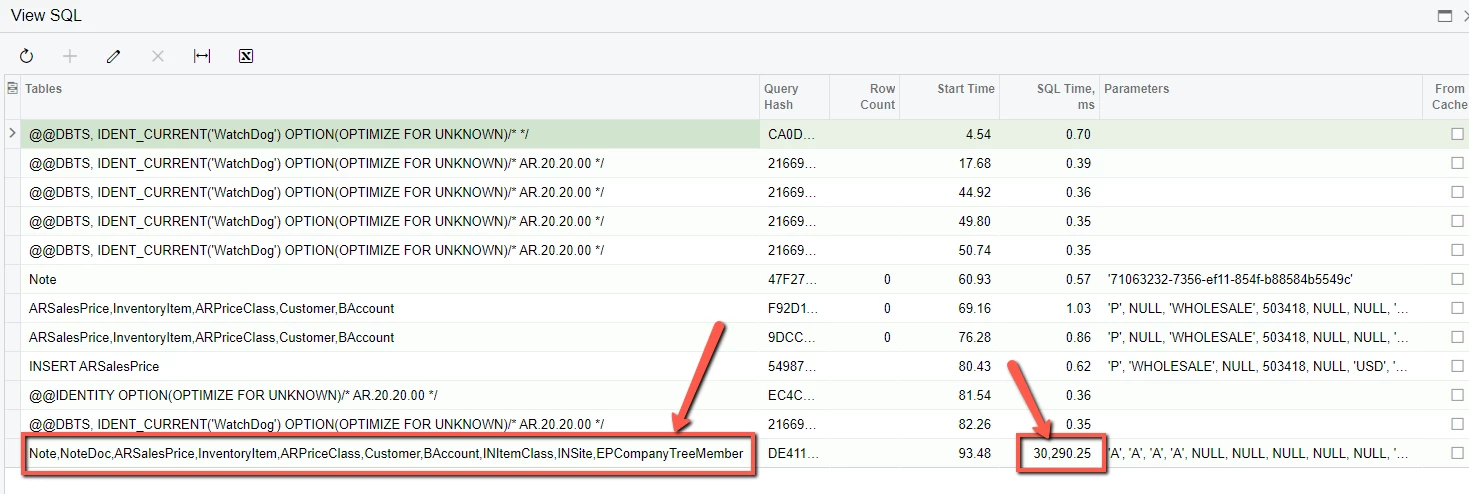
However, when I looked at View SQL, it shows that many SQL tables are being accessed to add a new Sales Price:

Does this look normal?


Forum|alt.badge.img+2
  • Author
  • Semi-Pro I
  • Answer
  • August 9, 2024

The reason SQL is taking forever is due to that fact that we have millions of Sales Prices rows.  Not including an InventoryID filter in the PUT method body was a HUGE mistake.

I was able to get a response back immediately when I sent this body:

{

    "InventoryID": { "value": "00000-00002" },

    "SalesPriceDetails": [

    {

        "PriceType": { "value": "Customer Price Class" },

        "PriceCode": { "value": "WHOLESALE" },

        "UOM": { "value": "EA" },

        "Price": { "value": "168.60" },

        "EffectiveDate": { "value": "2024-08-01" },

        "ExpirationDate": { "value": "2024-09-30" }

     }

]

}


Chris Hackett
Community Manager
Forum|alt.badge.img
  • Acumatica Community Manager
  • August 9, 2024

Thank you for sharing your solution with the community @bpgraves!