Is there any way to call the PrintInvoice action on an SO Invoice and specify the printer to get a paper copy? I’ve made an entry in our custom endpoint to call the PrintInvoice action on an invoice, but when I submit the PUT, I’m getting an error “Invalid URI structure”.
@AllenVaughn Sorry for the delayed response. I needed time to understand how it works in practice :) Below are step-by-step instructions.
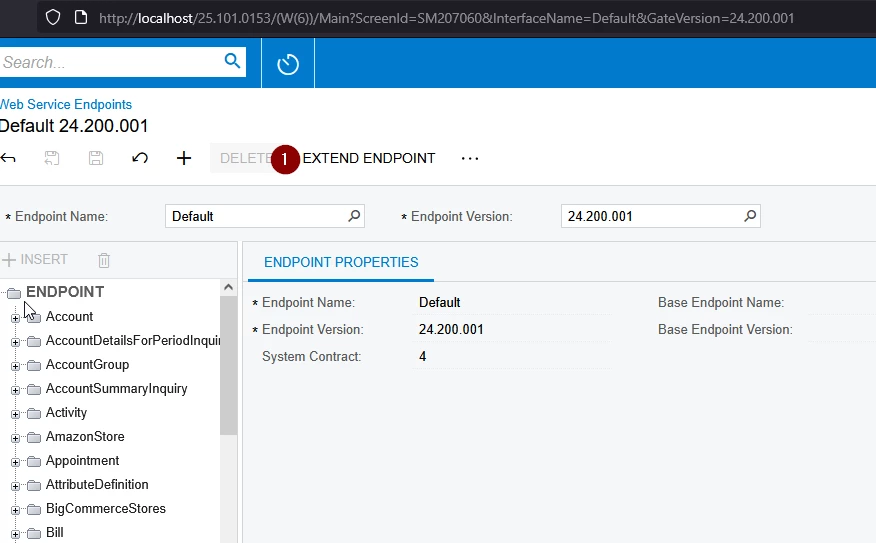
You need to expand the web service endpoint to add the required report to it.
From Acumatica help:
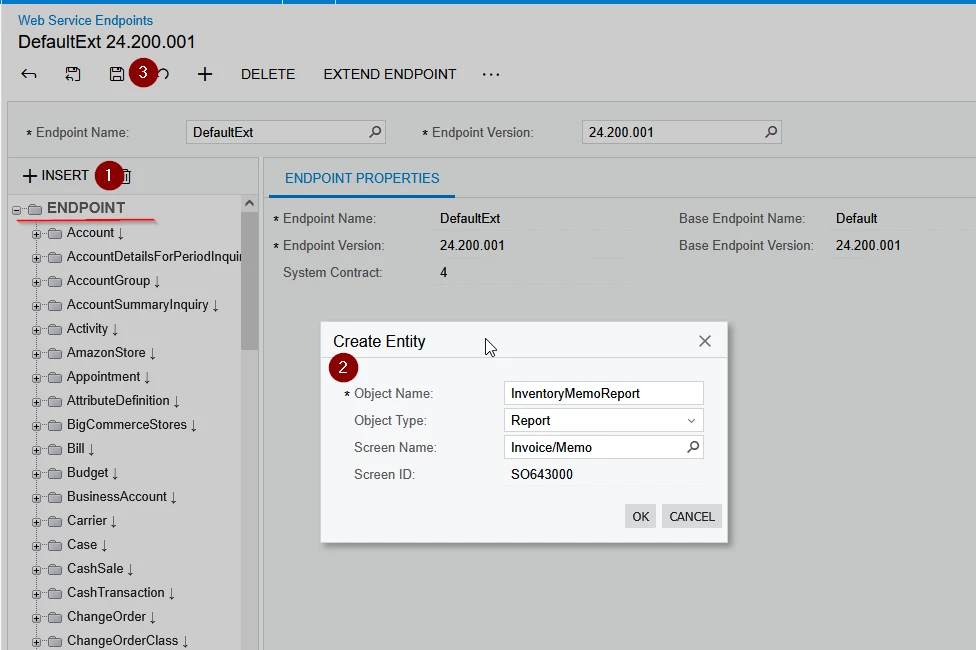
To Add a Report Entity to the Contract of the Endpoint
In the Endpoint Name box, select the name of the endpoint to which you want to add an entity.
In the Endpoint Version box, select the version of the endpoint to which you want to add an entity.
In the left pane, select the Endpoint node.
On the toolbar of the left pane, click Insert, and in the Create Entity dialog box, do the following:
In the Object Name box, type the name of the entity. This is the name of the API object that you will use in the code of your application to work with the entity. Hint:
For details on the characters that can be used in the entity names, see Naming Rules for Endpoints. 2. In the Object Type box, select Report. 3. In the Screen Name lookup box, select the report to which the entity should correspond. 4. Click OK. The Fields tab is populated with the fields for each parameter of the report. 5. Optional: Modify the list of fields, as described in To Add Fields to an Entity.
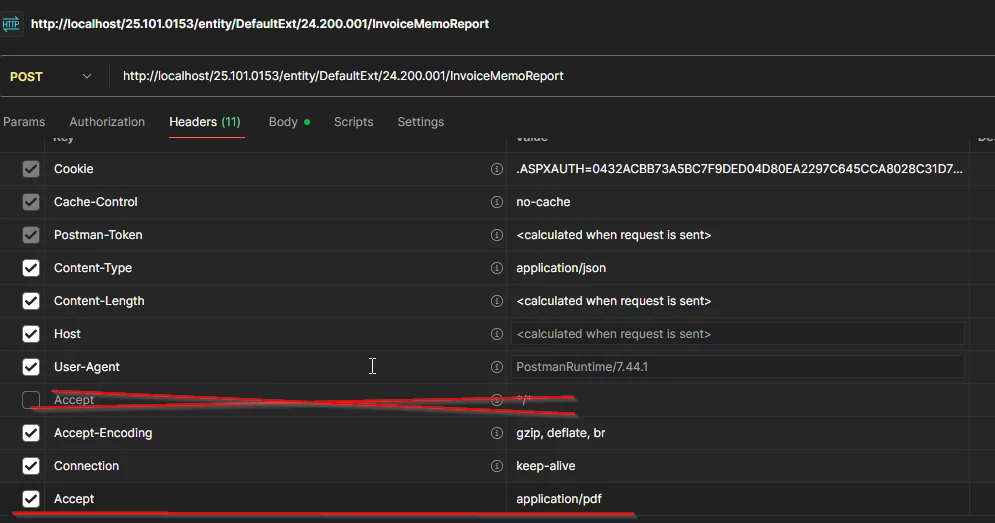
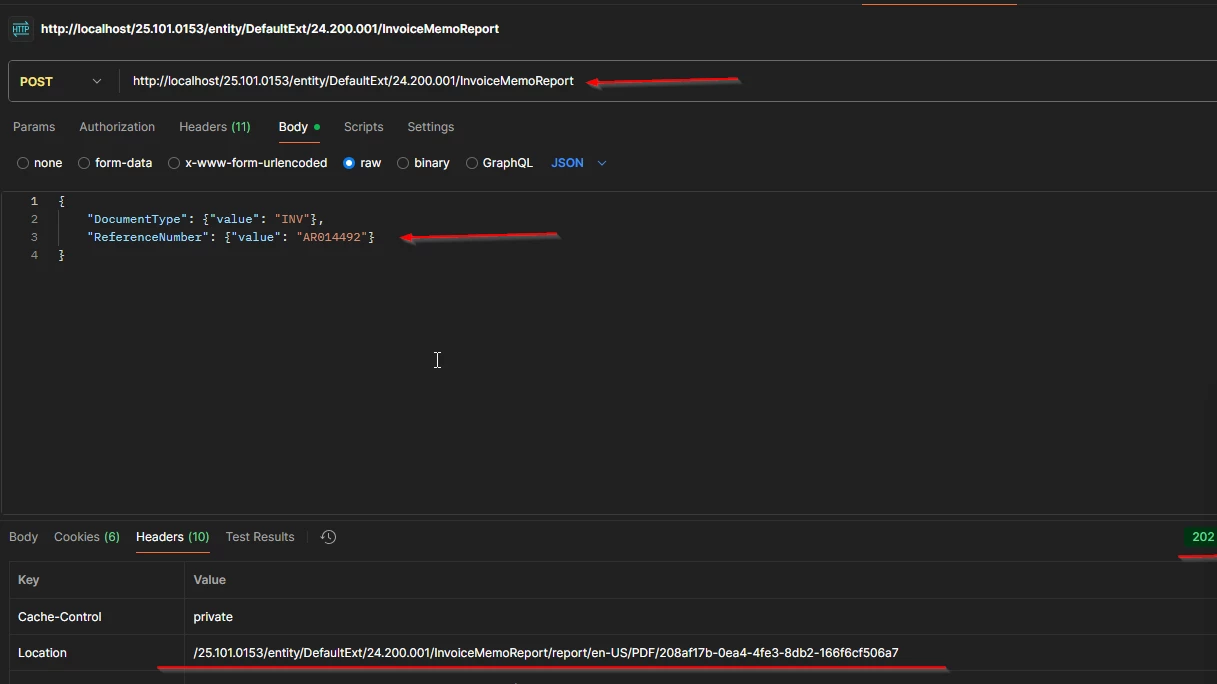
Almost everything is ready to go. 2. Open Postman, executing login request.
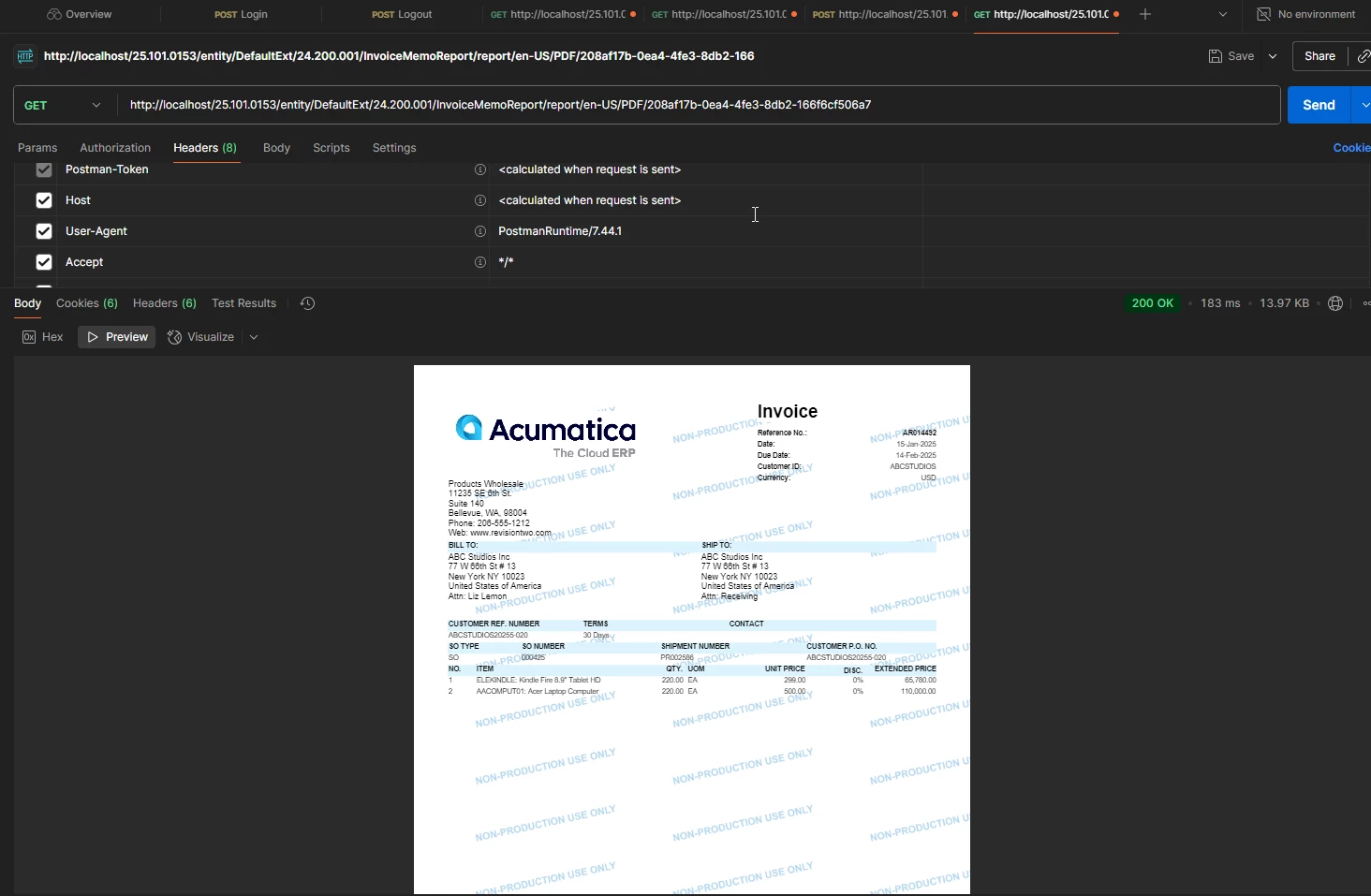
if return code - 202, all OK. From Acumatica help: The Location header of the response contains the URL that you can use to obtain the requested report by using the GET HTTP method. When the report is ready, this GET request returns the 200 OK status code. The requested report is returned in the response body.
You are attempting to call the PrintInvoice action on an AR Invoice (SO Invoice) through a custom REST endpoint. The error Invalid URI structure is usually caused not by the JSON, but by an incorrect URL or incorrect action setup in the endpoint.
It’s also important to understand that the standard PrintInvoice action does not accept a printer parameter — it either returns a PDF or prints using the user’s default settings / DeviceHub. If you need to choose a printer, you must implement a custom action.
1️⃣ Correct URI Structure for Actions
The standard REST URL format for calling an action is:
PUT /entity/{EndpointName}/{Version}/{Entity}/{Key}/action/{ActionName}
Example for AR Invoice:
PUT /entity/Default/22.200.001/ARInvoice/Invoice/AR006006/action/PrintInvoice
If you call the action without passing the key in the URL, then you must supply the entity object in the JSON body, and the URL becomes:
PUT /entity/Default/22.200.001/ARInvoice/PrintInvoice
So the Invalid URI structure error indicates that your endpoint URL or entity/action mapping is incorrect, not the payload.
2️⃣ Why You Cannot Specify a Printer in Standard PrintInvoice
Feature
Standard PrintInvoice
Return PDF via API
✅ Yes
Auto-print using default printer / DeviceHub
✅ Yes
Select a specific printer via API
❌ Not supported
Pass { "PrinterName": "Printer01" } from REST API
❌ Not supported
To print to a specific printer, you must:
Create a custom action on ARInvoiceEntry (ex: PrintToDevice)
Add a parameter like PrinterName
Use ReportPrinterJobManager.PrintReport() or PXReportPrinter.Print()
Publish the action in your custom endpoint
Call it via REST API
3️⃣ Example Custom Action That Accepts a Printer Name
public class ARInvoiceEntry_Extension : PXGraphExtension<ARInvoiceEntry> { public PXAction<ARInvoice> PrintToPrinter; [PXButton, PXUIField(DisplayName = "Print to Printer")] public IEnumerable printToPrinter(PXAdapter adapter, string printerName) { var invoice = Base.Document.Current; var parameters = new Dictionary<string, string> { ["ARInvoice.DocType"] = invoice.DocType, ["ARInvoice.RefNbr"] = invoice.RefNbr };
I’m trying to call the report directly as shown in the last example in your Summary, but I don’t have an entity in an endpoint labeled ‘report’. Am I reading that incorrectly? What am I missing?
Never mind. I created a new Report entity in my custom endpoint and when I do a post to that endpoint with the supplied entity it returns the location to download the PDF in the Location header of the response. I can now retrieve a PDF of the invoice.
Another question: This report process takes a while to generate a new report on the invoice. Since this invoice is an already existing invoice, is there not some way to go directly to a URL of the PDF copy of an existing invoice or does it regenerate the entire invoice on every request?
If I’m simply wanting to reprint an existing invoice, surely the invoice isn’t generated entirely again just to simply print another copy.
@AllenVaughn Sorry for the delayed response. I needed time to understand how it works in practice :) Below are step-by-step instructions.
You need to expand the web service endpoint to add the required report to it.
From Acumatica help:
To Add a Report Entity to the Contract of the Endpoint
In the Endpoint Name box, select the name of the endpoint to which you want to add an entity.
In the Endpoint Version box, select the version of the endpoint to which you want to add an entity.
In the left pane, select the Endpoint node.
On the toolbar of the left pane, click Insert, and in the Create Entity dialog box, do the following:
In the Object Name box, type the name of the entity. This is the name of the API object that you will use in the code of your application to work with the entity. Hint:
For details on the characters that can be used in the entity names, see Naming Rules for Endpoints. 2. In the Object Type box, select Report. 3. In the Screen Name lookup box, select the report to which the entity should correspond. 4. Click OK. The Fields tab is populated with the fields for each parameter of the report. 5. Optional: Modify the list of fields, as described in To Add Fields to an Entity.
Almost everything is ready to go. 2. Open Postman, executing login request.
if return code - 202, all OK. From Acumatica help: The Location header of the response contains the URL that you can use to obtain the requested report by using the GET HTTP method. When the report is ready, this GET request returns the 200 OK status code. The requested report is returned in the response body.
Another question: This report process takes a while to generate a new report on the invoice. Since this invoice is an already existing invoice, is there not some way to go directly to a URL of the PDF copy of an existing invoice or does it regenerate the entire invoice on every request?
If I’m simply wanting to reprint an existing invoice, surely the invoice isn’t generated entirely again just to simply print another copy.
I've checked, and it looks like the PDF is only available for a single download