

Solved

Pin Activity Via REST API (Row Context?)

  • January 22, 2026
  • 2 replies
  • 26 views

Forum|alt.badge.img

I am trying to pin an Activity to a Lead via REST API. There isn’t an action for togglePinActivity on the DEFAULT Lead endpoint out-of-the-box, so I added one:
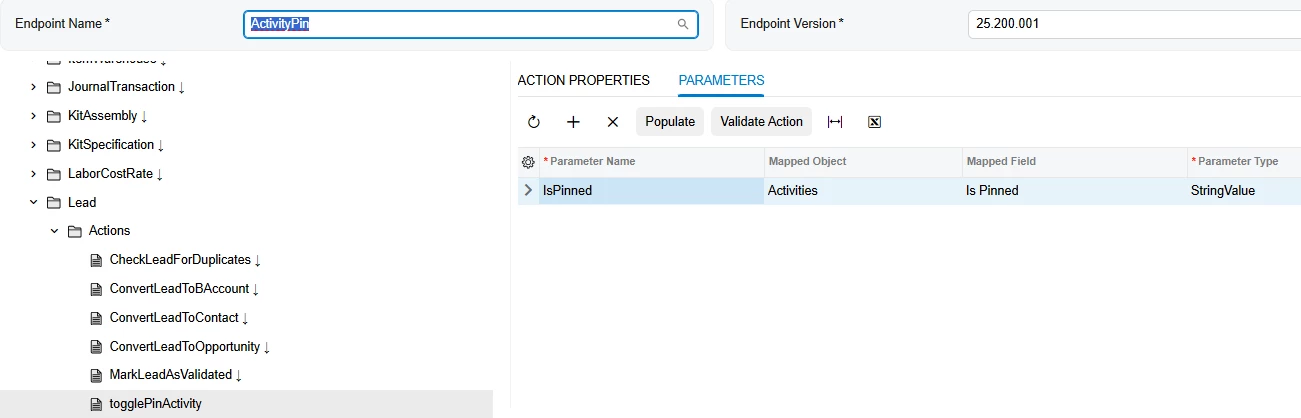
 

I found a lead in the sales demo data that had multiple activities associated (Darren Walker):
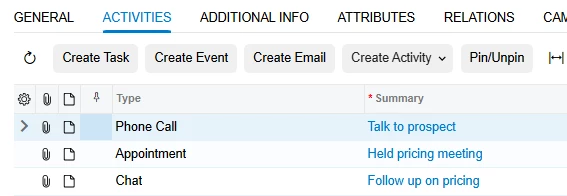
I got into the DAC Schema browser and found the Note ID for the 3rd activity here (Summary: Follow up on pricing) and used that and the lead’s id (9833) to create an API request.

I POSTed to http://localhost/25R2SalesDemo/entity/ActivityPin/25.200.001/Lead/togglePinActivity

{
"entity": {
"LeadID":{"value":9833}
},
"parameters": {
"id":"4d1a3b2c-d87f-e411-beca-00b56d0561c2",
"NoteID":{"value":"4d1a3b2c-d87f-e411-beca-00b56d0561c2"}
}
}

I tried the activity note two ways (id and NoteID). I get a 204, which is a successful response. I check the UI, and it did pin an activity, but always the first one, regardless of the ID parameter I send:
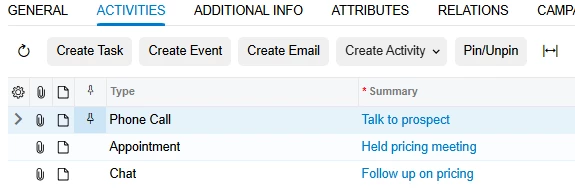
Posting again removes the pin on the first activity. How can I tell the API which activity I want it to act on? Am I structuring the parameters wrong? How do I even find out what parameters an action expects?

Best answer by MaheshLakum

Hi ​@PBSA 
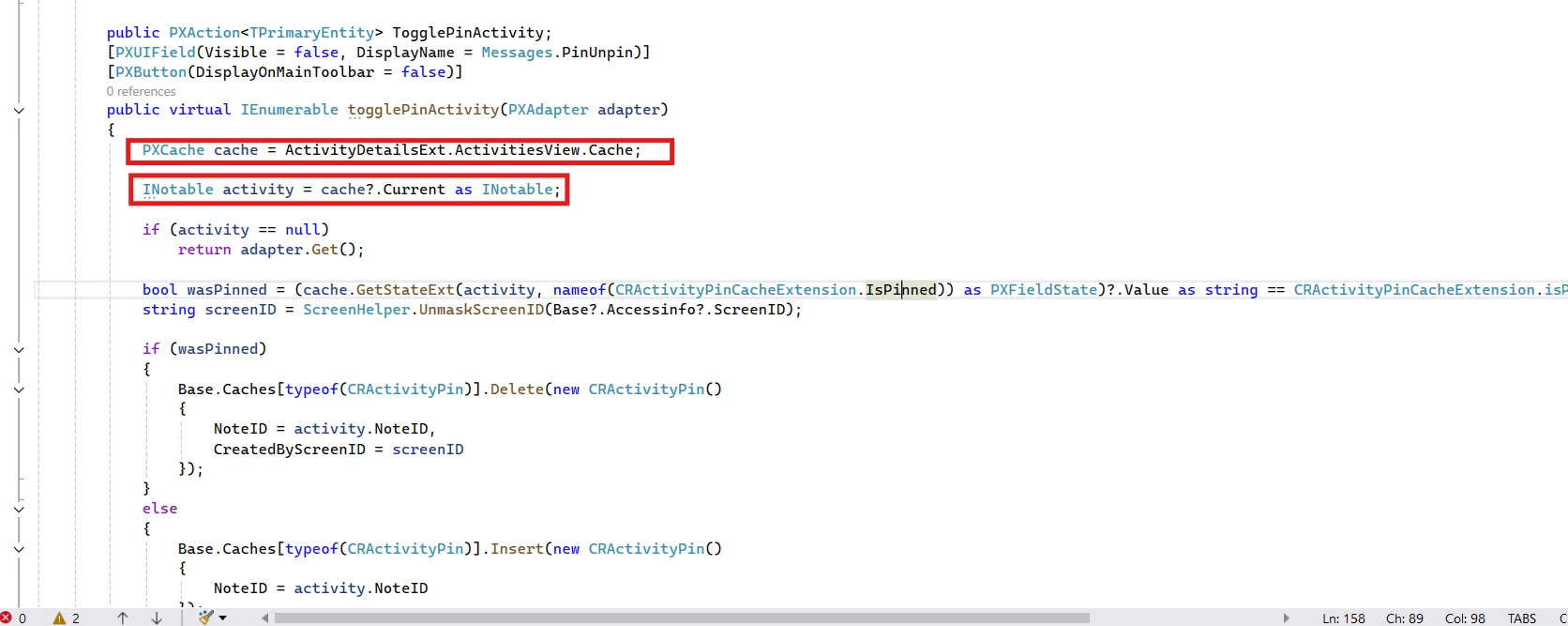
Based on the base code, togglePinActivity always operates on ActivitiesView.Cache.Current. The action does not read any parameters from the request and has no logic to locate an activity by NoteID. In the UI, this works because the selected row becomes Cache.Current. When called via REST, no row context exists, so Acumatica defaults Cache.Current to the first activity. As a result, the first activity is always pinned/unpinned and any NoteID passed in the request is ignored. This behavior is expected and there is no way to control which activity is pinned using this action through REST.


When an activity is pinned, a record is created in the CRActivityPin table, and this record is deleted when the activity is unpinned. Therefore, if we can perform the same operation directly through an API request instead of triggering togglePinActivity, we would be able to pin or unpin the desired activity. Hope this helps.


2 replies

  • Freshman II
  • Answer
  • January 26, 2026

Hi ​@PBSA 
Based on the base code, togglePinActivity always operates on ActivitiesView.Cache.Current. The action does not read any parameters from the request and has no logic to locate an activity by NoteID. In the UI, this works because the selected row becomes Cache.Current. When called via REST, no row context exists, so Acumatica defaults Cache.Current to the first activity. As a result, the first activity is always pinned/unpinned and any NoteID passed in the request is ignored. This behavior is expected and there is no way to control which activity is pinned using this action through REST.


When an activity is pinned, a record is created in the CRActivityPin table, and this record is deleted when the activity is unpinned. Therefore, if we can perform the same operation directly through an API request instead of triggering togglePinActivity, we would be able to pin or unpin the desired activity. Hope this helps.


Forum|alt.badge.img
  • Author
  • Jr Varsity III
  • January 26, 2026

@MaheshLakum Thank you for confirming and explaining. 

I made this customization to add an action for this to the Activity form instead:

using PX.Data;
using PX.Objects.CR;
using System;
using System.Collections;
using System.Linq;
using PX.Data.BQL.Fluent;
using PX.Common;

namespace PX.Objects.EP
{
public class CRActivityMaint_PinViaAPI : PXGraphExtension<CRActivityMaint>
{

public SelectFrom<CRActivityPin>.View ActivityPins;


// API-callable action
public PXAction<CRPMTimeActivity> TogglePinAPI;

[PXButton]
[PXUIField(DisplayName = "Toggle Pin (API)", Visible = true)]
public virtual IEnumerable togglePinAPI(PXAdapter adapter)
{
//PXTrace.WriteInformation("=== TogglePinViaAPI triggered ===");
var activity = Base.Activities.Current;
if (activity == null)
{
//PXTrace.WriteWarning("No current activity!");
yield break;
}

//PXTrace.WriteInformation($"Activity: NoteID={activity.NoteID}, RefNoteID={activity.RefNoteID}, ClassID={activity.ClassID}");

PXCache pinCache = Base.Caches<CRActivityPin>();

// Check current pin state
PXResultset<CRActivityPin> pins = PXSelect<CRActivityPin,
Where<CRActivityPin.noteID, Equal<Required<CRActivityPin.noteID>>>
>.Select(Base, activity.NoteID);

if (pins != null && pins.Count > 0)
{
foreach (CRActivityPin pin in pins){
//PXTrace.WriteInformation($"Deleting pin: {pin.NoteID}");
pinCache.Delete(pin);
}
Base.Actions.PressSave();
}
else
{
//PXTrace.WriteInformation("No pin found → Pinning");

// Pin
var bAccountPin = new CRActivityPin()
{
NoteID = activity.NoteID,
};
pinCache.GetExtension<CRActivityPinExt>(bAccountPin).TargetScreenID = "CR303000";

pinCache.Insert(bAccountPin);
Base.Actions.PressSave(); // have to save twice or the two pins will consolidate during audit field addition

var customerPin = new CRActivityPin()
{
NoteID = activity.NoteID,
};
pinCache.GetExtension<CRActivityPinExt>(customerPin).TargetScreenID = "AR303000";

pinCache.Insert(customerPin);
Base.Actions.PressSave(); // have to save twice or the two pins will consolidate during audit field addition

//PXTrace.WriteInformation($"CreatedByScreenID init: {customerPin.TargetScreenID}");
}

// Persist changes
//Base.Actions.PressSave();
//PXTrace.WriteInformation("=== TogglePinViaAPI finished ===");
yield return activity;
}


protected virtual void _(Events.RowPersisting<CRActivityPin> e)
{

if (e.Row == null || e.Operation.Command() != PXDBOperation.Insert)
return;

var cache = e.Cache;
var pin = (CRActivityPin)e.Row;
var ext = cache.GetExtension<CRActivityPinExt>(pin);

/*
PXTrace.WriteInformation(
$"[CRActivityPin Persist BEFORE] NoteID={pin.NoteID}, " +
$"CreatedByScreenID='{pin.CreatedByScreenID}', " +
$"GraphScreenID='{Base?.Accessinfo?.ScreenID}', " +
$"TargetScreenID(Ext)='{ext?.TargetScreenID}'"
);
*/

if (!string.IsNullOrEmpty(ext?.TargetScreenID))
{
cache.SetValue<CRActivityPin.createdByScreenID>(pin, ext.TargetScreenID);
PXTrace.WriteInformation($"[CRActivityPin Persist AFTER] Forced CreatedByScreenID='{pin.CreatedByScreenID}'");
}
else
{
PXTrace.WriteWarning("[CRActivityPin Persist] Missing TargetScreenID; leaving CreatedByScreenID as-is.");
}

}

}
}

This also required a DAC extension:

namespace PX.Objects.CR
{
public class CRActivityPinExt : PXCacheExtension<PX.Objects.CR.CRActivityPin>
{
#region TargetScreenID
// BQL field declaration – name MUST match the property exactly (case-sensitive)
public abstract class targetScreenID : PX.Data.BQL.BqlString.Field<targetScreenID> { }

// Unbound marker used only at runtime (not persisted)
[PXString(8, IsUnicode = false)]
[PXUnboundDefault] // optional; keeps the field in cache without DB binding
[PXUIField(DisplayName = "Target Screen ID", Visible = false, Enabled = false)]
public virtual string TargetScreenID { get; set; }
#endregion
}
}

My use-case is for pinning activities to Business Accounds and Customers rather than Leads.