Answer

OData4 With Generic Inquiry and DataTime parameters

  • June 11, 2025
  • 10 replies
  • 178 views

JKurtz29
Varsity II
Forum|alt.badge.img+1

What is the proper format for a DateTime parameter when using  OData against a GI that has parameters.

A simple sample would be getting a list of customers modified since a certain date / time, assuming parameter name is ModDate.

 

Parameters
Condition to apply parameter


ODataDateText_WithParameters(ModDate=2025-06-01) == 500 - Specified cast is not valid.

ODataDateText_WithParameters(ModDate='2025-06-01') == 404

ODataDateText_WithParameters(ModDate=2025-06-01T00:00:00Z) == 400 (problem with : )


I’ve tried other formatting techniques such as URL encoding the values, encoding the entire parameter string, even asked AI, but that just sent me in circles trying the same things over and over, getting the same results.

The only hack I’ve found is to have the parameter derive it’s type from a text field (such as Account Name), and then pass in the value as a string :

 

Mapping to a string schema field


ODataDateText_WithParameters(ModDate='2025-06-01') == works when parameter is mapped to a string field instead of a date field.

I feel like I shouldn’t be doing that as a workaround though.  Any thoughts as to what I may be missing when the field is mapped to date field?

Before you suggest it, no, I will not be able to use the $filter parameter.  My query looks at too many table’s modified dates.
Best answer by JKurtz29

Did you find a solution for this?  Also struggling with an ODATA feed that I can’t seem to get dates to work as filters or parameters.

In the GI, I set the Parameter’s schema field to a character / text field, and then when passing the data as a parameter, it’s formatted as DateGT=’1900-01-01’  (DataGT is the name of my parameter)

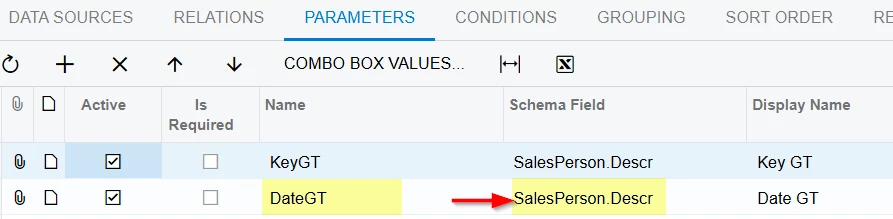
Here is one where I’m pulling in modified salespersons -- my DateGT parameter is pulling it’s schema field from SalesPerson.Descr so that it expects a text value.


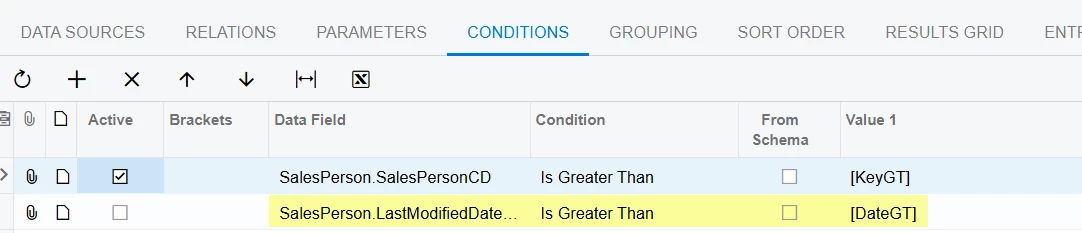
Here’s the Conditions tab showing how the parameter is applied (nothing special):


Calling with Postman with a GET (not a POST or PUT!):


PS:  Acumatica support confirmed the issue as a bug, so it may eventually get fixed.  For now, I am using this workaround in about 40 OData queries and it seems to work quite well.

10 replies

Forum|alt.badge.img+7
  • Captain II
  • June 12, 2025

According to the I300 docs you can use placeholders for complicated parameter values;

https://xyz/erp/t/U100/api/odata/gi/ DBStorageDetailsByItemWarehouseLocation_WithParameters(Warehouse=@1)?@1='WHOLESALE’

I wonder if you’re able to do that for dates with something like:

..._WithParameters(ModDate=@1)?@1=datetime'2024-08-23'


Forum|alt.badge.img+1
  • Jr Varsity II
  • June 12, 2025

Hi ​@JKurtz29 ,

Can you try by using below,

{  

    "Date": {

        "value": "2024-02-15T18:25:43.511Z"

    }

}

hope above helps!!


JKurtz29
Varsity II
Forum|alt.badge.img+1
  • Author
  • Varsity II
  • June 12, 2025

According to the I300 docs you can use placeholders for complicated parameter values;

https://xyz/erp/t/U100/api/odata/gi/ DBStorageDetailsByItemWarehouseLocation_WithParameters(Warehouse=@1)?@1='WHOLESALE’

I wonder if you’re able to do that for dates with something like:

..._WithParameters(ModDate=@1)?@1=datetime'2024-08-23'

No, that did not work.

I set the parameter back to a DateTime field and tried multiple variations for the parameter:
@1=datetime'2024-08-23'
@1=datetime('2024-08-23')

@1=Edm.Date('2024-08-23')

@1=Edm.DateTimeOffset('2024-08-23')


JKurtz29
Varsity II
Forum|alt.badge.img+1
  • Author
  • Varsity II
  • June 12, 2025

Hi ​@JKurtz29 ,

Can you try by using below,

{  

    "Date": {

        "value": "2024-02-15T18:25:43.511Z"

    }

}

hope above helps!!

Where would I put that?  The body?  The body isn’t sent to the server on a Get method.  Are you suggesting I switch to post or put?


Forum|alt.badge.img+1
  • Jr Varsity II
  • June 12, 2025

Hi ​@JKurtz29 ,

you can keep above Json request in body & make a put call

As I can see your parameter name is mod date so modify Json (date name) paramter accordingly


JKurtz29
Varsity II
Forum|alt.badge.img+1
  • Author
  • Varsity II
  • June 12, 2025

Hi ​@JKurtz29 ,

you can keep above Json request in body & make a put call

As I can see your parameter name is mod date so modify Json (date name) paramter accordingly

Did you try that?  I get a “405 Method Not Allowed” when I try to do a POST. 


Forum|alt.badge.img+1
  • Jr Varsity II
  • June 12, 2025

can you try by using PUT


JKurtz29
Varsity II
Forum|alt.badge.img+1
  • Author
  • Varsity II
  • June 12, 2025

can you try by using PUT

Of course I tried that, but I’ll try again and show you that it doesn’t work:

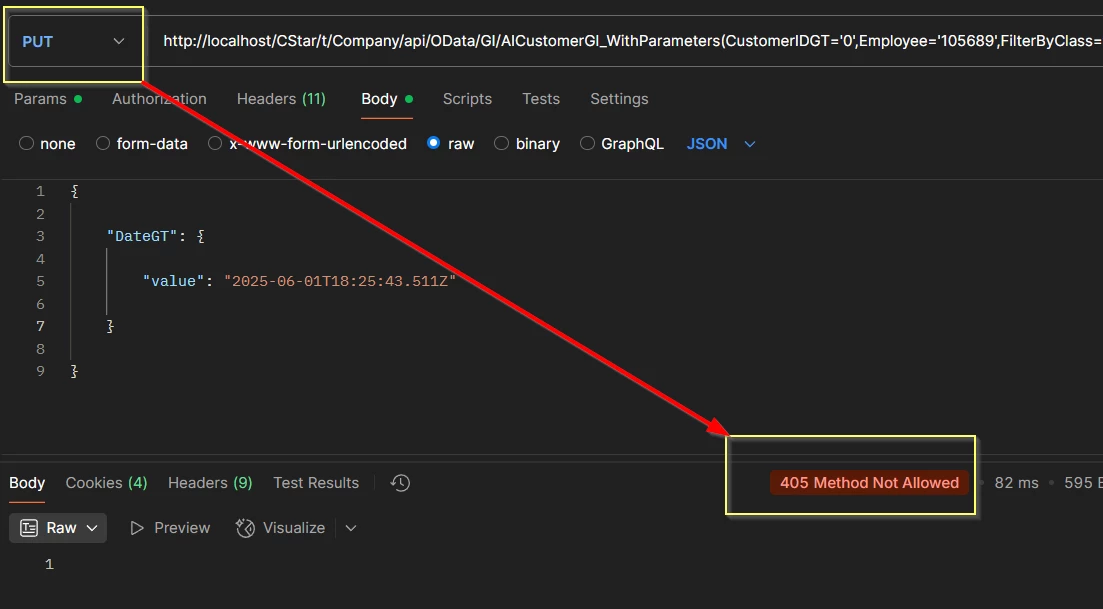
This is my real query, not the simple mock-up one from earlier.  My parameter name in this query is DateGT.  I’ve set the method to PUT, added the parameter in the body, and the result is a 405 error.


  • Freshman I
  • August 15, 2025

Did you find a solution for this?  Also struggling with an ODATA feed that I can’t seem to get dates to work as filters or parameters.


JKurtz29
Varsity II
Forum|alt.badge.img+1
  • Author
  • Varsity II
  • Answer
  • August 15, 2025

Did you find a solution for this?  Also struggling with an ODATA feed that I can’t seem to get dates to work as filters or parameters.

In the GI, I set the Parameter’s schema field to a character / text field, and then when passing the data as a parameter, it’s formatted as DateGT=’1900-01-01’  (DataGT is the name of my parameter)

Here is one where I’m pulling in modified salespersons -- my DateGT parameter is pulling it’s schema field from SalesPerson.Descr so that it expects a text value.


Here’s the Conditions tab showing how the parameter is applied (nothing special):


Calling with Postman with a GET (not a POST or PUT!):


PS:  Acumatica support confirmed the issue as a bug, so it may eventually get fixed.  For now, I am using this workaround in about 40 OData queries and it seems to work quite well.