Answer

Login error in API.

  • June 25, 2024
  • 9 replies
  • 329 views

Forum|alt.badge.img+3

Hi, All I am trying to put notes on every customer. My login is successful but when I am trying to call put api through another script of python, its says you are not login in. I have attach my login code below. I have attach cookie in put request header but still it shows error. Any idea on this please.


Thanks


def login_to_acumatica():

    # API endpoint
    url = "http://my-company/AcumaticaSB/entity/Auth/login"
    json_data = ({
        "name": "ta",
        "password": "Db}",
        "tenat": "Store",
        "branch": "",
        "locale": ""
        })

    try:
        # Send POST request with JSON body
        response = requests.post(url,  json=json_data)
        import re
        # Check if the request was successful
        if response.status_code == 204:
            print("Login successful.")
            print("Response:")
            cookie = response.cookies
  
            return cookie
        else:
            print("Login failed with status code:", response.status_code)
    except Exception as e:
        print("An error occurred:", e)

Best answer by tahayabali

Yes. Already solved this error. Session in request library works fine. I have included the whole session.put(url, payload)

9 replies

Dmitrii Naumov
Acumatica Moderator
Forum|alt.badge.img+7
  • Acumatica Moderator
  • June 25, 2024

@tahayabali  could you also share the code that you use to put the note? 

Please check that you use the cookie that you receive from the login request.


Forum|alt.badge.img+3
  • Author
  • Captain I
  • June 25, 2024

Sure below is my code for putting note. DO i need to return ASP session id only or the complete cookie in the header request?

“”

    def write_note_to_cusomter(customer_id, tax_id, login):
        """
        write a note on customer if sales id is valud or invalid
        """        
        
       
        url = "http:/my company/AcumaticaSB/entity/Default/22.200.001/Customer?$filter=CustomerID eq '{customer_id}'"

        # Define the payload data
        payload = {
            "custom": {
                "BAccount": {
                    "NotePopupText": {
                        "type": "CustomStringField",
                        "value":f"This customer have invalid Certificate. Tax ID:{tax_id}"
                    }
                }
            }
        }

        headers = {
        'If-None-Match': '*',
        'Content-Type': 'application/json',
        'Cookie':login
        }
        response = requests.put( url, headers ,json=payload)


        if response.status_code == 200:
            print("Data successfully updated.")
            
        else:
            print("Error in putting note")””


Forum|alt.badge.img+3
  • Author
  • Captain I
  • June 25, 2024

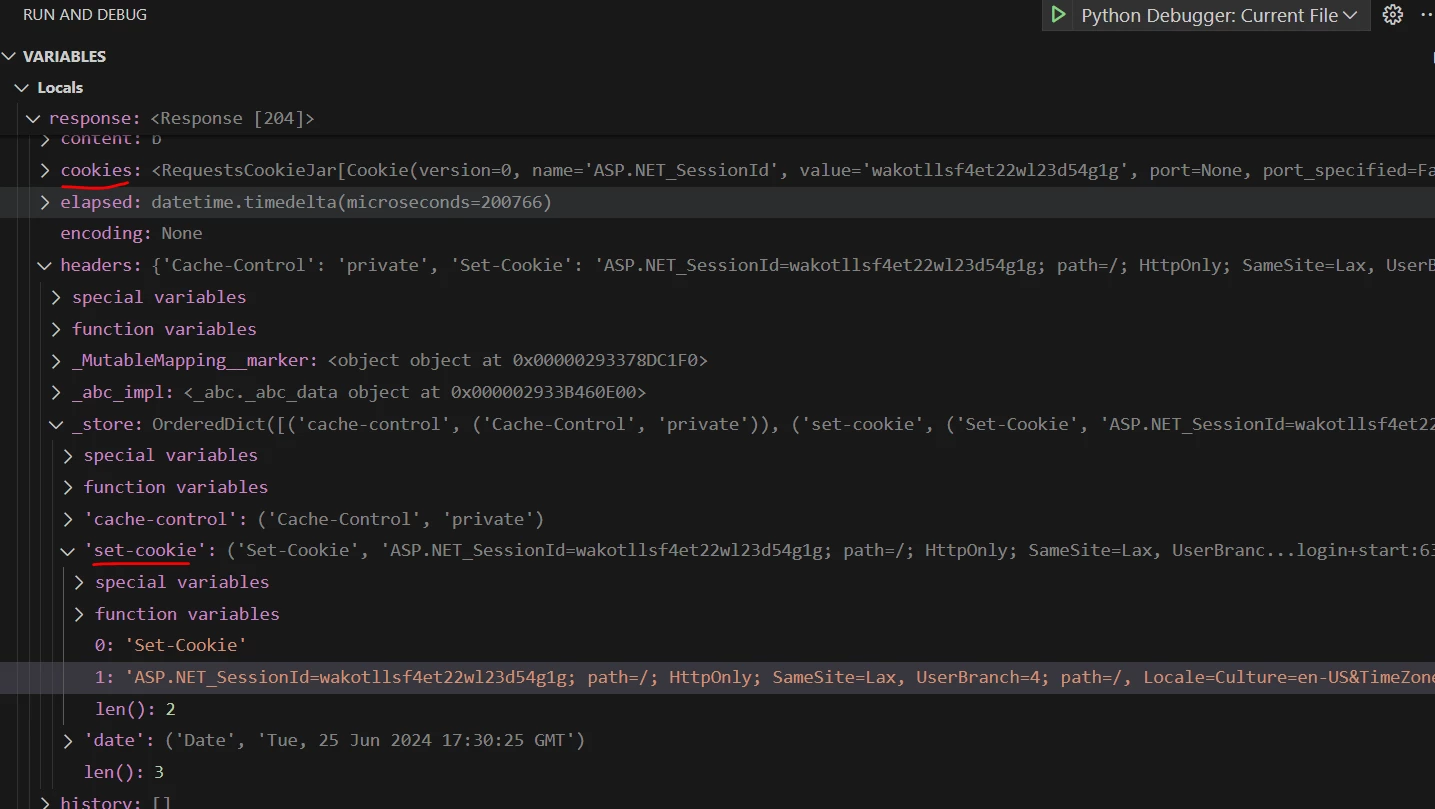
@Dmitrii Naumov which cookie i need to return? Look image below. I am using separate files one is to login and one to call the put api


Dmitrii Naumov
Acumatica Moderator
Forum|alt.badge.img+7
  • Acumatica Moderator
  • June 25, 2024

The ASP.NET_SessionId cookie needs to be sent with the Put request.


It’s better to set all of them though. There are some additional ones, e.g Locale


Forum|alt.badge.img+3
  • Author
  • Captain I
  • June 25, 2024

I tried just with ASP.Net sessiond cookie but it failed So now I am trying with the whole like locale, APXAUth and others.


Forum|alt.badge.img+3
  • Author
  • Captain I
  • June 25, 2024

I have added thse ['.ASPXAUTH', 'ASP.NET_SessionId', 'Locale', 'UserBranch', 'requestid', 'requeststat']

but still the same problem. In Post man it works fine but in script it is raising login error, 


Forum|alt.badge.img+1
  • Varsity I
  • June 27, 2024

Here is my code that logs in and Gets all customers. and Logs out.  Use Sessions. Much Easier

import requests
import json

# Acumatica API base URL
base_url = 'https://your_site.acumatica.com/entity'

# Credentials
username = ''
password = ''


# Create a session
session = requests.Session()
try:
# Authenticate
login_url = base_url + '/auth/login'
print(login_url)
response = session.post(login_url, json={'name': username, 'password': password, "tenant": "your_tennant", "branch": ""})

# Check if authentication was successful
if response.status_code == 204:
print("Authentication successful")

# Example GET request to retrieve data
get_url = base_url + "/Default/23.200.001/Customer"
payload = {

}


# Attempt to retrieve data
try:
response = session.get(get_url)
print(response.text)

except Exception as e:
print("An error occurred while retrieving data:", str(e))
else:
print("Authentication failed:", response.status_code)
except Exception as e:
print("An error occurred during authentication:", str(e))
finally:
# Logout
logout_url = base_url + '/auth/logout'
session.post(logout_url)
print("Logged out")


Forum|alt.badge.img+3
  • Author
  • Captain I
  • Answer
  • June 27, 2024

Yes. Already solved this error. Session in request library works fine. I have included the whole session.put(url, payload)


Forum|alt.badge.img+3
  • Author
  • Captain I
  • June 27, 2024

def login_to_acumatica():


    # API endpoint

    url = "http://mycompany/AcumaticaSB/entity/Auth/login"

    json_data = ({

        "name": "your_username",

        "password": "your_pass",

        "tenat": “Your tenat",

        "branch": "",

        "locale": ""

        })


    try:

        # Send POST request with JSON body

        session = requests.Session()


        response = session.post(url,  json=json_data)

        print(session.cookies.get_dict())


        import re

        # Check if the request was successful

        if response.status_code == 204:

            print("Login successful.")

            print("Response:")

        return session

    except Exception as e:

        print("An error occurred:", e)