Solved

Integration - Distribution has Negative Amounts

  • December 17, 2021
  • 6 replies
  • 168 views

Forum|alt.badge.img

Does anyone have an equation that can turn a negative to a positive amount in integrations. Our client integrates several thousand transactions and a handful (maybe a hundred) sometimes have a negative amount in the Debit and Credit field. This is happening because of how they are entered in the originating system. I have tried a few equations but keep getting errors.


=IIf( [Debit Amount]>0, [Debit Amount], [Debit Amount]*-1)

  • Cannot perform the ‘*’ Operation on System.String and System.Int32. 
    • I have tried double and decimal formats and still get this error.

=ABS([Credit Amount])

  • An error has occurred while the Abs(Identifier(Debit Amount)) function was being executed: ‘Type mismatch in the argument 1 of the Abs() function: Expected on of the Integer types.’
    • I have tried the Int32, double, and string types. 
  • I use this in excel. Not sure if the function actually works in Acumatica but thought I’d give it a try. 

Best answer by ChandraM

Hi @rebeckamckinney53  If your are referring to the import Scenario integrations, try the below:

=IIf( CDBL([Debit Amount])>0, CDBL([Debit Amount]), CDBL([Debit Amount])*-1.00)

6 replies

Forum|alt.badge.img+8
  • Semi-Pro I
  • December 17, 2021

Hi @rebeckamckinney53 To which screen are you integrating the data? is it the Journal Transactions Screen?

If it is a negative debit amount, then it is actually it is positive credit amount. Similarly, a negative Credit is a positive debit.


Forum|alt.badge.img+8
  • Semi-Pro I
  • December 17, 2021

Hi @rebeckamckinney53 What is the language being used in the integration? If the changing credit to debit and debit to credit for negative values does not help, please provide more details on your integrations code.


Forum|alt.badge.img+8
  • Semi-Pro I
  • Answer
  • December 17, 2021

Hi @rebeckamckinney53  If your are referring to the import Scenario integrations, try the below:

=IIf( CDBL([Debit Amount])>0, CDBL([Debit Amount]), CDBL([Debit Amount])*-1.00)


Forum|alt.badge.img

Hi @rebeckamckinney53  If your are referring to the import Scenario integrations, try the below:

=IIf( CDBL([Debit Amount])>0, CDBL([Debit Amount]), CDBL([Debit Amount])*-1.00)


This was it! Sorry I didn’t respond last week. I got caught up in a few emergencies and didn’t see the replies until today. i spent the morning testing and getting everything else resolved. I appreciate all of you input!


Forum|alt.badge.img
  • Jr Varsity II
  • January 22, 2026

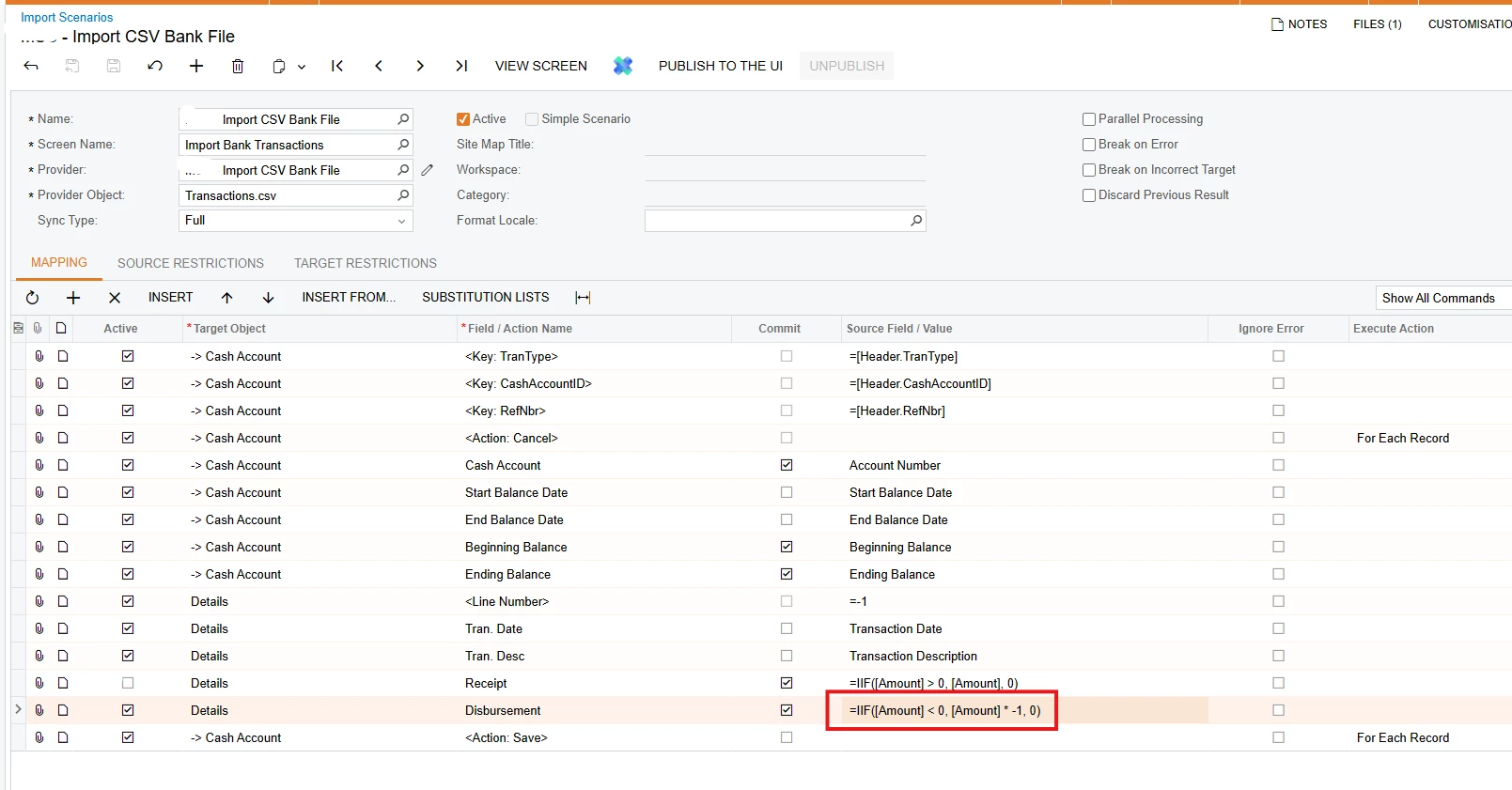
Hi ​@ChandraM - I am getting the same errors as the rebecka in this post. I’ve tried your formula, but it still doesn’t work for me. I am trying to create an import scenario to upload import bank transactions via csv file. The csv file has an amount column with a negative value and I want it to get imported in Disbursement column in Import Bank Transactions screen


This is the csv file
Condition statement in my import scenario which doesn’t work. Tried your formula, doesn’t work either


Forum|alt.badge.img

Hey ​@MarkD 

I went and looked at the integration that I wrote. My equation looks like this:
=IIf( CDBL([Debit Amount])>0, CDBL([Debit Amount]), CDBL([Debit Amount])*-1.00)