Answer

How can we update a custom field on the Issues screen using API calls without mapping the field in the Web Service Endpoint.

  • August 28, 2025
  • 8 replies
  • 117 views

Hi Team,
We have a requirement to create Issues(IN302000) via API calls and insert line details along with a custom field, but without mapping the custom field in the Web Service Endpoint. Currently, when we use a PUT request, the Issue is created with the line details, but the custom field is not being inserted. Could you please review this and suggest the best possible approach to achieve it.
For your reference, we’ve attached the package and the Postman request.
http://localhost/NAWEndpoints25.101.0153/(W(7))/entity/Default/24.200.001/InventoryIssue?$expand=Details

{

    "Details": [

        {

            "InventoryID": {

                "value": "AACOMPUT01"

            },

            "WarehouseID": {

                "value": "WHOLESALE"

            },

            "Location": {

                "value": "R1S1"

            },

            "Qty": {

                "value": 1.000000

            },

            "UOM": {

                "value": "EA"

            },

           "custom": {

                "Transactions": {

                    "UsrCWQty": {

                        "type": "CustomDecimalField",

                        "value": 19.00000

                    }

                }

            }

        }

    ],

    "Hold": {

        "value": true

    }

}

Best answer by Django

It looks like you can access fields that aren’t in the endpoint. I’m not a fan of that but the REST Api examples I have show updating un-exposed fields.

I see that the SOOrderEntry graph has a view called Transactions. 

 "custom": {
"Transactions": {
"UsrCWQty": {
"type": "CustomDecimalField",
"value": 19.00000
}
}
}

But the INIssueEntry.cs graph detail lines are exposed by a view called transactions. (No capital T).

Can you try changing the case in your JSon and try again? (I’ve no idea if this will make a difference.)

 "custom": {
"transactions": {
"UsrCWQty": {
"type": "CustomDecimalField",
"value": 19.00000
}
}
}


8 replies

Forum|alt.badge.img+7
  • Captain II
  • August 28, 2025

Why have you been asked not to add the field to the end points? 


  • Author
  • Freshman I
  • August 28, 2025

Without mapping the custom field in the Web Service Endpoint, the approach works as expected in the Sales Order screen. They are requesting the same functionality for the Issues screen.


jinin
Pro I
Forum|alt.badge.img+11
  • Pro I
  • August 28, 2025

Hi ​@SanthoshB09,
 

Could you please explain how you are retrieving data through the endpoint without adding the custom field to the endpoint?

If the field was added via Customization → Manage User-Defined Fields, then yes, UDFs are automatically exposed in the API under the custom object for the entity or line item.


However, if the field was added via a DAC extension, you must explicitly add it to the endpoint before it can be used.


  • Author
  • Freshman I
  • August 28, 2025

Hi ​@jinin,
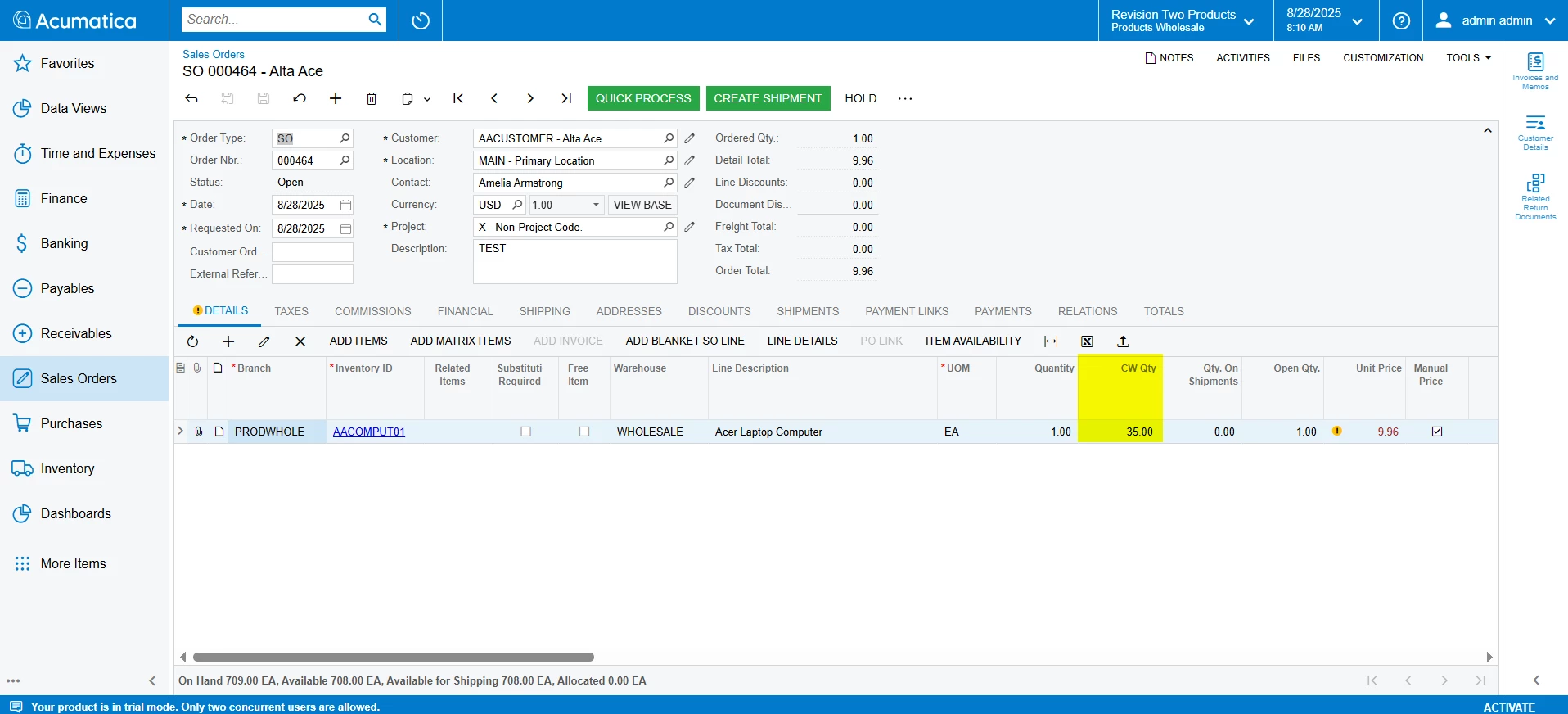
Thank you for your response. I’ve added the same custom field to the Sales Order screen, and when inserting the record through Postman, it worked as expected. Please find the screenshot attached for your reference.


And here is the Postman request:

http://localhost/NAWEndpoints25.101.0153/(W(7))/entity/Default/24.200.001/SalesOrder?$expand=Details
 

{

    "CustomerID": {

        "value": "AACUSTOMER"

    },

    "LocationID": {

        "value": "MAIN"

    },

    "Description": {

        "value": "TEST"

    },

    "OrderType": {

        "value": "SO"

    },

    "Details": [

        {

            "InventoryID": {

                "value": "AACOMPUT01"

            },

            "OrderQty": {

                "value": 1.00

            },

            "UnitPrice": {

                "value": 9.96

            },

            "UOM": {

                "value": "EA"

            },

            "custom": {

                "Transactions": {

                    "UsrCWQty": {

                        "type": "CustomDecimalField",

                        "value": 35.00000

                    }

                }

            }

        }

    ],

    "Status": {}

}

I tried the same approach on the Issues screen with the line details, but the custom field is not getting inserted. Could you please review this and suggest the best possible approach to achieve it.


Forum|alt.badge.img+7
  • Captain II
  • Answer
  • August 28, 2025

It looks like you can access fields that aren’t in the endpoint. I’m not a fan of that but the REST Api examples I have show updating un-exposed fields.

I see that the SOOrderEntry graph has a view called Transactions. 

 "custom": {
"Transactions": {
"UsrCWQty": {
"type": "CustomDecimalField",
"value": 19.00000
}
}
}

But the INIssueEntry.cs graph detail lines are exposed by a view called transactions. (No capital T).

Can you try changing the case in your JSon and try again? (I’ve no idea if this will make a difference.)

 "custom": {
"transactions": {
"UsrCWQty": {
"type": "CustomDecimalField",
"value": 19.00000
}
}
}


Dmitrii Naumov
Acumatica Moderator
Forum|alt.badge.img+7
  • Acumatica Moderator
  • August 28, 2025

@jinin  this statement is not correct. From the API point of view there is no difference between a field added via UDF and a custom field. The field should be available via “custom” either way

Hi ​@SanthoshB09,
 

Could you please explain how you are retrieving data through the endpoint without adding the custom field to the endpoint?

If the field was added via Customization → Manage User-Defined Fields, then yes, UDFs are automatically exposed in the API under the custom object for the entity or line item.


However, if the field was added via a DAC extension, you must explicitly add it to the endpoint before it can be used.


jinin
Pro I
Forum|alt.badge.img+11
  • Pro I
  • August 28, 2025

@jinin  this statement is not correct. From the API point of view there is no difference between a field added via UDF and a custom field. The field should be available via “custom” either way

Hi ​@SanthoshB09,
 

Could you please explain how you are retrieving data through the endpoint without adding the custom field to the endpoint?

If the field was added via Customization → Manage User-Defined Fields, then yes, UDFs are automatically exposed in the API under the custom object for the entity or line item.


However, if the field was added via a DAC extension, you must explicitly add it to the endpoint before it can be used.


Noted. Thanks for the info ​@Dmitrii Naumov 


  • Author
  • Freshman I
  • August 29, 2025

Hi ​@Django,
Thank you for your response. It’s now working as expected.