

Answer

Hitting API login limit despite logging out with each call

  • December 3, 2025
  • 1 reply
  • 36 views

We have a home brewed web app that handles some of our system's more unique and customized functions, and it needs to make various API calls, especially to the SalesOrder endpoint.
We have a push notification setup to send a notice whenever a line changes on SOLine and that sends to the web app, which then makes an API call to grab order information to update the order in its system. For each call it logs in, does its thing, and logs out. We started getting the error "Sign-in limit exceeded LoginLimit:50", and at first couldn't figure out what was going on - we thought potentially we were getting so many calls that it was logging in 10 times in a row and hitting the user limit before the previous run had finished and queuing in more than 10 logins at once. Here is the flow:
    
  1. Web app gets an 'OrderChanges' Push Notification from Acumatica (We have set this up so we can track various changes and then update the shipping message in our eCommerce platform).
  2. Because we need the full order information to update the e-commerce tie, the web app has to reach out to the Acumatica Order API for order data for each Push Notification.
  3. Because there are issues with logins silently expiring, we have set the web app to login and logout for each API request. We used to try and use persistent logins, but found it wasn't reliable.
  4. Therefore, when we get several order changes at once, these API logins can accrue quickly and crash into each other before logging out and end up hitting the API limit (at least this is a theory). Especially since there are other API calls that may be happening at the same time from other applications or other functionalities in web app.
 
We had a few ideas about how to modify the functionality and behavior in the web app to make it work more efficiently and run without error (while staying fast), but I'm curious what the best practice answer might be here, and whether there is a better login/logout system? 
We were thinking about the following, but some of these will be a lot of work, so I wanted to get some other opinions before we dove in: 
  • Batch Queue – Store push-notification data and process it every few minutes to reduce simultaneous API logins.
  • Reuse Logins – Implement a shared/persistent login-management system to avoid logging in/out on every request (complex to maintain).
  • Scheduled GI Pull – Remove push notifications and instead expand a Generic Inquiry for the web app to poll periodically, though detecting changes may be difficult and the GI could become large.
  • Include More Data in Push Notification – Try to send all needed order/line data directly in the push event, though this is likely not feasible for line-level details

Best answer by paulgilfoy13

Hey ​@cnorten

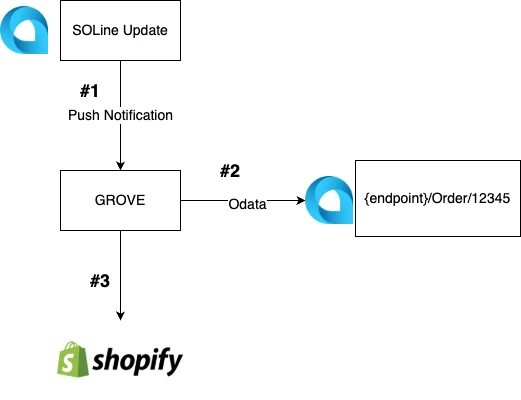
Please excuse my rudimentary drawing 🙂


Based off of the description, a batch queue makes sense. 

I would highly recommend gathering more data. 

  1. Use the licensed monitoring console (SM604000) and 

  2. Use the Request Profiler (SM205070) with a filter on the GROVE_API user.


Using the Request Profiler you will have definitive proof that GROVE_API was trying to login with multiple sessions. 

While you are using the request profiler, it's worth investigating if your GROVE_API is trying to make multiple requests at the same time. A batch queue can solve for this.


That being said, I have not noticed a persistent login management problem. I primarily use python for API workflows. In the requests library (the python library that deals with API requests) there is an ability to have a "session" object that will keep my login managed throughout all the "work" I do via the API. I know that C# and JavaScript have similar "session" objects in their request's libraries. I'd recommend looking into that. 


I'd also recommend using OData for any GET requests in Acumatica. It ends up being faster and cheaper (Odata requests don't count towards your transaction limits).


I hope this is helpful. 


One more thought regarding batch queues -

I just built one using Celery and Redis. It seems super complex. But once you build your 1st , it is straight forward. Let me know if you’d like some help and I’ll send some youtube tutorials I liked. 


I still recommend logging in / out with every "unit of work" (or however we classify our work). Acumatica will silently throttle API requests if too many users are doing transactions - occasionally those "throttling" will result in lost requests. That is where having a mini batch system can be useful. 


Thanks,
​​​​​​​Paul

1 reply

paulgilfoy13
Freshman II
  • Freshman II
  • Answer
  • December 3, 2025

Hey ​@cnorten

Please excuse my rudimentary drawing 🙂


Based off of the description, a batch queue makes sense. 

I would highly recommend gathering more data. 

  1. Use the licensed monitoring console (SM604000) and 

  2. Use the Request Profiler (SM205070) with a filter on the GROVE_API user.


Using the Request Profiler you will have definitive proof that GROVE_API was trying to login with multiple sessions. 

While you are using the request profiler, it's worth investigating if your GROVE_API is trying to make multiple requests at the same time. A batch queue can solve for this.


That being said, I have not noticed a persistent login management problem. I primarily use python for API workflows. In the requests library (the python library that deals with API requests) there is an ability to have a "session" object that will keep my login managed throughout all the "work" I do via the API. I know that C# and JavaScript have similar "session" objects in their request's libraries. I'd recommend looking into that. 


I'd also recommend using OData for any GET requests in Acumatica. It ends up being faster and cheaper (Odata requests don't count towards your transaction limits).


I hope this is helpful. 


One more thought regarding batch queues -

I just built one using Celery and Redis. It seems super complex. But once you build your 1st , it is straight forward. Let me know if you’d like some help and I’ll send some youtube tutorials I liked. 


I still recommend logging in / out with every "unit of work" (or however we classify our work). Acumatica will silently throttle API requests if too many users are doing transactions - occasionally those "throttling" will result in lost requests. That is where having a mini batch system can be useful. 


Thanks,
​​​​​​​Paul
