



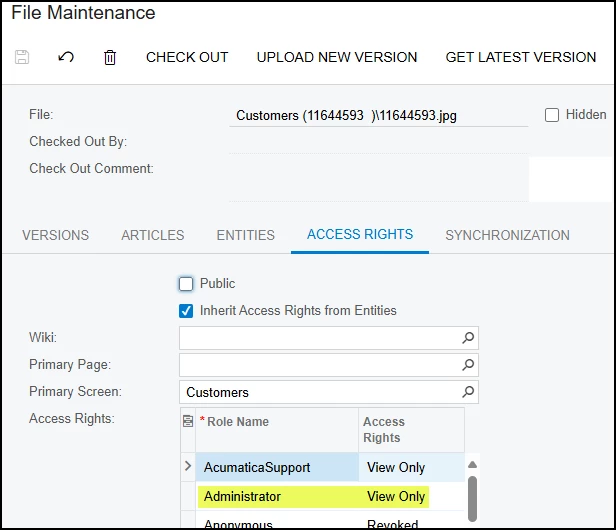
I set up a Powershell script to load images to customer accounts from a folder. This is a process that will happen once per year. I would prefer to replace the file with the same name rather than create a new version of the file on subsequent uploads, but Acumatica does not support replacement via the PUT command. I added a delete operation for each file beforehand, but the operation always fails with a 500 internal server error. I have the Admin role, but I believe the failure is security related based on the message “Operation is not valid due to the current state of the object” from testing the same operation in Postman and after reviewing the Access Rights tab under File Maintenance.
Whether I upload a file via the Customer screen or via the REST API, file maintenance shows ‘View only’ as the access right, but I can delete the file via the screen from the customer account without any issues. Where would the “View only” right be inherited from and why does it seemingly only apply to the API operation? If I look at the Admin role under Customer, I don’t see much, just the standard setting for Generic Inquiry Export. Thanks.
For refence, the script snippet is as follows:
# Delete existing file before upload
$deleteUrl = "$baseEntity/Customer/$customerId/files/$fileName"
try {
    Invoke-WebRequest -Uri $deleteUrl `
        -Method Delete `
        -WebSession $session
    Write-Host "Deleted existing file $fileName for Customer $customerId"
} catch {
    $response = $_.Exception.Response
    if ($response -ne $null) {
        $statusCode = $response.StatusCode.value__
        Write-Host "Delete failed for $fileName with status code $statusCode - $($_.Exception.Message)"
    } else {
        Write-Host "Delete failed for $fileName - $($_.Exception.Message)"
    }
}