Solved

Calling and assign values to Acumatica form using 3rd party REST API

  • September 29, 2023
  • 12 replies
  • 257 views

Forum|alt.badge.img

Hi Team,

Can someone help me out to configure the 3rd party REST API to Acumatica and display it’s data on the custom screen? 

Best answer by praveenpo

@bhagyat25,

for first issue with the latest RestSharp we dont need this you can directly use the Rest Client.

for second issue you can change from Get to GET that will solve your issue.

12 replies

jinin
Pro I
Forum|alt.badge.img+11
  • Pro I
  • September 29, 2023

Hi @bhagyat25 

You can create a configuration screen with the necessary fields required to interact with the API calls for the 3rd-party (destination) system. You can create a custom screen according to your needs and use the API call to retrieve data from the destination system.

Sample screenshot of the configuration screen.


Forum|alt.badge.img
  • Author
  • Jr Varsity II
  • October 2, 2023

Hi @bhagyat25 

You can create a configuration screen with the necessary fields required to interact with the API calls for the 3rd-party (destination) system. You can create a custom screen according to your needs and use the API call to retrieve data from the destination system.

Sample screenshot of the configuration screen.


Hi @jinin ,

I need graph code sample, how to call the API and how to catch the API results and assign values into the controls. Can you help me out?

Thanks


praveenpo
Semi-Pro III
Forum|alt.badge.img+3
  • Semi-Pro III
  • October 2, 2023

Hi @bhagyat25,

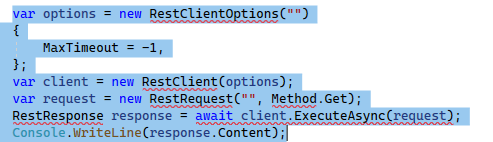
Here is the sample code calling a REST API call.

var options = new RestClientOptions("<Your Base API Url here>")
{
  MaxTimeout = -1,
};
var client = new RestClient(options);
var request = new RestRequest("/v1/DistributionCenters", Method.Get);
request.AddHeader("Authorization""Bearer <Bearrer Token>");
RestResponse response = await client.ExecuteAsync(request);
Console.WriteLine(response.Content);
 

response.Content will contain the response. Based on the response you can Derserialize the response and use based on your requirement.

Hop this is Helpful.


Forum|alt.badge.img
  • Author
  • Jr Varsity II
  • October 2, 2023

Hi @praveenpo ,

Thanks for your response, But showing errors, No namespaces to add. Can you help me out?


praveenpo
Semi-Pro III
Forum|alt.badge.img+3
  • Semi-Pro III
  • October 2, 2023

You have to use the RestSharp dll and as reference.


Forum|alt.badge.img
  • Author
  • Jr Varsity II
  • October 2, 2023

Is that Nuget one?


praveenpo
Semi-Pro III
Forum|alt.badge.img+3
  • Semi-Pro III
  • October 2, 2023

RestSharp dll will be available in the bin folder for the website. You can add that to your solution.


Forum|alt.badge.img
  • Author
  • Jr Varsity II
  • October 2, 2023

Thanks got it


Forum|alt.badge.img
  • Author
  • Jr Varsity II
  • October 2, 2023

Hi @praveenpo ,

Still I got this error.


praveenpo
Semi-Pro III
Forum|alt.badge.img+3
  • Semi-Pro III
  • October 2, 2023

You can paste the error here, so that i can get some information to suggest


Forum|alt.badge.img
  • Author
  • Jr Varsity II
  • October 2, 2023

I already added RestSharp.dll from the bin folder


praveenpo
Semi-Pro III
Forum|alt.badge.img+3
  • Semi-Pro III
  • Answer
  • October 3, 2023

@bhagyat25,

for first issue with the latest RestSharp we dont need this you can directly use the Rest Client.

for second issue you can change from Get to GET that will solve your issue.