Question

Workflow condition won't appear

  • December 17, 2024
  • 5 replies
  • 70 views

Forum|alt.badge.img+7

I’m been trying to add a condition to the workflow of SOShipmentEntry (SO302000) so that it will make other parts of the workflow easier to configure. My code compiles but the condition doesn’t appear within the editor.

I’m guessing that I have a parameter incorrect. I’ve leaned heavily on this post but to no avail.

Can anyone see something obvious?

using PX.Data;
using PX.Data.WorkflowAPI;
using PX.Objects.SO;
using static PX.Data.WorkflowAPI.BoundedTo<PX.Objects.SO.SOShipmentEntry, PX.Objects.SO.SOShipment>;
using PX.Data.BQL;

namespace CustomerOEMods.Workflow
{
public class SOShipmentEntryWorkFlowExt : PXGraphExtension<PX.Objects.SO.SOShipmentEntry_Workflow, SOShipmentEntry_Extension, SOShipmentEntry>
{

public class shipViaPickup : BqlString.Constant<shipViaPickup> { public shipViaPickup() : base("PICKUP") { } }

#region Conditions

public class Conditions : Condition.Pack
{
public Condition IsCustomerPICKUPOrder =>
GetOrCreate(b => b.FromBql<
SOShipment.shipVia.IsEqual<shipViaPickup>>
());
}
#endregion


public override void Configure(PXScreenConfiguration config) => Configure(config.GetScreenConfigurationContext<SOShipmentEntry, SOShipment>());
public virtual void Configure(WorkflowContext<SOShipmentEntry, SOShipment> context)
{
var conditions = context.Conditions.GetPack<SOShipmentEntryWorkFlowExt.Conditions>();
var baseConditions = context.Conditions.GetPack<PX.Objects.SO.SOShipmentEntry_Workflow.Conditions>();

}
}

}

 

5 replies

Forum|alt.badge.img+8
  • Captain II
  • December 17, 2024

HI ​@Django 

You could try this:

public Condition IsCustomerPICKUPOrder => 
GetOrCreate(b => b.FromBql<Where<
SOShipment.shipVia.IsEqual<shipViaPickup>>>
());

I’ve added a where to it, its the difference between your condition which doesn’t show up and mine which does show up.

These are mine:

 public class Conditions : Condition.Pack
{
public Condition CreditViolated => GetOrCreate(b =>
b.FromBql<Where<SOShipmentCreditHold.usrCreditHold.IsEqual<True>>>());
}


Forum|alt.badge.img+7
  • Author
  • Captain II
  • December 17, 2024

Hi ​@aiwan,

Thank you for the assistance. I added in the missing Where but my condition doesn’t appear.

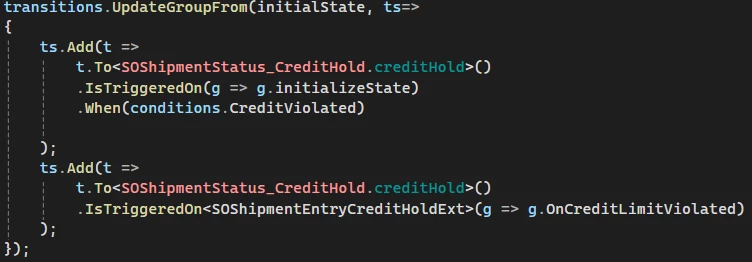
Do you use your condition in any code within your workflow extension? I’m wondering if the condition will only appear if it is being used and that I cannot just add a condition?

@Keith Richardson - sorry to ping you - do you see anything wrong in this code to add a condition to the Shipment Entry workflow?

using PX.Data;
using PX.Data.WorkflowAPI;
using PX.Objects.SO;
using static PX.Data.WorkflowAPI.BoundedTo<PX.Objects.SO.SOShipmentEntry, PX.Objects.SO.SOShipment>;
using PX.Data.BQL;

namespace CustomerOEMods
{
public class SOShipmentEntryWorkFlowExt : PXGraphExtension<PX.Objects.SO.SOShipmentEntry_Workflow, SOShipmentEntry_Extension, SOShipmentEntry>
{

public class shipViaPickup : BqlString.Constant<shipViaPickup> { public shipViaPickup() : base("PICKUP") { } }

#region Conditions
public class Conditions : Condition.Pack
{
public Condition IsAPICKUPOrder => GetOrCreate(b =>
b.FromBql<Where<SOShipment.shipVia.IsEqual<shipViaPickup>>>());
}
#endregion

public override void Configure(PXScreenConfiguration config) => Configure(config.GetScreenConfigurationContext<SOShipmentEntry, SOShipment>());
public virtual void Configure(WorkflowContext<SOShipmentEntry, SOShipment> context)
{
var conditions = context.Conditions.GetPack<SOShipmentEntryWorkFlowExt.Conditions>();

}
}

}


Forum|alt.badge.img+8
  • Captain II
  • January 7, 2025

Hi ​@Django 


Yes, I do use this within the extension.


Chris Hackett
Community Manager
Forum|alt.badge.img
  • Acumatica Community Manager
  • April 24, 2025

Hi ​@Django were you able to find a solution? Thank you!


Forum|alt.badge.img+7
  • Author
  • Captain II
  • April 25, 2025

@Chris Hackett - Unfortunately, no. I’ve been doing the T270 course so I’ll probably figure it out soon.