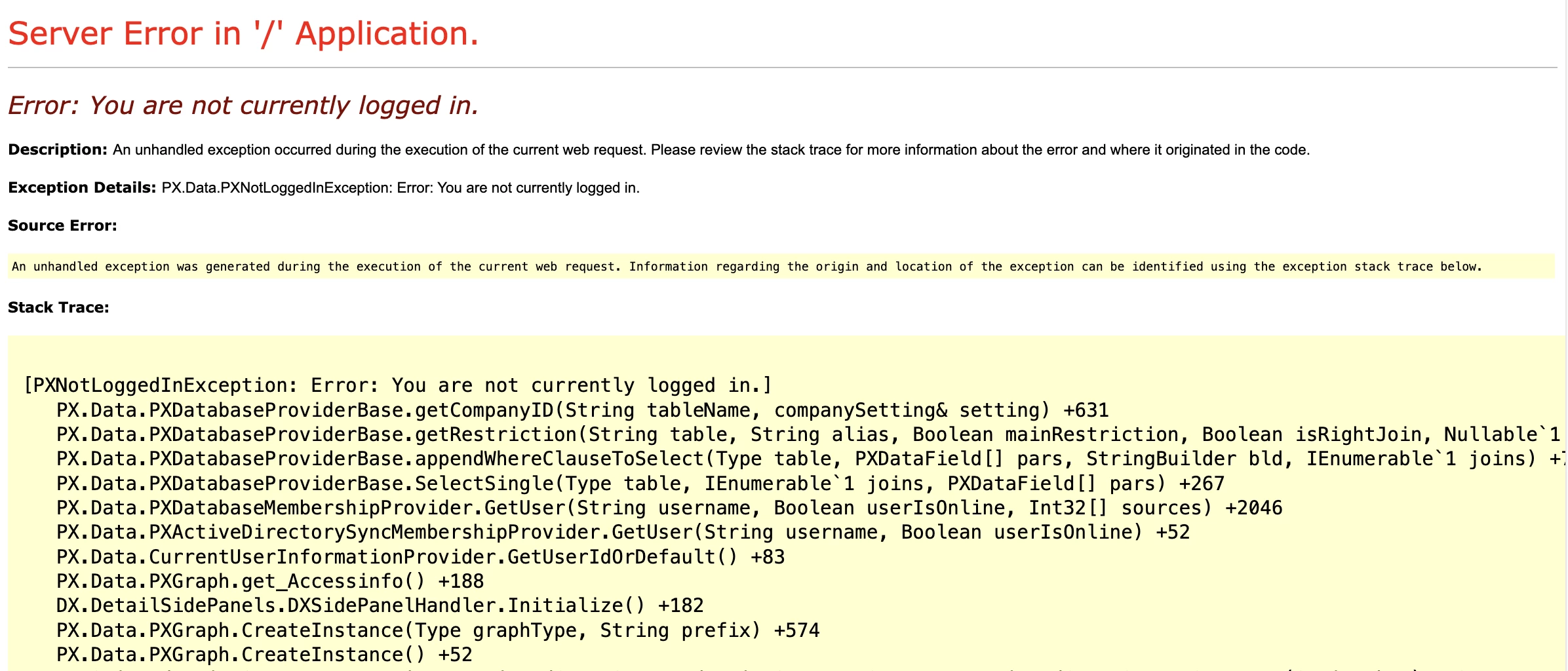
I have an advanced customization product which is causing unexpected behavior with the REST API. There are currently two cases reported of such behavior:
- Environment: 25 R1, multi-node
Symptom: when using OAuth 2.0 with Resource Owner Password Credentials, after a successful authentication returns<script>window.open("/Main","_top");</script>on the first request and a blank 200 on subsequent requests.
API requests not using OAuth 2.0 (just authenticating with user / password work fine).
Behavior cannot be reproduced locally (with client’s data and customizations) or in the client’s Acumatica-provisioned sandbox.
Client is working around the issue by only publishing my customization on the main node and sending API requests to the processing node.
- Environment: 25 R2 (modern UI)
Symptom: when logging into the connected instance through the Jigx app with OAuth 2.0 with Authorization Code, the client receives an error from the Jigx app indicating they are unable to sign in.
Behavior cannot be reproduced locally (with client’s data and customizations) through the Jigx app or Postman; client has no sandbox.
I can’t share a lot of the code publicly for IP reasons, but there are a few things notable things happening in the customization that could potentially cause unexpected behavior (more so than most customizations):
- I’m using the
Initializemethod of a graph extension ofPXGraphwith extensive gating to add a custom action to applicable and configured screens. I’ve verified as best I can that the gating is working as expected. (code is below)- I (Claude) found the
IsActiveForGraph<>()which I added toSMAccessPersonalMaintandMyProfileMaintsince they were involved in the OAuth 2.0 flows; this hasn’t helped that I can tell. - For Classic UI, I’m hooking
Page_Loadto inject JavaScript into the pages; for the client on 25 R2, they’ve tested a Modern-only version which has this excluded with no success
- I (Claude) found the
Claude analyzed the ROPC and AC flows and according to it, found that only one piece of the flow is shared:
Exactly one method is shared:
IPXLogin.InitUserEnvironment()→InitWithDefaultBranch()→PXGraph.CreateInstance<SMAccessPersonalMaint>(). This is the only code that runs in both flows. Everything upstream (how auth is validated) and downstream (redirect vs return-to-middleware) is different.Key observations
- Both flows create
SMAccessPersonalMaintvia the same_pxLogin.InitUserEnvironment()call- In both flows,
Initialize()bails immediately (no ScreenID) — locally, on both 25R1 and 25R2- Neither flow can be reproduced as failing locally, regardless of version
- The customer's environment has something we haven't replicated that causes the failure
// Acuminator disable once PX1016 ExtensionDoesNotDeclareIsActiveMethod extension should be constantly active
public class DXSidePanelHandler : PXGraphExtension<PXGraph>
{
    public static bool IsActiveForGraph<TGraph>() where TGraph : PXGraph
    {
        return typeof(TGraph) != typeof(PX.SM.SMAccessPersonalMaint)
            && typeof(TGraph) != typeof(PX.SM.MyProfileMaint);
    }

    private PXAction _dxSetActivePanel;
    private PXAction _dxRefreshPanel;

    public override void Initialize()
    {
        base.Initialize();

        Type primaryType = null;

        string screenID = Base.Accessinfo.ScreenID?.Replace(".", "");
        if (string.IsNullOrEmpty(screenID)) return;

        // page.Load hook is intentionally before the gates below.
        // Graph instances created during the initial GET bail at the gates
        // (no PrimaryView, workflow not defined, etc.), but that's the only
        // point where RegisterStartupScript works. Callback-time instances
        // pass the gates but page.Load has already fired by then.
        // OnPageLoad handles its own config/mapping checks independently.
        var page = HttpContext.Current?.Handler as PXPage;
        if (page is object && !page.IsCallback && !page.IsPostBack
            && page.Items["DXSidePanelHooked"] is null)
        {
            page.Items["DXSidePanelHooked"] = true;
            page.Load += OnPageLoad;
        }

        if (string.IsNullOrEmpty(Base.PrimaryView)) return;

        bool isApi = Base.IsContractBasedAPI || Base.IsDacBasedOdataAPI;
        if (isApi) return;

        bool proxyIsActive = PXGraph.ProxyIsActive;
        bool unattendedMode = Base.UnattendedMode;
        bool isProcessing = Base.IsProcessing;
        bool isMobile = Base.IsMobile;
        bool isImportExport = Base.IsImport || Base.IsExport;
        if (proxyIsActive || unattendedMode || isImportExport || isMobile) return;

        primaryType = Base.Views[Base.PrimaryView].Cache.GetItemType();
        Base.RowSelected.AddHandler(primaryType, OnPrimaryRowSelectedWithoutActions);

#if !Version_24R1 && !Version_24R2
        bool isScreenCustomized = Base.IsScreenConfigurationCustomized();
        if (!isScreenCustomized) return;
#endif
        var mappings = DXSidePanelConfigProvider.GetMappingsForScreen(Base, screenID);
        if (mappings.Count == 0) return;

        _dxSetActivePanel = PXNamedAction.AddHiddenAction(
            Base, primaryType, SELECT_ACTION, SELECT_ACTION, DXSetActivePanelHandler);
        _dxRefreshPanel = PXNamedAction.AddHiddenAction(
            Base, primaryType, REFRESH_ACTION, REFRESH_ACTION, DXRefreshPanelHandler);

        Base.RowSelected.RemoveHandler(primaryType, OnPrimaryRowSelectedWithoutActions);
        Base.RowSelected.AddHandler(primaryType, OnPrimaryRowSelectedWithActions);
    }

    private void OnPrimaryRowSelectedWithoutActions(PXCache sender, PXRowSelectedEventArgs e)
    {
        if (e.Row is null) return;

        // NavigationParams marks side panel parameters / filter fields as readonly;
        //   clearing it lets users adjust filters
        if (Base.NavigationParams is null) return;

        if (DXSidePanelTrace.Enabled)
            PXTrace.WriteInformation($"DXSidePanel: Clearing NavigationParams on {Base.Accessinfo.ScreenID}: [{string.Join(", ", Base.NavigationParams)}]");

        Base.NavigationParams = null;
    }

    private void OnPrimaryRowSelectedWithActions(PXCache sender, PXRowSelectedEventArgs e)
    {
        if (e.Row is null) return;

        _dxSetActivePanel?.SetEnabled(true);
        _dxRefreshPanel?.SetEnabled(true);

        // NavigationParams marks side panel parameters / filter fields as readonly;
        //   clearing it lets users adjust filters
        if (Base.NavigationParams is null) return;

        if (DXSidePanelTrace.Enabled)
            PXTrace.WriteInformation($"DXSidePanel: Clearing NavigationParams on {Base.Accessinfo.ScreenID}: [{string.Join(", ", Base.NavigationParams)}]");

        Base.NavigationParams = null;
    }
}