


Answer

What events fire when you click + on a grid to add a new line?

  • July 5, 2023
  • 7 replies
  • 240 views

Joe Schmucker
Captain II
Forum|alt.badge.img+3

I have a grid that looks like this:
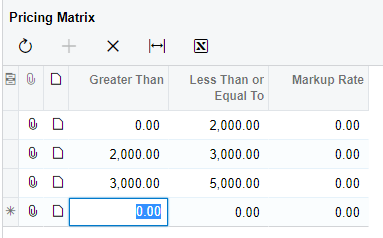
When I click + to add a new line item, I want to default the value in the Greater Than field to the Less Than value in the previous line.

I can get it to work, but no matter which event handler I use, it only will do the update to the field AFTER I leave the line.

Enter 6000 in the less than field
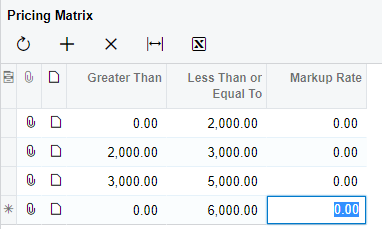
 Tab out of the line and the 5000 gets populated.
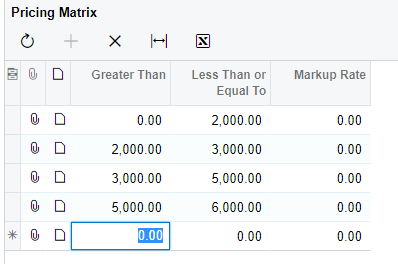
I am using the FieldDefaulting handler to get the previous line and update the newvalue for the row being defaulted.

NOTE...this code WORKS, but it only fires AFTER you leave the line.  When the current row has a SortOrder of zero, this tells me that this is a new row and to get the previous row.

		protected void ICSPricingMatrix_FromPrice_FieldDefaulting(PXCache cache, PXFieldDefaultingEventArgs e)
{
var row = (ICSPricingMatrix)e.Row;
if (row == null) return;

if (row.SortOrder == 0)
{
ICSPricingMatrix prevItem = SelectFrom<ICSPricingMatrix>
.Where<ICSPricingMatrix.priceClassID.IsEqual<@P.AsString>>.AggregateTo<Max<ICSPricingMatrix.sortOrder>>
.View.Select(this, row.PriceClassID);
if (prevItem != null)
{
e.NewValue = prevItem.ToPrice;
}
}
}

Shouldn’t FieldDefaulting fire as soon as I click the plus sign?  What the heck does fire when you click the plus sign?


Best answer by Naveen Boga

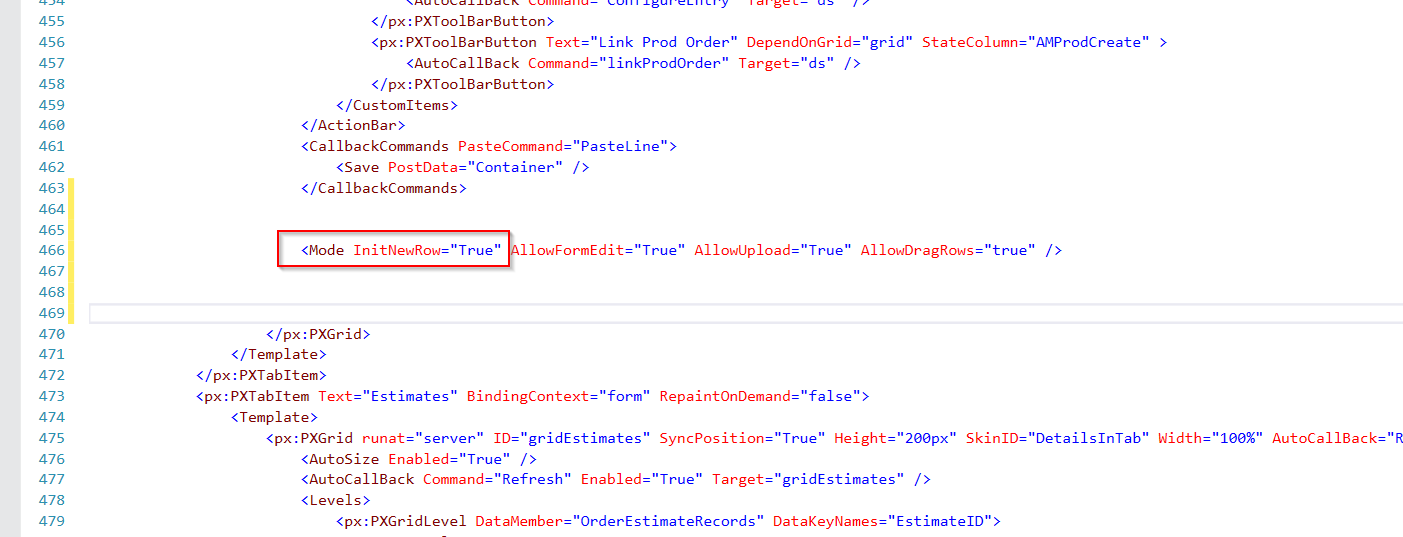
Hi @Joe Schmucker  To fire this event, you need to add the below syntax in the .aspx page otherwise it won’t be invoked.


   <Mode InitNewRow="True"  AllowUpload="True" AllowDragRows="true" />


7 replies

Forum|alt.badge.img+1
  • Pro I
  • July 5, 2023

@Joe Schmucker RowInserting


Joe Schmucker
Captain II
Forum|alt.badge.img+3
  • Author
  • Captain II
  • July 5, 2023

@girik06 I set a breakpoint on RowInserting and it is not fired until after I tab off the last line of the grid.

When I click the add icon, this does not get fired.  As soon as I leave the row, it fires.


Naveen Boga
Captain II
Forum|alt.badge.img+19
  • Captain II
  • Answer
  • July 6, 2023

Hi @Joe Schmucker  To fire this event, you need to add the below syntax in the .aspx page otherwise it won’t be invoked.


   <Mode InitNewRow="True"  AllowUpload="True" AllowDragRows="true" />


Joe Schmucker
Captain II
Forum|alt.badge.img+3
  • Author
  • Captain II
  • July 6, 2023

@Naveen Boga Are you kidding me???  I spent 3 hours trying to figure this out and it is that simple?  OMG.  Lesson learned.  Thank you for your help AGAIN!

We love you Naveen!


Naveen Boga
Captain II
Forum|alt.badge.img+19
  • Captain II
  • July 6, 2023

@Joe Schmucker  It happens sometimes!! :) 

Thank you for your kind words! I'm glad I could assist you in resolving the issue. :) 


Forum|alt.badge.img
  • Freshman I
  • July 17, 2025

@Naveen Boga -- Thanks two years later!!! This was a big help


Naveen Boga
Captain II
Forum|alt.badge.img+19
  • Captain II
  • July 17, 2025

Thank you ​@aaronjkeeney


