Answer

Values in Selector are not displaying in Mobile screen

  • December 31, 2021
  • 7 replies
  • 406 views

rajanip50
Freshman I
Forum|alt.badge.img

Hi,

I created one new Selector field in Stock Item Custom Tab.
In screen level records are showing in selector.. But In mobile screen I am not able to get the values for that Selector field.

Can you help me on this how to approach on this issue.


Below is the  Selector Field 

#region TSStorageCondID
[PXDBInt(IsKey = true)] 
[PXSelector(typeof(Search<TSStorageConditions.storageCondID, Where<TSStorageConditions.active, Equal<True>>>),
typeof(TSStorageConditions.storageCondCD),
typeof(TSStorageConditions.descr),
SubstituteKey = typeof(TSStorageConditions.storageCondCD),
DescriptionField = typeof(TSStorageConditions.descr), ValidateValue = false)]
[PXUIField(DisplayName = "Storage Condition ID")]
public virtual int? TSStorageCondID { get; set; }
public abstract class tSStorageCondID : PX.Data.BQL.BqlInt.Field<tSStorageCondID>
{
}
#endregion


Thanks.


Best answer by Troy Vars

I would check the screen Web Service and make sure that the Selector Field you are trying to customize is recognized by the internal name you are trying to utilize TSStorageCondID is probably not correct as it tends to be some variation on the Display name and not the field name

Example from Dev Blog here where UsrStatus is field name but Mobile App/Web Service is just Status

https://www.acumatica.com/blog/adding-a-status-to-the-acumatica-mobile-app-filter-for-field-service/

From the Screen in the right upper area under Tools => Web Service

A new tab should open with the Screen ID and Web Service

Click on Service Description link, scroll down to the section where you added the selector during your customization and find the name there. This is usually the one that the Mobile Customization is looking for


More on Getting WSDL with screenshots here https://help-2021r1.acumatica.com/(W(2))/Help?ScreenId=ShowWiki&pageid=a36c007a-a860-4808-8da1-4721f7616acb

configuring selectors

https://help-2021r1.acumatica.com/(W(1))/Help?ScreenId=ShowWiki&pageid=f5d08023-22d3-4e15-bc94-5b0ec85d9aa6

Configuring UDF

https://help-2021r1.acumatica.com/(W(1))/Help?ScreenId=ShowWiki&pageid=b2c1b484-af68-4dee-a7c7-349446cb4d80


7 replies

Forum|alt.badge.img+8
  • Semi-Pro I
  • January 2, 2022

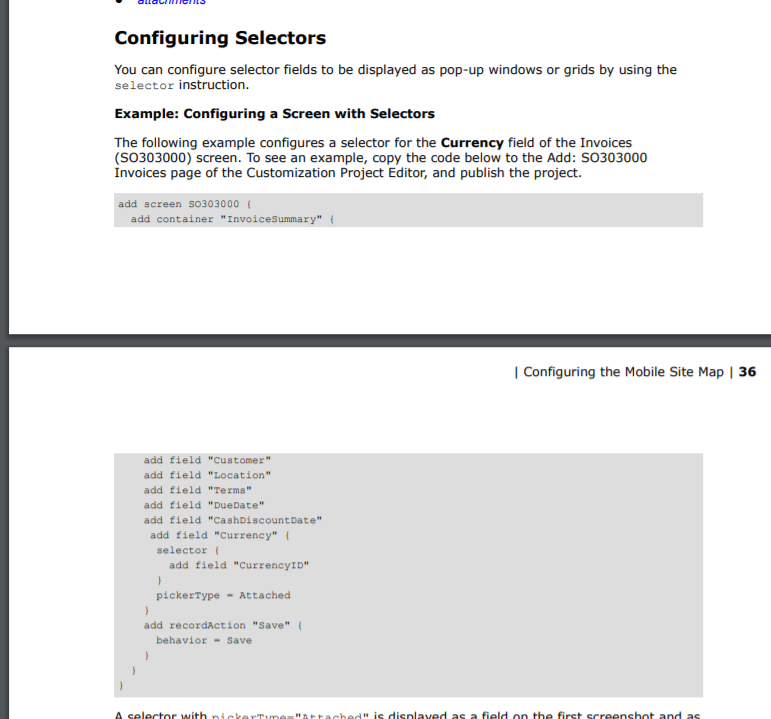
Hi @rajanip50 There are some additional steps to prepare the selrctor for Mobile APP.

Please review the Configure Selector Section in the below document. Hope this helps.

Thanks


Forum|alt.badge.img+8
  • Semi-Pro I
  • January 2, 2022

Hi @rajanip50 Please find the below details from the document.


rajanip50
Freshman I
Forum|alt.badge.img
  • Author
  • Freshman I
  • January 5, 2022

@ChandrasekharM We tried by adding above code But still Selector is not working. Below code we have added. Can you check and revert if We are missing anything?

add container "StorageConditions"{

add field "StorageConditionID" {

pickerType = Searchable

selector {

add field "TSStorageCondID" {

}

}

Also We did in this way :

add container "StorageConditions"{
    add field "StorageConditionID" {
     
    selector {
        
        add field "TSStorageCondID" {
    pickerType = Attached
    }
           }
    }

Thanks


Naveen Boga
Captain II
Forum|alt.badge.img+19
  • Captain II
  • January 5, 2022

Hi @rajanip50 Yes, the same issue I have seen for the customised field,  values are not showing on the Selector field, but for the default Acumatica it is showing properly.


  • Freshman II
  • January 17, 2022

Hello @rajanip50 and @Naveen B ,

I’m also facing similar issues in the custom selector field and UDF also not working as a selector in mobile.

Any suggestion/solution to resolve this or is it a restriction from the Acumatica mobile framework?


Troy Vars
Semi-Pro I
Forum|alt.badge.img+2
  • Semi-Pro I
  • Answer
  • January 19, 2022

I would check the screen Web Service and make sure that the Selector Field you are trying to customize is recognized by the internal name you are trying to utilize TSStorageCondID is probably not correct as it tends to be some variation on the Display name and not the field name

Example from Dev Blog here where UsrStatus is field name but Mobile App/Web Service is just Status

https://www.acumatica.com/blog/adding-a-status-to-the-acumatica-mobile-app-filter-for-field-service/

From the Screen in the right upper area under Tools => Web Service

A new tab should open with the Screen ID and Web Service

Click on Service Description link, scroll down to the section where you added the selector during your customization and find the name there. This is usually the one that the Mobile Customization is looking for

More on Getting WSDL with screenshots here https://help-2021r1.acumatica.com/(W(2))/Help?ScreenId=ShowWiki&pageid=a36c007a-a860-4808-8da1-4721f7616acb

configuring selectors

https://help-2021r1.acumatica.com/(W(1))/Help?ScreenId=ShowWiki&pageid=f5d08023-22d3-4e15-bc94-5b0ec85d9aa6

Configuring UDF

https://help-2021r1.acumatica.com/(W(1))/Help?ScreenId=ShowWiki&pageid=b2c1b484-af68-4dee-a7c7-349446cb4d80


Chris Hackett
Community Manager
Forum|alt.badge.img
  • Acumatica Community Manager
  • January 21, 2022

Hi @rajanip50 were you able to get this working? Thanks!