

Answer

Validation before save

  • January 12, 2024
  • 13 replies
  • 393 views

Forum|alt.badge.img

Hi. Can someone tell me the steps to apply validation message to the save button? I want provide a validation message when user click on save. It’s bit urgent. Thanks in advance.

Best answer by Giri K

Try this

@ifelix 

public void ARInvoice_RowPersisting(PXCache cache, PXRowPersistingEventArgs e, PXRowPersisting baseHandler)
    {
     if (baseHandler!= null)
                baseHandler(cache, e);
           
        //your validation
        throw new PXException("my validation");
    }

13 replies

Forum|alt.badge.img+1
  • Pro I
  • January 12, 2024

@ifelix 
In RowPersistingEvent of Header Table you can give Validation.


Forum|alt.badge.img
  • Author
  • Freshman I
  • January 12, 2024

@ifelix 
In RowPersistingEvent of Header Table you can give Validation.

How to access this RowPersistingEvent ? Do i have to override a method called RowPersistingEvent? In override methods there wasn’t method as such. Therefore should i just write it in my code like this?

   public void SOOrder_RowPersisting(PXCache cache, PXRowPersistingEventArgs e, PXRowPersisting baseHandler)
{
baseHandler?.Invoke(cache, e);

ARInvoice row = Base.Document.Current;

throw new PXSetPropertyException("Your custom validation.", PXErrorLevel.Error);
}


Forum|alt.badge.img+1
  • Pro I
  • January 12, 2024

@ifelix  when you click on Save Button, RowPersisting Event will trigger automatically.


public void SOOrder_RowPersisting(PXCache cache, PXRowPersistingEventArgs e, PXRowPersisting baseHandler)
{
baseHandler?.Invoke(cache, e);

//your validation

--------------------
--------------------
}


Forum|alt.badge.img
  • Author
  • Freshman I
  • January 12, 2024

@ifelix  when you click on Save Button, RowPersisting Event will trigger automatically.


public void SOOrder_RowPersisting(PXCache cache, PXRowPersistingEventArgs e, PXRowPersisting baseHandler)
{
baseHandler?.Invoke(cache, e);

//your validation

--------------------
--------------------
}
 

It just saves without giving me any validation. I took this code from chatgpt. Can you provide me a proper code to make this work ?


This is the code i used.

 public void SOOrder_RowPersisting(PXCache cache, PXRowPersistingEventArgs e, PXRowPersisting baseHandler)
    {
        baseHandler?.Invoke(cache, e);
    
        //your validation
        throw new PXException("my validation");
    }


Forum|alt.badge.img+1
  • Pro I
  • January 12, 2024

@ifelix Which screen you are working on?


Forum|alt.badge.img
  • Author
  • Freshman I
  • January 12, 2024

@ifelix Which screen you are working on?

I am working on Sales Order Invoice Screen.


Forum|alt.badge.img+1
  • Pro I
  • Answer
  • January 12, 2024

Try this

@ifelix 

public void ARInvoice_RowPersisting(PXCache cache, PXRowPersistingEventArgs e, PXRowPersisting baseHandler)
    {
     if (baseHandler!= null)
                baseHandler(cache, e);
           
        //your validation
        throw new PXException("my validation");
    }


Forum|alt.badge.img
  • Author
  • Freshman I
  • January 12, 2024

Try this

@ifelix 

public void ARInvoice_RowPersisting(PXCache cache, PXRowPersistingEventArgs e, PXRowPersisting baseHandler)
    {
     if (baseHandler!= null)
                baseHandler(cache, e);
           
        //your validation
        throw new PXException("my validation");
    }
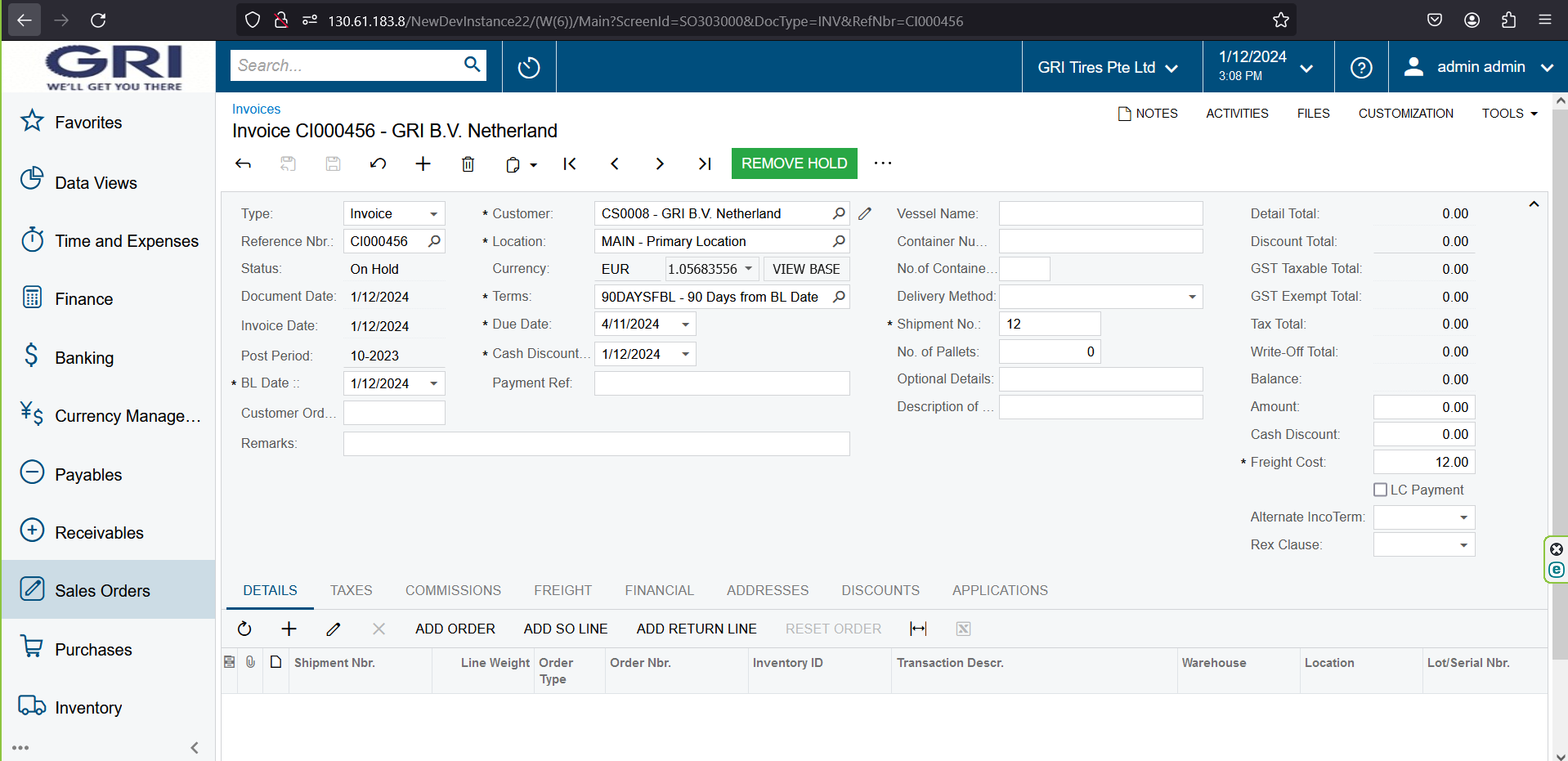
Thank you so much it’s working now.


Forum|alt.badge.img
  • Author
  • Freshman I
  • January 12, 2024

hi @girik06 


So i used a confirmation message box on save. If user click yes then i want to proceed with save. If user select ‘no’ i want avoid saving. I get this error when i select no. “Error: Key field cannot start with a leading space.”


Here’s my code. How can i fix it ?

public void ARInvoice_RowPersisting(PXCache cache, PXRowPersistingEventArgs e, PXRowPersisting baseHandler)
    {
     if (baseHandler!= null)
                baseHandler(cache, e);
           
        WebDialogResult result = Base.Document.Ask("Confirmation", "Do you want to remove the hold?", MessageButtons.YesNo);

         if (result == WebDialogResult.No)
         {
             e.Cancel = true; // User clicked "No" in the confirmation dialog, cancel the save operation
         }
    }


Forum|alt.badge.img+1
  • Pro I
  • January 12, 2024

you can write below code in NO condition
throw new PXException(“Save Cancelled”)


Forum|alt.badge.img
  • Author
  • Freshman I
  • January 16, 2024

you can write below code in NO condition
throw new PXException(“Save Cancelled”)

Hi @girik06 

Thank you. It solved my issue.


Forum|alt.badge.img
  • Author
  • Freshman I
  • January 17, 2024

hi @girik06 


So i used a confirmation message box on save. If user click yes then i want to proceed with save. If user select ‘no’ i want avoid saving. I get this error when i select no. “Error: Key field cannot start with a leading space.”


Here’s my code. How can i fix it ?

public void ARInvoice_RowPersisting(PXCache cache, PXRowPersistingEventArgs e, PXRowPersisting baseHandler)
    {
     if (baseHandler!= null)
                baseHandler(cache, e);
           
        WebDialogResult result = Base.Document.Ask("Confirmation", "Do you want to remove the hold?", MessageButtons.YesNo);

         if (result == WebDialogResult.No)
         {
             e.Cancel = true; // User clicked "No" in the confirmation dialog, cancel the save operation
         }
    }


hi @girik06 ,

So this method triggers on remove hold button as well. How can i make it work only for the save button ?


Forum|alt.badge.img
  • Author
  • Freshman I
  • January 17, 2024

hi @girik06 ,

So this method triggers on remove hold button as well. How can i make it work only for the save button ?

This happens after i save the record only. Before saving everything works fine but once i save, the confirmation message which i wrote for the save button occurs on remove hold button as well. How can i stop this and make it happen only at the save button ?