Answer

Using a Boolean Attribute as a Mandatory Field Condition

  • August 10, 2025
  • 4 replies
  • 80 views

I want to make a custom field mandatory on a template item, with the condition drawing from a boolean attribute.

Is it possible to use attributes in a condition within a customisation package? If so, how?


Best answer by svwk05

@Shayne  No Problem.

Here’s the quick flow:

  1. Open your Customization Project Editor in Acumatica.

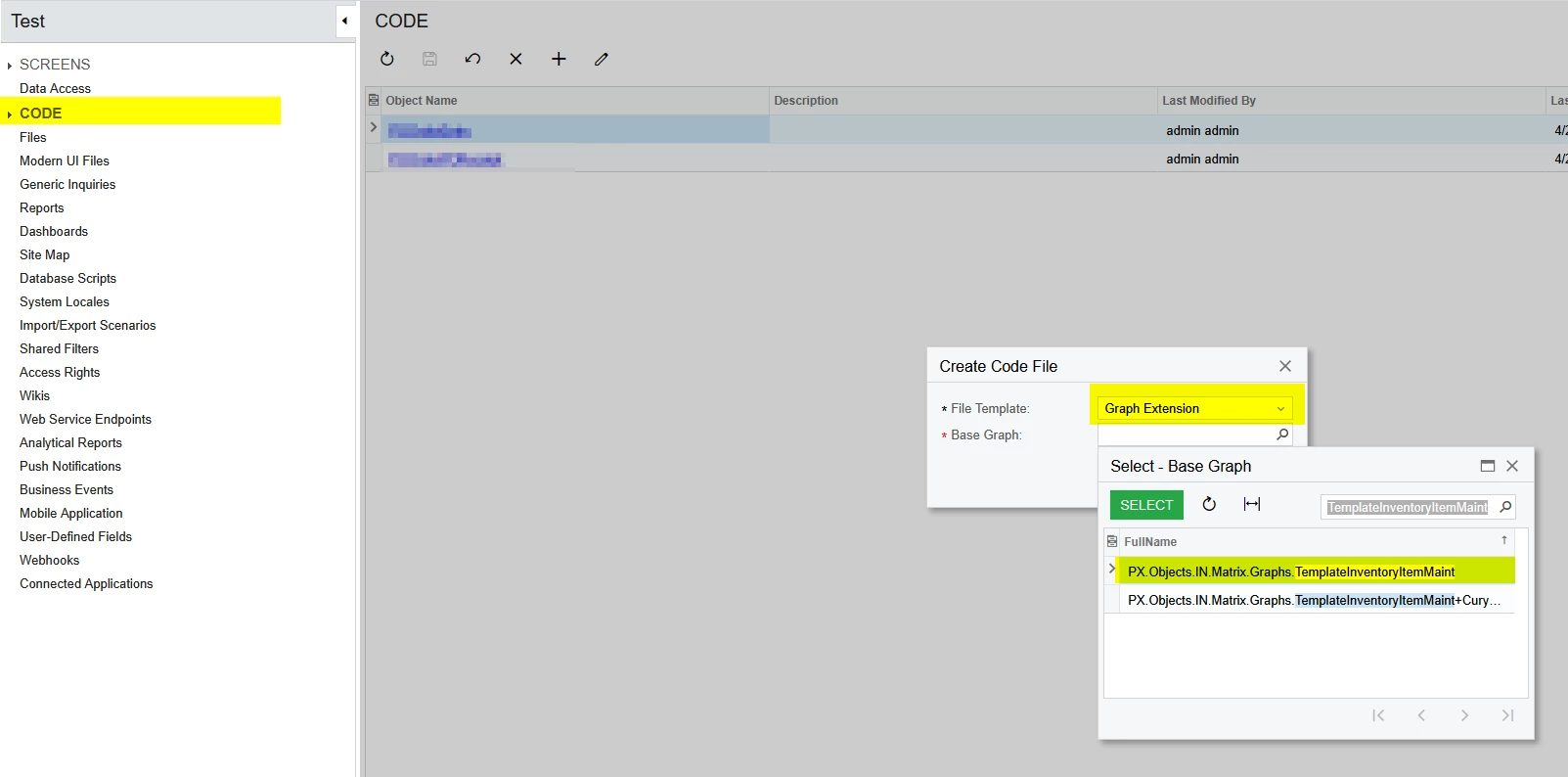
  2. Add a Code File for your graph extension of Template Item screen(As you mentioned) (e.g., TemplateInventoryItemMaint.cs).

  3. Paste the code into the appropriate event handler (like RowSelected) inside that extension.

  4. In the code BQL change the attribute of yours and set your custom field to make required.

  5. Publish the customisation.

Hope this helps!

4 replies

JSpikowski
Jr Varsity II
Forum|alt.badge.img
  • Jr Varsity II
  • August 10, 2025

Boolean as in "True" or "False"?


Forum|alt.badge.img+1
  • Semi-Pro III
  • August 11, 2025

Hello ​@Shayne

Yes, It is possible you can try below code in customization package and publish.

Sample code.

protected virtual void InventoryItem_RowSelected ( PXCache cache, PXRowSelectedEventArgs e, PXRowSelected baseMethod )
{
baseMethod?.Invoke(cache, e);

InventoryItem row = e.Row as InventoryItem;
if (row == null) return;

CSAnswers attrValue = PXSelect<CSAnswers,
Where<CSAnswers.refNoteID, Equal<Required<InventoryItem.noteID>>,
And<CSAnswers.attributeID, Equal<Required<CSAnswers.attributeID>>>>>.Select(Base, row.NoteID, "MYBOOLATTRIBUTE");

if (attrValue != null && attrValue.Value == "1")
{
bool isTemplate = attrValue.Value== "1" ? true : false;
PXUIFieldAttribute.SetRequired<InventoryItemExt.usrMyCustomField>(cache, isTemplate);
}

}


  • Author
  • Freshman I
  • August 11, 2025

Hello ​@Shayne

Yes, It is possible you can try below code in customization package and publish.

Sample code.

protected virtual void InventoryItem_RowSelected ( PXCache cache, PXRowSelectedEventArgs e, PXRowSelected baseMethod )
{
baseMethod?.Invoke(cache, e);

InventoryItem row = e.Row as InventoryItem;
if (row == null) return;

CSAnswers attrValue = PXSelect<CSAnswers,
Where<CSAnswers.refNoteID, Equal<Required<InventoryItem.noteID>>,
And<CSAnswers.attributeID, Equal<Required<CSAnswers.attributeID>>>>>.Select(Base, row.NoteID, "MYBOOLATTRIBUTE");

if (attrValue != null && attrValue.Value == "1")
{
bool isTemplate = attrValue.Value== "1" ? true : false;
PXUIFieldAttribute.SetRequired<InventoryItemExt.usrMyCustomField>(cache, isTemplate);
}

}


Thanks for this.

Sorry I'm not 100% good with customisations, once I've edited fields to what the attributes are, where do i post the code, in the ASPX?


Forum|alt.badge.img+1
  • Semi-Pro III
  • Answer
  • August 11, 2025

@Shayne  No Problem.

Here’s the quick flow:

  1. Open your Customization Project Editor in Acumatica.

  2. Add a Code File for your graph extension of Template Item screen(As you mentioned) (e.g., TemplateInventoryItemMaint.cs).

  3. Paste the code into the appropriate event handler (like RowSelected) inside that extension.

  4. In the code BQL change the attribute of yours and set your custom field to make required.

  5. Publish the customisation.

Hope this helps!