Solved

Updating MUI screens by running the command line doesn't seem to work

  • July 10, 2026
  • 8 replies
  • 60 views

Joe Schmucker
Captain II
Forum|alt.badge.img+3

The only way I can get the changes to the MUI screen is to modify the files in the development section in VS, then update the MUI files in the project editor and publish the project.

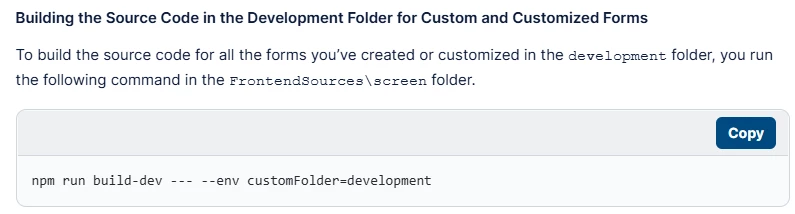
I thought I could update the MUI screen by executing this statement in Terminal, but it doesn’t make the changes:

If this worked, it would save me hours in testing.  Publishing the entire project takes forever compared to running the command line to build the screen.

Also, my popup wasn’t showing the fields.  I published, restarted the app, reset caches, MANY times.  I kept changing the TS and HTML, but the fields were not showing.  Suddenly, they are showing.  I literally spent 5 hours trying things, republishing resetting everything and it didn’t show the fields.  

Is there some steps I am not taking after publishing the project to get the MUI code to display properly?  I’ve been losing my mind over this.



Best answer by darylbowman

I'm in the same position. The local compile works as long as no files are published. Once even a single file is published, local builds do nothing.


Haven't cracked it yet.

8 replies

darylbowman
Captain II
Forum|alt.badge.img+17

I'm in the same position. The local compile works as long as no files are published. Once even a single file is published, local builds do nothing.


Haven't cracked it yet.


darylbowman
Captain II
Forum|alt.badge.img+17

I don't think this ☝🏻 is a good answer. I'd love to get some Acumatica feedback.


MichaelShirk
Captain II
Forum|alt.badge.img+6

I’m assuming we’re talking here about modifications to OOB screens, and not changes to custom screens?


darylbowman
Captain II
Forum|alt.badge.img+17

I’m not sure it makes any difference, but I do mostly modifications.


MichaelShirk
Captain II
Forum|alt.badge.img+6

So far I’ve only been converting our custom screens, but I never have to publish to see MUI changes. 
I thought waiting ~30 seconds for the build to finish and the screen to load was bad! 
 

I’d be interested in comparing my process with someone who’s having an issue with it. 


darylbowman
Captain II
Forum|alt.badge.img+17

You’re mixing published MUI changes with local compiles?


MichaelShirk
Captain II
Forum|alt.badge.img+6

If I’m understanding correctly, then yes. 

I have our large customization project published with many MUI screens. 
If I need to make a change, I do so in Visual Studio, follow the steps in the screenshot below, then reload my page in the browser. 
 

Then once I’m ready to release a new package version, I open the customization project, load changes for MUI files, and publish.  


Forum|alt.badge.img+8
  • Captain II
  • July 11, 2026

Buried within another discussion thread was this command line option:

npm run build-dev --- --env screenids=SO301000 customFolder=development

However, sometimes it works, sometimes it doesn’t.

It also doesn’t respond to manual changes to the .ts field, it only seems to work for the HTML file.

So if I need to change the .ts file, I update the project and then do a full publish.

Also, changes I make to the .ts file and import into the customization project aren’t properly reflected in the MUI editor.