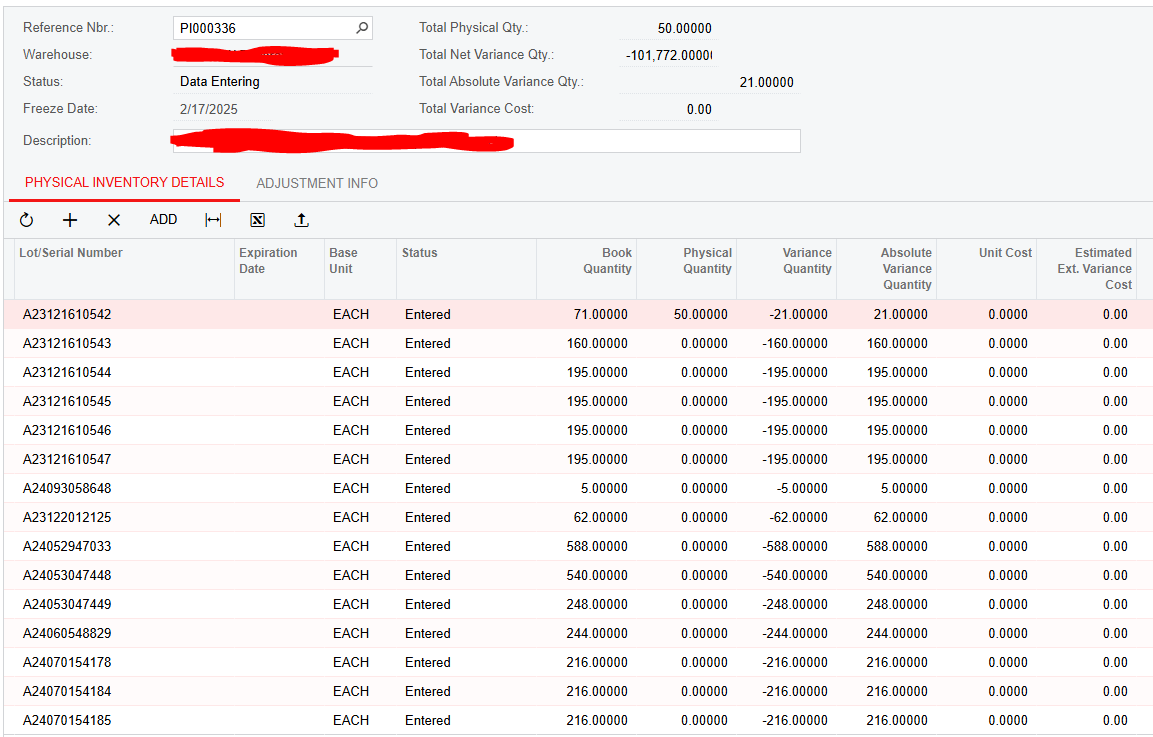
I have two custom fields Absolute Variance Quantity for rows and Total Absolute Variance Quantity in the header. I can get these fields to update via PI Review and Scan and Count just fine, but when I do an action such as Set Not Entered To Zero, the custom header field won’t update.
Here, the only value that got send to the custom header field was the first line (21), but the header field should be close to 101,772
Here is my code for the field definitions and this screen:
using System; using System.Collections; using System.Collections.Generic; using System.Linq; using PX.Common; using PX.Data; using PX.Data.BQL; using PX.Data.BQL.Fluent; using PX.Objects.CM; using PX.Objects.Common.Extensions; using PX.Objects.CS; using PX.Objects.IN.PhysicalInventory; using PX.Data.WorkflowAPI; using PX.Objects; using PX.Objects.IN;
namespace PX.Objects.IN { //this is for the PI Review screen, where data can be entered manually line by line public class INPIReview_Extension : PXGraphExtension<PX.Objects.IN.INPIReview> { protected void _(Events.FieldUpdated<INPIDetail, INPIDetail.physicalQty> e) { var row = (INPIDetail)e.Row;
//save this changed cache to the form Base.Actions.PressSave();
//Refresh the header Base.PIHeader.View.RequestRefresh();
return;
}
} }
I’ve tried changing the field in the event handler to INPIDetail.varQty but it resulted in the custom detail field not updating at all. Changing the event handler to RowUpdated also didn’t work, and it only changed the header field after the next row got changed, so it was always one row behind.
Best answer by u662
That looks about right. (Note, Minus is depreciated, use Subtract in the future).
So what that will do is:
Populate UsrAbsVarQty with the results of that first formula (the Switch). I know you said that you’re already populating this field properly - you won’t need to do that in code since you’re doing it by using the declaration.
It will update the header usrTotalAbsVarQty field with the net change of the UsrAbsVarQty field.
@Django In combination with a method override of RecalcTotals(), this worked.
using System; using System.Collections; using System.Collections.Generic; using System.Linq; using PX.Common; using PX.Data; using PX.Data.BQL; using PX.Data.BQL.Fluent; using PX.Objects.CM; using PX.Objects.Common.Extensions; using PX.Objects.CS; using PX.Objects.IN.PhysicalInventory; using PX.Data.WorkflowAPI; using PX.Objects; using PX.Objects.IN;
namespace PX.Objects.IN { //this is for the PI Review screen, where data can be entered manually line by line
public class INPIReview_Extension : PXGraphExtension<PX.Objects.IN.INPIReview> {
protected void _(Events.FieldUpdated<INPIDetail, INPIDetail.physicalQty> e) { var row = (INPIDetail)e.Row;
In your INPIDetailExt.usrAbsVarQty field declaration for PXFormula you can use a switch formula to simulate the ABS function on the VarQty field value. And by having the VarQty listed in the PXFormula, it will be added to the fields checked for updates. Meaning, when VarQty is changed, your PXFormula will be (re)calculated. The first part of the formula will update the UsrAbsVarQty field and then the second part will update the header value.
Your header value really shouldn’t be one update behind at all so I’m not sure what’s happening there.
One thing to look at is if the grid is set to hold on to its updates (batch mode?)
Note that this process will only update the header field with the net change that each record introduces but I think that will be exactly what you want anyway.
In your INPIDetailExt.usrAbsVarQty field declaration for PXFormula you can use a switch formula to simulate the ABS function on the VarQty field value. And by having the VarQty listed in the PXFormula, it will be added to the fields checked for updates. Meaning, when VarQty is changed, your PXFormula will be (re)calculated. The first part of the formula will update the UsrAbsVarQty field and then the second part will update the header value.
Your header value really shouldn’t be one update behind at all so I’m not sure what’s happening there.
One thing to look at is if the grid is set to hold on to its updates (batch mode?)
Note that this process will only update the header field with the net change that each record introduces but I think that will be exactly what you want anyway.
@Django Would the use of Minus<INPIDetail.varQty> (if it’s less than zero) be applicable here?
But maybe I missed something but don’t you want your header total to be the sum of the absolute value of the varQty field value? Or just of the negative varQty field values?
But maybe I missed something but don’t you want your header total to be the sum of the absolute value of the varQty field value? Or just of the negative varQty field values?
@Django The custom header will be the total for the custom absolute variance detail columns as defined by typeof(SumCalc<INPIHeaderExt.usrTotalAbsVarQty>). The custom detail field is currently populated by correctly code.
You are correct, the custom header total should be the sum of the absolute value of the varQty field values.
If I’m following correctly, the code for the custom detail field’s PXFormula (INPIDetailExt.usrAbsVarQty), as you initially suggested, should be something like:
That looks about right. (Note, Minus is depreciated, use Subtract in the future).
So what that will do is:
Populate UsrAbsVarQty with the results of that first formula (the Switch). I know you said that you’re already populating this field properly - you won’t need to do that in code since you’re doing it by using the declaration.
It will update the header usrTotalAbsVarQty field with the net change of the UsrAbsVarQty field.
That looks about right. (Note, Minus is depreciated, use Subtract in the future).
So what that will do is:
Populate UsrAbsVarQty with the results of that first formula (the Switch). I know you said that you’re already populating this field properly - you won’t need to do that in code since you’re doing it by using the declaration.
It will update the header usrTotalAbsVarQty field with the net change of the UsrAbsVarQty field.
@Django In combination with a method override of RecalcTotals(), this worked.
using System; using System.Collections; using System.Collections.Generic; using System.Linq; using PX.Common; using PX.Data; using PX.Data.BQL; using PX.Data.BQL.Fluent; using PX.Objects.CM; using PX.Objects.Common.Extensions; using PX.Objects.CS; using PX.Objects.IN.PhysicalInventory; using PX.Data.WorkflowAPI; using PX.Objects; using PX.Objects.IN;
namespace PX.Objects.IN { //this is for the PI Review screen, where data can be entered manually line by line
public class INPIReview_Extension : PXGraphExtension<PX.Objects.IN.INPIReview> {
protected void _(Events.FieldUpdated<INPIDetail, INPIDetail.physicalQty> e) { var row = (INPIDetail)e.Row;