Question

Unable to Publish Any Customization

  • June 18, 2025
  • 8 replies
  • 107 views

Forum|alt.badge.img

When I try to publish any customization, I get the following error: 
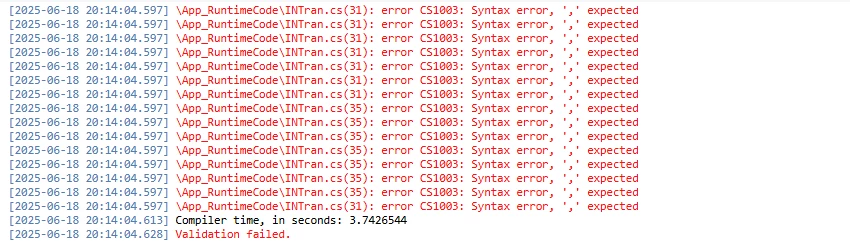
Any advice on resolving the issue?

8 replies

Dmitrii Naumov
Acumatica Moderator
Forum|alt.badge.img+7
  • Acumatica Moderator
  • June 18, 2025

@kkraus looks like you have some incorrect code in App_RuntimeCode\INTran.cs


CherryStreet
Jr Varsity I
Forum|alt.badge.img
  • Jr Varsity I
  • June 19, 2025

I ran your error codes through our AI Assistant and this is what it gave me.  Hope it helps:
 

The error in your screenshot clearly shows a C# syntax error from your customization project during compilation:

\App_RuntimeCode\INTran.cs(xx): error CS1003: Syntax error, ',' expected

This typically means that there's invalid code formatting or a malformed statement — most likely missing a comma, or using the wrong delimiter (especially in a field declaration or attribute). Let's walk through how to resolve this properly.


1. Error Summary

  • File: INTran.cs (this is in your App_RuntimeCode folder, so it's custom code from a customization project)
  • Lines: 31 and 35
  • Error Code: CS1003 — Syntax error, ',' expected
  • Common Cause: Malformed attribute, enum, or method parameter list (often caused by incorrect copy/paste or editing of DACs)
 

2. Immediate Resolution Steps 🚀

Step 1: Open the INTran.cs File

  1. In Acumatica Customization Project Editor, open the Customization Project.
  2. Go to Code App_RuntimeCode INTran.cs.
  3. Jump to Line 31 and Line 35.
  4. Review any attribute or method on those lines — especially those that contain:
    • Multiple parameters
    • PX attributes (e.g., [PXDBString(…), [PXDefault(…)], etc.)
  5. Ensure parameters are separated by commas.

Step 2: Common Syntax Issues to Look For

Here are some examples of mistakes that trigger CS1003:

Incorrect:

[PXDBString(10 PXUIField(DisplayName="My Field"))]

Correct:

[PXDBString(10), PXUIField(DisplayName="My Field")]

Or:

Incorrect:

[PXDefault(TypeCode.String "default")]

Correct:

[PXDefault(TypeCode.String, "default")]

🔍 Look carefully for a missing comma between arguments or attribute declarations.


3. Best Practice Fix

Once you've located and corrected the syntax, do the following:

  • Save the file.
  • Rebuild the customization project.
  • Republish.
 

4. ERP Pro Tip 💡

💡 Tip for Customizers: Use Visual Studio or Visual Studio Code to edit .cs files in your customization project with IntelliSense — it catches syntax issues before publishing and speeds up debugging.


Sagar Greytrix
Captain II
Forum|alt.badge.img+3

The error is a syntax error. You missed adding a comma (,) in  the InTran.cs file at line numbers 31 and 35. You can check this in Visual Studio—after running the project, you'll see the error there. or Could you share your code for this file?


Forum|alt.badge.img
  • Author
  • Freshman II
  • June 20, 2025

The error is a syntax error. You missed adding a comma (,) in  the InTran.cs file at line numbers 31 and 35. You can check this in Visual Studio—after running the project, you'll see the error there. or Could you share your code for this file?

Where would I find the InTran.cs File?


Forum|alt.badge.img+1
  • Jr Varsity I
  • June 20, 2025

The error is a syntax error. You missed adding a comma (,) in  the InTran.cs file at line numbers 31 and 35. You can check this in Visual Studio—after running the project, you'll see the error there. or Could you share your code for this file?

Where would I find the InTran.cs File?

It should be within one of your customization projects which you are trying to publish, under the code tab.


Forum|alt.badge.img
  • Author
  • Freshman II
  • June 25, 2025

The error is a syntax error. You missed adding a comma (,) in  the InTran.cs file at line numbers 31 and 35. You can check this in Visual Studio—after running the project, you'll see the error there. or Could you share your code for this file?

Where would I find the InTran.cs File?

It should be within one of your customization projects which you are trying to publish, under the code tab.

Alright, found it. Here’s the code; offending lines are bolded:

using PX.Data.ReferentialIntegrity.Attributes;
using PX.Data;
using PX.Objects.CM;
using PX.Objects.Common.Attributes;
using PX.Objects.Common.Bql;
using PX.Objects.Common;
using PX.Objects.CS;
using PX.Objects.GL;
using PX.Objects.IN.Attributes;
using PX.Objects.IN;
using PX.Objects.PM;
using PX.Objects.PO;
using PX.Objects.SO;
using PX.Objects;
using System.Collections.Generic;
using System;

namespace PX.Objects.IN
{
  public class INTranExt : PXCacheExtension<PX.Objects.IN.INTran>
  {
    #region UsrCustomField
    [PXString]
    [PXUIField(DisplayName="Custom Field")]
    public virtual string UsrCustomField { get; set; }
    public abstract class usrCustomField : PX.Data.BQL.BqlString.Field<usrCustomField> { }
    #endregion
  }
  public class myExtensionEXT: PXGraphExtension<PX.Objects.SO>
  {
    PXSelect<SOOrder, Where<SOOrder.OrderNbr = INTran.SOOrderNbr && SOOrder.OrderType = INTran.SOOrderType >, OrderBy OrderNbr>
  }
  public class myExtensionEXT: PXGraphExtension<PX.Objects.PO>
  {
    PXSelect<POReceipt, Where<POReceipt.ReceiptNbr = INTran.POReceiptNbr && POReceipt.ReceiptType = INTran.POReceiptType >, OrderBy ReceiptNbr>
  }   
}


DrewNisley
Pro I
Forum|alt.badge.img+3
  • Pro I
  • June 25, 2025

@kkraus Your selects aren’t assigned to any variables and are not doing anything, as well as being the wrong syntax. What are you trying to acheive with these extensions?


Chris Hackett
Community Manager
Forum|alt.badge.img
  • Acumatica Community Manager
  • September 23, 2025

Hi ​@kkraus were you able to find a solution? Thank you!