Solved

Unable to get a grid field to be enabled on Prepare Physical Count grid

  • January 7, 2026
  • 6 replies
  • 63 views

Joe Schmucker
Captain II
Forum|alt.badge.img+3

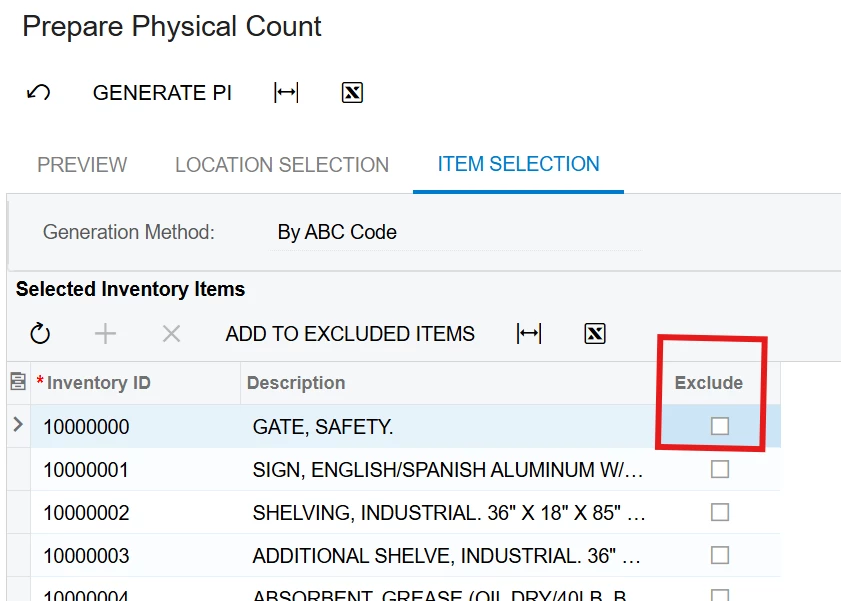
My customer wants to be able to select items in the Selected Inventory Items grid and add them to the Excluded Inventory Items grid without having to add them one at a time.

I created a custom checkbox and an action to do this.  However, I cannot get the checkbox field to be enabled.


The grid has a Details skin, so that shouldn’t make the grid read only.

I tried adding code to the row selected handler for the grid but it is still disabled.

protected virtual void InventoryItem_RowSelected(PXCache cache, PXRowSelectedEventArgs e, PXRowSelected baseHandler)
{
var row = (InventoryItem)e.Row;
baseHandler?.Invoke(cache, e);

PXUIFieldAttribute.SetEnabled<SCGCInventoryItemExt.usrExclude>(cache, null, true);

Base.InventoryItemsToLock.Cache.AllowUpdate = true;
}

I tried it as shown above and also without using the baseHandler but no difference.

		protected virtual void InventoryItem_RowSelected(PXCache cache, PXRowSelectedEventArgs e)
{
var row = (InventoryItem)e.Row;

PXUIFieldAttribute.SetEnabled<SCGCInventoryItemExt.usrExclude>(cache, null, true);

Base.InventoryItemsToLock.Cache.AllowUpdate = true;
}

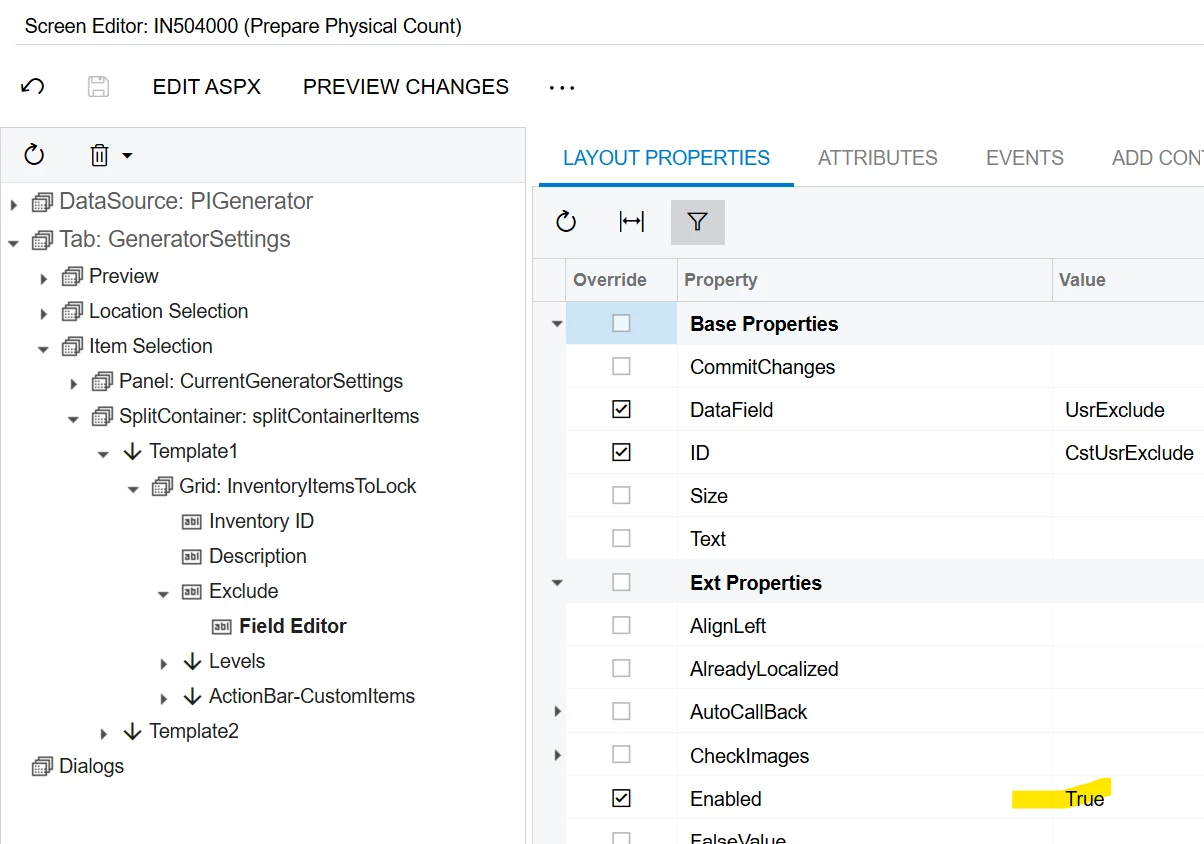
In the project editor, I added the field to the level and set Enable to true.


It seems like the graph is disabling the grid.  Any ideas on how to override this and get the field enabled?


Best answer by Joe Schmucker

Here is my solution.  I’d like to be able to have the option to check items and use an action to process the selected items, but for now, they can select an item and it will move it to the Excluded Items grid.

This is my code in case anyone wants to look at it:

DAC extension

using PX.Data;

namespace SCGC
{
// Acuminator disable once PX1016 ExtensionDoesNotDeclareIsActiveMethod extension should be constantly active
public sealed class SCGCInventoryItemExt : PXCacheExtension<PX.Objects.IN.InventoryItem>
{
#region UsrExclude
[PXBool]
[PXUIField(DisplayName = "Exclude", Enabled = true)]
public bool? UsrExclude { get; set; }
public abstract class usrExclude : PX.Data.BQL.BqlBool.Field<usrExclude> { }
#endregion
}
}

Graph Extension:

	public class PIGenerator_Extension : PXGraphExtension<PX.Objects.IN.PIGenerator>
{
public override void Initialize()
{
base.Initialize();
Base.InventoryItemsToLock.AllowUpdate = true;
Base.LocationsToLock.AllowUpdate = true;
}

#region Actions
public PXAction<INLocation> ClearExcludedLocations;
[PXUIField(DisplayName = "Clear Excluded Locations", Enabled = true)]
[PXButton(CommitChanges = true)]
public void clearExcludedLocations()
{

WebDialogResult result = Base.ExcludedLocations.Ask(ActionsMessages.Warning, ICSMessages.ClearExcludedLocations,
MessageButtons.OKCancel, MessageIcon.Warning, true);

if (result != WebDialogResult.OK) return;

foreach (var item in this.Base.ExcludedLocations.Select())
{
Base.ExcludedLocations.Delete(item);
}
Base.Actions.PressSave();
}

public PXAction<InventoryItem> ClearExcludedItems;
[PXUIField(DisplayName = "Clear Excluded Items", Enabled = true)]
[PXButton(CommitChanges = true)]
public void clearExcludedItems()
{

WebDialogResult result = Base.ExcludedInventoryItems.Ask(ActionsMessages.Warning, ICSMessages.ClearExcludedItems,
MessageButtons.OKCancel, MessageIcon.Warning, true);

if (result != WebDialogResult.OK) return;

foreach (var item in this.Base.ExcludedInventoryItems.Select())
{
Base.ExcludedInventoryItems.Delete(item);
}
Base.Actions.PressSave();
}
#endregion


#region Event Handlers
protected virtual void INLocation_UsrExclude_FieldUpdated(PXCache cache, PXFieldUpdatedEventArgs e)
{
var row = (INLocation)e.Row;
if (row != null)
{
if (row.LocationID != null)
{
ExcludedLocation item = new ExcludedLocation();
item.LocationID = row.LocationID;
Base.ExcludedLocations.Update(item);

cache.Remove(row);
Base.ExcludedLocations.View.RequestRefresh();
}
}
}

protected virtual void InventoryItem_UsrExclude_FieldUpdated(PXCache cache, PXFieldUpdatedEventArgs e)
{
var row = (InventoryItem)e.Row;
if (row != null)
{
if (row.InventoryID != null)
{
ExcludedInventoryItem item = new ExcludedInventoryItem();
item.InventoryID = row.InventoryID;
Base.ExcludedInventoryItems.Update(item);

cache.Remove(row);
Base.InventoryItemsToLock.View.RequestRefresh();
}
}
}

protected virtual void INLocation_RowSelected(PXCache cache, PXRowSelectedEventArgs e)
{
var row = (INLocation)e.Row;

PXUIFieldAttribute.SetEnabled<SCGCINLocationExt.usrExclude>(cache, null, true);
PXUIFieldAttribute.SetEnabled<INLocation.locationCD>(cache, null, false);
PXUIFieldAttribute.SetEnabled<INLocation.descr>(cache, null, false);
}

protected virtual void InventoryItem_RowSelected(PXCache cache, PXRowSelectedEventArgs e)
{
var row = (InventoryItem)e.Row;

PXUIFieldAttribute.SetEnabled<SCGCInventoryItemExt.usrExclude>(cache, null, true);
PXUIFieldAttribute.SetEnabled<InventoryItem.inventoryCD>(cache, null, false);
PXUIFieldAttribute.SetEnabled<InventoryItem.descr>(cache, null, false);
}

 

6 replies

Forum|alt.badge.img+8
  • Captain II
  • January 7, 2026

What’s the DAC code look like for your UsrExclude field?


Forum|alt.badge.img+4

Hi ​@Joe Schmucker 

The issue is that the InventoryItemsToLock view in this graph has the [PXReadOnlyView] attribute. You can remove this attribute in a graph extension.

Also, this graph uses a data view delegate, so you will need to override it as well and return the records from the base view.

However, even after that you may still need to fix additional issues, since this screen appears to be designed as read-only.

public class PIGeneratorExt : PXGraphExtension<PIGenerator>
{
//[PXReadOnlyView]
public PXSelect<InventoryItem> InventoryItemsToLock;

public virtual IEnumerable inventoryItemsToLock()
{
// return base records here
}
}


Forum|alt.badge.img+2
  • Pro II
  • January 8, 2026

@Joe Schmucker 

Can you try with view.Cache.AllowInsert & AllowUpdate.

protected virtual void _(Events.RowSelected<InventoryItem> e, PXRowSelected baseHandler)
{
var row = (InventoryItem)e.Row;
baseHandler?.Invoke(e.Cache, e.Args);

Base.InventoryItemsToLock.Cache.AllowInsert = true;
Base.InventoryItemsToLock.Cache.AllowUpdate = true;

PXUIFieldAttribute.SetEnabled<SCGCInventoryItemExt.usrExclude>(e.Cache, null, true);
}

If that does not work, have you tried with work flow


Joe Schmucker
Captain II
Forum|alt.badge.img+3
  • Author
  • Captain II
  • January 8, 2026

Hi ​@VSKWAN78 

That is where I am at right now.  I’ve managed to get the grid to allow me to check the box.  I added additional lines in row selected to disable the other two fields.

The issue I am facing is that when I check a bunch of boxes and try to loop through the View on the grid in my custom action, I do a View.Select() and loop through where the checkbox is checked. However, the custom field is returned as null since the View doesn’t actually contain the field.  It is an unbound boolean field.  It is an extension field, but the process to get the records doesn’t include that field.  If it did, I would be just about done without having to copy hundreds of lines of Acumatica code.  I explain that next.


I’m trying to add a custom virtual table with InventoryID.  In the field updated event for UsrExclude, I add the inventoryID to the table.  In my PXOverride of the GetAdditionalInventoryItemsToLockDelegate, I will left join to the table and if it is linked, it will process my custom code.

Doing this requires me to copy a LOT of Acumatica base code, but I’ll see if I can get it to work.

Note that I have code that works on the UsrExclude field updated to do what I want, but I want to be able to have the user select multiple boxes and process them with my custom action. 

So, I have a working project if you do them one at a time, but I want to eventually have the user filter the grid, select All and run the process.


Joe Schmucker
Captain II
Forum|alt.badge.img+3
  • Author
  • Captain II
  • January 8, 2026

What’s the DAC code look like for your UsrExclude field?

        #region UsrExclude
        [PXBool]
        [PXUIField(DisplayName = "Exclude", Enabled = true)]
        public bool? UsrExclude { get; set; }
        public abstract class usrExclude : PX.Data.BQL.BqlBool.Field<usrExclude> { }
        #endregion


Joe Schmucker
Captain II
Forum|alt.badge.img+3
  • Author
  • Captain II
  • Answer
  • January 8, 2026

Here is my solution.  I’d like to be able to have the option to check items and use an action to process the selected items, but for now, they can select an item and it will move it to the Excluded Items grid.

This is my code in case anyone wants to look at it:

DAC extension

using PX.Data;

namespace SCGC
{
// Acuminator disable once PX1016 ExtensionDoesNotDeclareIsActiveMethod extension should be constantly active
public sealed class SCGCInventoryItemExt : PXCacheExtension<PX.Objects.IN.InventoryItem>
{
#region UsrExclude
[PXBool]
[PXUIField(DisplayName = "Exclude", Enabled = true)]
public bool? UsrExclude { get; set; }
public abstract class usrExclude : PX.Data.BQL.BqlBool.Field<usrExclude> { }
#endregion
}
}

Graph Extension:

	public class PIGenerator_Extension : PXGraphExtension<PX.Objects.IN.PIGenerator>
{
public override void Initialize()
{
base.Initialize();
Base.InventoryItemsToLock.AllowUpdate = true;
Base.LocationsToLock.AllowUpdate = true;
}

#region Actions
public PXAction<INLocation> ClearExcludedLocations;
[PXUIField(DisplayName = "Clear Excluded Locations", Enabled = true)]
[PXButton(CommitChanges = true)]
public void clearExcludedLocations()
{

WebDialogResult result = Base.ExcludedLocations.Ask(ActionsMessages.Warning, ICSMessages.ClearExcludedLocations,
MessageButtons.OKCancel, MessageIcon.Warning, true);

if (result != WebDialogResult.OK) return;

foreach (var item in this.Base.ExcludedLocations.Select())
{
Base.ExcludedLocations.Delete(item);
}
Base.Actions.PressSave();
}

public PXAction<InventoryItem> ClearExcludedItems;
[PXUIField(DisplayName = "Clear Excluded Items", Enabled = true)]
[PXButton(CommitChanges = true)]
public void clearExcludedItems()
{

WebDialogResult result = Base.ExcludedInventoryItems.Ask(ActionsMessages.Warning, ICSMessages.ClearExcludedItems,
MessageButtons.OKCancel, MessageIcon.Warning, true);

if (result != WebDialogResult.OK) return;

foreach (var item in this.Base.ExcludedInventoryItems.Select())
{
Base.ExcludedInventoryItems.Delete(item);
}
Base.Actions.PressSave();
}
#endregion


#region Event Handlers
protected virtual void INLocation_UsrExclude_FieldUpdated(PXCache cache, PXFieldUpdatedEventArgs e)
{
var row = (INLocation)e.Row;
if (row != null)
{
if (row.LocationID != null)
{
ExcludedLocation item = new ExcludedLocation();
item.LocationID = row.LocationID;
Base.ExcludedLocations.Update(item);

cache.Remove(row);
Base.ExcludedLocations.View.RequestRefresh();
}
}
}

protected virtual void InventoryItem_UsrExclude_FieldUpdated(PXCache cache, PXFieldUpdatedEventArgs e)
{
var row = (InventoryItem)e.Row;
if (row != null)
{
if (row.InventoryID != null)
{
ExcludedInventoryItem item = new ExcludedInventoryItem();
item.InventoryID = row.InventoryID;
Base.ExcludedInventoryItems.Update(item);

cache.Remove(row);
Base.InventoryItemsToLock.View.RequestRefresh();
}
}
}

protected virtual void INLocation_RowSelected(PXCache cache, PXRowSelectedEventArgs e)
{
var row = (INLocation)e.Row;

PXUIFieldAttribute.SetEnabled<SCGCINLocationExt.usrExclude>(cache, null, true);
PXUIFieldAttribute.SetEnabled<INLocation.locationCD>(cache, null, false);
PXUIFieldAttribute.SetEnabled<INLocation.descr>(cache, null, false);
}

protected virtual void InventoryItem_RowSelected(PXCache cache, PXRowSelectedEventArgs e)
{
var row = (InventoryItem)e.Row;

PXUIFieldAttribute.SetEnabled<SCGCInventoryItemExt.usrExclude>(cache, null, true);
PXUIFieldAttribute.SetEnabled<InventoryItem.inventoryCD>(cache, null, false);
PXUIFieldAttribute.SetEnabled<InventoryItem.descr>(cache, null, false);
}