Answer

Unable to Enable Custom Field on Branches (CS102000) Screen

  • March 20, 2025
  • 15 replies
  • 158 views

DipakNilkanth
Pro III
Forum|alt.badge.img+13

Hi Community,

I am facing a small issue while working on a customization.

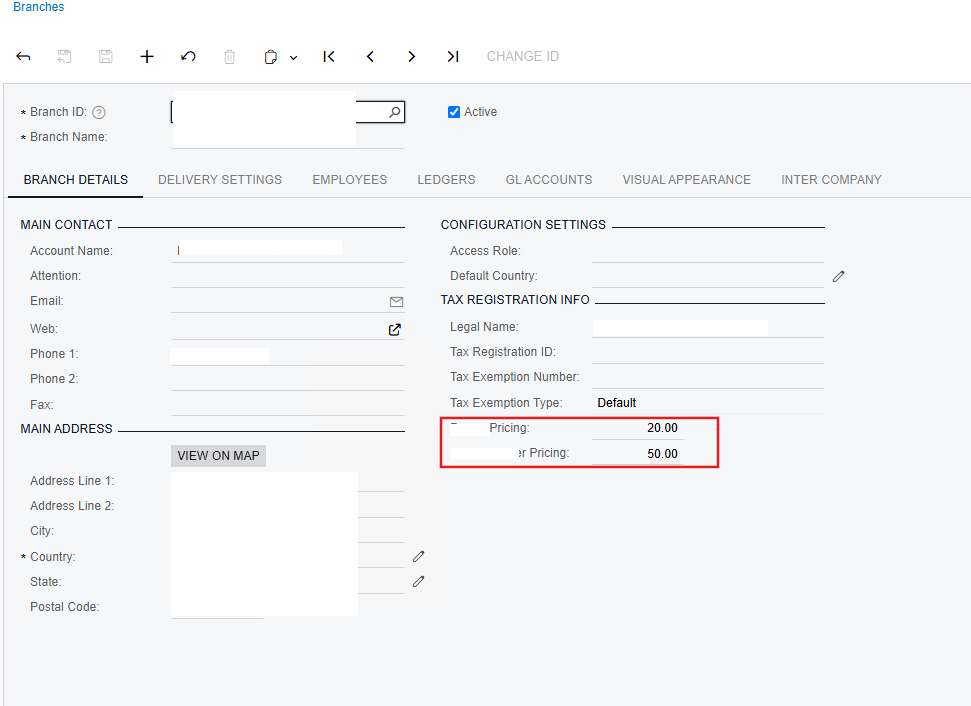
I have added a custom field on the Branches (CS102000) screen, which uses the LocationStand DAC. However, I am unable to enable this field.

Here’s what I have tried so far

protected void Location_RowSelected(PXCache cache, PXRowSelectedEventArgs e)
{
var row = (Location)e.Row;
if (row == null) return;

// Enable custom fields
PXUIFieldAttribute.SetEnabled<LocationStand.usrCustomField>(cache, row, true);
;
}


I set the Enabled property of the field to True from Customization editor

Despite this, the field remains disabled.

public class LocationStand : PXCacheExtension<PX.Objects.CR.Standalone.Location>
{
public static bool IsActive()
{
return true;
}

#region UsrCustomField
[PXDBDecimal(2)]
[PXUIField(DisplayName = "Custom Field")]
[PXDefault(TypeCode.Decimal, "0.0", PersistingCheck = PXPersistingCheck.Nothing)]
public virtual Decimal? UsrCustomField { get; set; }
public abstract class usrCustomField : PX.Data.BQL.BqlDecimal.Field<usrCustomField> { }
#endregion
}


Is there any base functionality or system restriction preventing this field from being enabled? Or am I missing something in the customization ?

Any insights or suggestions would be greatly appreciated.

Thank you!

Best answer by Samvel Petrosov

Hi ​@Vignesh Ponnusamy ,

Thank you for your effort and time on this.

I was also able to make both custom fields editable using the code you previously provided. However, the issue is that I cannot edit them simultaneously.

If I change the value of one field and press Tab or Save, both fields become greyed out.

Thanks again for your assistance!

Please try the code below, it works for me fine and the fields are enabled pretty much all the time.

Please rename the custom fields with the names that you used.

using PX.Data;

namespace PX.Objects.CS
{
// Acuminator disable once PX1016 ExtensionDoesNotDeclareIsActiveMethod extension should be constantly active
public class BranchMaintDefLocationExt_Extension : PXGraphExtension<BranchMaint.DefLocationExt, BranchMaint>
{
#region Event Handlers
protected virtual void _(Events.RowSelected<BranchMaint.BranchBAccount> e)
{
this.Base1.DefLocation.AllowUpdate = true;
PXUIFieldAttribute.SetEnabled(this.Base1.DefLocation.Cache, this.Base1.DefLocation.Current, false);
PXUIFieldAttribute.SetEnabled<PX.Objects.CR.Standalone.LocationExt.usrTestField1>(this.Base1.DefLocation.Cache, this.Base1.DefLocation.Current, true);
PXUIFieldAttribute.SetEnabled<PX.Objects.CR.Standalone.LocationExt.usrTestField2>(this.Base1.DefLocation.Cache, this.Base1.DefLocation.Current, true);
}
#endregion
}
}


15 replies

Vignesh Ponnusamy
Acumatica Moderator
Forum|alt.badge.img+5

Hello ​@Nilkanth Dipak,

Set AllowUpdate to true for the the view like below, this should enable the custom field along with other fields as well. You can disable the other field here if you like to keep them read-only

    public class BranchMaint_Extension : PXGraphExtension<PX.Objects.CS.BranchMaint>
{
#region Event Handlers
protected void Location_RowSelected(PXCache cache, PXRowSelectedEventArgs e)
{
var row = (PX.Objects.CR.Standalone.Location)e.Row;
if (row == null) return;
// Enable custom fields
var defLocationExt = Base.GetExtension<BranchMaint.DefLocationExt>();
defLocationExt.DefLocation.AllowUpdate = true; PXUIFieldAttribute.SetEnabled<PX.Objects.CR.Standalone.LocationExt.usrCustomField>(cache, row, true);
}
#endregion
}

Note: The view DefLocation is the extension so we need to use GetExtension to access the view

Hope that helps.! Good Luck,


darylbowman
Captain II
Forum|alt.badge.img+15

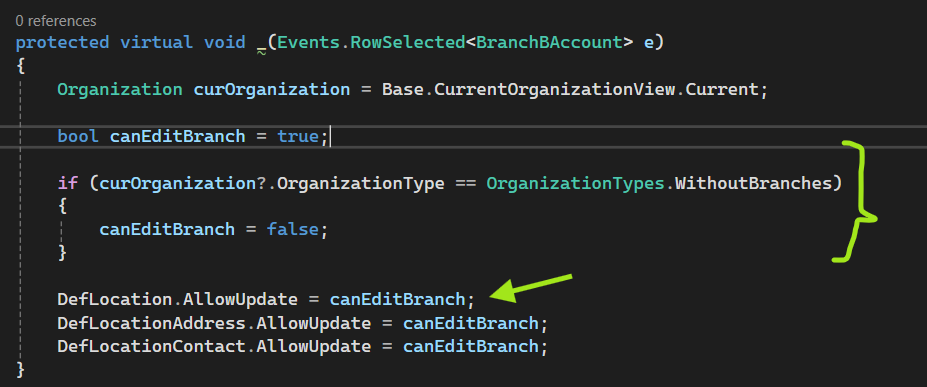
This is the root problem:


In order to keep existing functionality, you may want to do something like this:

protected virtual void _(Events.RowSelected<BranchBAccount> e, PXRowSelected b)
{
b?.Invoke(e.Cache, e.Args);

BranchBAccount row = e.Row;
if (row is null) return;

var locationExt = Base.GetExtension<DefLocationExt>();
bool canEditBranch = locationExt.DefLocation.AllowUpdate;

if (!canEditBranch)
{
// Enable the entire view
locationExt.DefLocation.AllowUpdate = true;

// Disable all fields in the view
PXUIFieldAttribute.SetEnabled(locationExt.DefLocation.Cache, locationExt.DefLocation.Current, false);

// Enable the fields you want
PXUIFieldAttribute.SetEnabled<LocationStand.usrCustomField>(e.Cache, row, true);
}
}


DipakNilkanth
Pro III
Forum|alt.badge.img+13
  • Author
  • Pro III
  • March 20, 2025

Hello ​@Nilkanth Dipak,

Set AllowUpdate to true for the the view like below, this should enable the custom field along with other fields as well. You can disable the other field here if you like to keep them read-only

    public class BranchMaint_Extension : PXGraphExtension<PX.Objects.CS.BranchMaint>
{
#region Event Handlers
protected void Location_RowSelected(PXCache cache, PXRowSelectedEventArgs e)
{
var row = (PX.Objects.CR.Standalone.Location)e.Row;
if (row == null) return;
// Enable custom fields
var defLocationExt = Base.GetExtension<BranchMaint.DefLocationExt>();
defLocationExt.DefLocation.AllowUpdate = true; PXUIFieldAttribute.SetEnabled<PX.Objects.CR.Standalone.LocationExt.usrCustomField>(cache, row, true);
}
#endregion
}

Note: The view DefLocation is the extension so we need to use GetExtension to access the view

Hope that helps.! Good Luck,

Hi ​@Vignesh Ponnusamy, ​@darylbowman 

I truly appreciate your insights on this.

I tried both approaches:

  1. As ​@Vignesh Ponnusamy ​​​​ suggested:

    • I implemented the code, and it works fine for one custom field.
    • However, when I change the value of a custom field, both custom fields become greyed out.
    • When I click Save, only the first field is saved.
    • To edit the second field, I need to refresh the page, after which both fields are enabled and editable.
  2. As ​@darylbowman  suggested:

    • I tried the same code snippet, but unfortunately, none of my custom fields were enabled.

Thanks again for your support!


darylbowman
Captain II
Forum|alt.badge.img+15

My bad. I had the wrong cache. Change to:

PXUIFieldAttribute.SetEnabled<LocationStand.usrCustomField>(locationExt.DefLocation.Cache, row, true);

However, I wouldn’t expect it to behave much differently than ​@Vignesh Ponnusamy’s code, except for keeping the existing functionality. I’m not sure why only one field would be being enabled.


DipakNilkanth
Pro III
Forum|alt.badge.img+13
  • Author
  • Pro III
  • March 20, 2025

Hi ​@darylbowman,
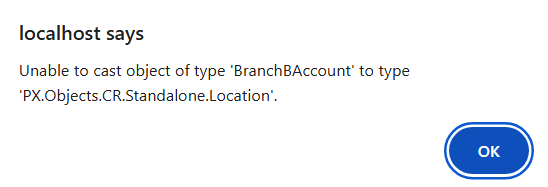
After changing the cache, getting issue as below.


darylbowman
Captain II
Forum|alt.badge.img+15

Sorry, wrong row as well 😂

PXUIFieldAttribute.SetEnabled<LocationStand.usrCustomField>(locationExt.DefLocation.Cache, locationExt.DefLocation.Current, true);


DipakNilkanth
Pro III
Forum|alt.badge.img+13
  • Author
  • Pro III
  • March 20, 2025

Hi ​@darylbowman,
Unfortunately , still the same issue.
 

Code is below :
 

 protected virtual void _(Events.RowSelected<BranchBAccount> e, PXRowSelected b)
{
b?.Invoke(e.Cache, e.Args);

BranchBAccount row = e.Row;
if (row is null) return;

var locationExt = Base.GetExtension<DefLocationExt>();
bool canEditBranch = locationExt.DefLocation.AllowUpdate;

if (!canEditBranch)
{
// Enable the entire view
locationExt.DefLocation.AllowUpdate = true;

// Disable all fields in the view
PXUIFieldAttribute.SetEnabled(locationExt.DefLocation.Cache, locationExt.DefLocation.Current, false);

// Enable the fields you want
PXUIFieldAttribute.SetEnabled<LocationStand.usrPricing1>(locationExt.DefLocation.Cache, locationExt.DefLocation.Current, true);
PXUIFieldAttribute.SetEnabled<LocationStand.usrPricing2>(locationExt.DefLocation.Cache, locationExt.DefLocation.Current, true);
}
}


DipakNilkanth
Pro III
Forum|alt.badge.img+13
  • Author
  • Pro III
  • March 20, 2025

@Vignesh Ponnusamy, Do you have any suggestions on why it works for updating only one custom field, while at the same moment, both fields become greyed out until the page is refreshed?


Samvel Petrosov
Jr Varsity II
Forum|alt.badge.img+8

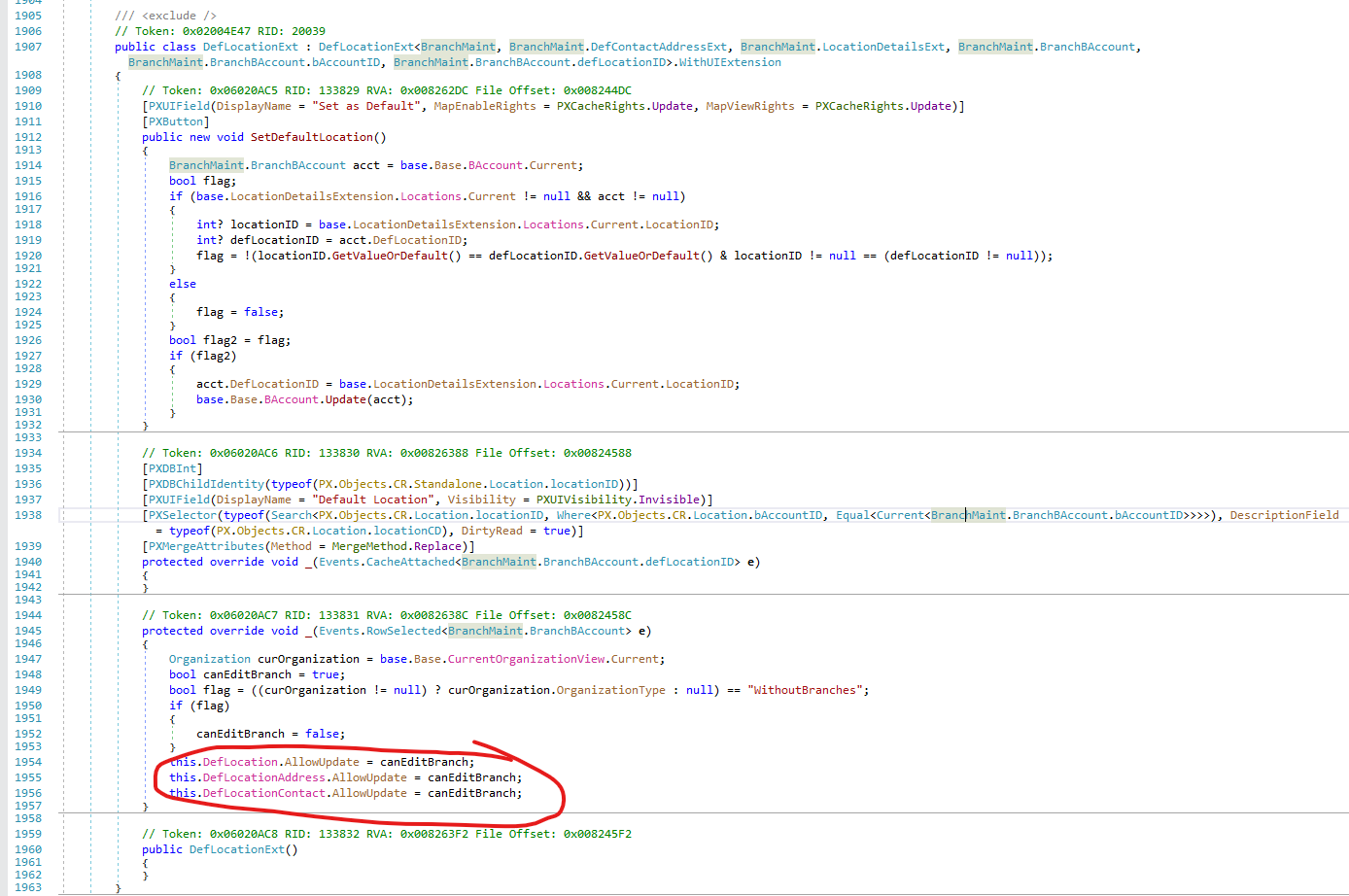
There is a PXGraphExtension inside BranchMaint that seems to be disabling the edit for the DefLocation data which looks like what you have extended. I would try to extend that and enable the custom fields after the base event work.


And it also looks like this will be an issue only for Branches that actually are Organizations without Branches, so technically you also need to add your fields to Companies page and have some sort of defaulting I guess.


Vignesh Ponnusamy
Acumatica Moderator
Forum|alt.badge.img+5

Hi ​@Nilkanth Dipak 

With following code, both the custom fields are enabled for me but upon saving both the fields changes to being read-only.

        protected void Location_RowSelected(PXCache cache, PXRowSelectedEventArgs e)
{
var row = (PX.Objects.CR.Standalone.Location)e.Row;
if (row == null) return;
// Enable custom fields
var defLocationExt = Base.GetExtension<BranchMaint.DefLocationExt>();
bool canEditBranch = defLocationExt.DefLocation.AllowUpdate;

if (!canEditBranch)
{
// Enable the entire view
defLocationExt.DefLocation.AllowUpdate = true;

// Disable all fields in the view
PXUIFieldAttribute.SetEnabled(defLocationExt.DefLocation.Cache, defLocationExt.DefLocation.Current, false);

defLocationExt.DefLocation.AllowUpdate = true;
PXUIFieldAttribute.SetEnabled<PX.Objects.CR.Standalone.LocationExt.usrCustomField>(cache, row, true);
PXUIFieldAttribute.SetEnabled<PX.Objects.CR.Standalone.LocationExt.usrCustomFieldTwo>(cache, row, true);
}
}

As per ​@Samvel Petrosov, I tried extending the DefLocationExt but so far no luck. I will let you know if I find way to get this working. Good Luck.!


DipakNilkanth
Pro III
Forum|alt.badge.img+13
  • Author
  • Pro III
  • March 20, 2025

Hi ​@Vignesh Ponnusamy ,

Thank you for your effort and time on this.

I was also able to make both custom fields editable using the code you previously provided. However, the issue is that I cannot edit them simultaneously.

If I change the value of one field and press Tab or Save, both fields become greyed out.

Thanks again for your assistance!


Samvel Petrosov
Jr Varsity II
Forum|alt.badge.img+8

Hi ​@Vignesh Ponnusamy ,

Thank you for your effort and time on this.

I was also able to make both custom fields editable using the code you previously provided. However, the issue is that I cannot edit them simultaneously.

If I change the value of one field and press Tab or Save, both fields become greyed out.

Thanks again for your assistance!

Please try the code below, it works for me fine and the fields are enabled pretty much all the time.

Please rename the custom fields with the names that you used.

using PX.Data;

namespace PX.Objects.CS
{
// Acuminator disable once PX1016 ExtensionDoesNotDeclareIsActiveMethod extension should be constantly active
public class BranchMaintDefLocationExt_Extension : PXGraphExtension<BranchMaint.DefLocationExt, BranchMaint>
{
#region Event Handlers
protected virtual void _(Events.RowSelected<BranchMaint.BranchBAccount> e)
{
this.Base1.DefLocation.AllowUpdate = true;
PXUIFieldAttribute.SetEnabled(this.Base1.DefLocation.Cache, this.Base1.DefLocation.Current, false);
PXUIFieldAttribute.SetEnabled<PX.Objects.CR.Standalone.LocationExt.usrTestField1>(this.Base1.DefLocation.Cache, this.Base1.DefLocation.Current, true);
PXUIFieldAttribute.SetEnabled<PX.Objects.CR.Standalone.LocationExt.usrTestField2>(this.Base1.DefLocation.Cache, this.Base1.DefLocation.Current, true);
}
#endregion
}
}


DipakNilkanth
Pro III
Forum|alt.badge.img+13
  • Author
  • Pro III
  • March 21, 2025

Hi ​@Samvel Petrosov,

Thank you for the suggested approach. However, could you please tell me what Base1 refers to? I am unable to find any declaration for Base1.


Samvel Petrosov
Jr Varsity II
Forum|alt.badge.img+8

Hi ​@Samvel Petrosov,

Thank you for the suggested approach. However, could you please tell me what Base1 refers to? I am unable to find any declaration for Base1.
 

Base1 refers to BranchMaint.DefLocationExt. It is defined in the public class BranchMaintDefLocationExt_Extension : PXGraphExtension<BranchMaint.DefLocationExt, BranchMaint>


DipakNilkanth
Pro III
Forum|alt.badge.img+13
  • Author
  • Pro III
  • March 21, 2025

Hi ​@Samvel Petrosov,

Apologies, I missed the graph declaration and only tried the RowSelected event.

Thank you for pointing it out. It worked perfectly—I truly appreciate your help on this!

Thank you ​@darylbowman ​@Vignesh Ponnusamy as well.