


I did my homework and found this article which explains how to retrieve an attribute from a KV table.
I am trying to get an attribute from POReceiptItemLotSerialAttributesHeaderKvExt. The main table is obviously POReceiptItemLotSerialAttributesHeader.
When I try to get the attribute the object is null.
In my code, I get the POReceiptItemLotSerialAttributesHeader record. Then, I try to pull the Attribute using that record for the attribute “AttributeSEEDCALC”.
Here is the code in my extension.
	public class POReceiptEntry_Extension : PXGraphExtension<PX.Objects.PO.POReceiptEntry>
	{
		#region Event Handlers

		protected void _(Events.RowUpdated<INItemLotSerialAttribute> e)
		{

			var row = (INItemLotSerialAttribute)e.Row;
			if (row == null) return;

			string measurement = null;
			double seedsPerLB = 0;
			double seedsPerGR = 0;
			double dweight = 0;
			double dseedsPer = 0;

			POReceipt pOReceipt = Base.Document.Current;
			if (pOReceipt == null) return;

			POReceiptItemLotSerialAttributesHeader header = SelectFrom<POReceiptItemLotSerialAttributesHeader>
				.Where<POReceiptItemLotSerialAttributesHeader.receiptNbr.IsEqual<@P.AsString>
					.And<POReceiptItemLotSerialAttributesHeader.lotSerialNbr.IsEqual<@P.AsString>
					.And<POReceiptItemLotSerialAttributesHeader.inventoryID.IsEqual<@P.AsInt>>>>
				.View.Select(Base, pOReceipt.ReceiptNbr, row.LotSerialNbr, row.InventoryID);
			if (header == null) return;

			PXFieldState udfValue = (PXFieldState)e.Cache.GetValueExt(header, "AttributeSEEDCALC");

			if (udfValue == null || udfValue.Value == null)
			{
				string joe = "";
			}
			else
			{
				string joe = "";
			}
}
The udfValue is always null.
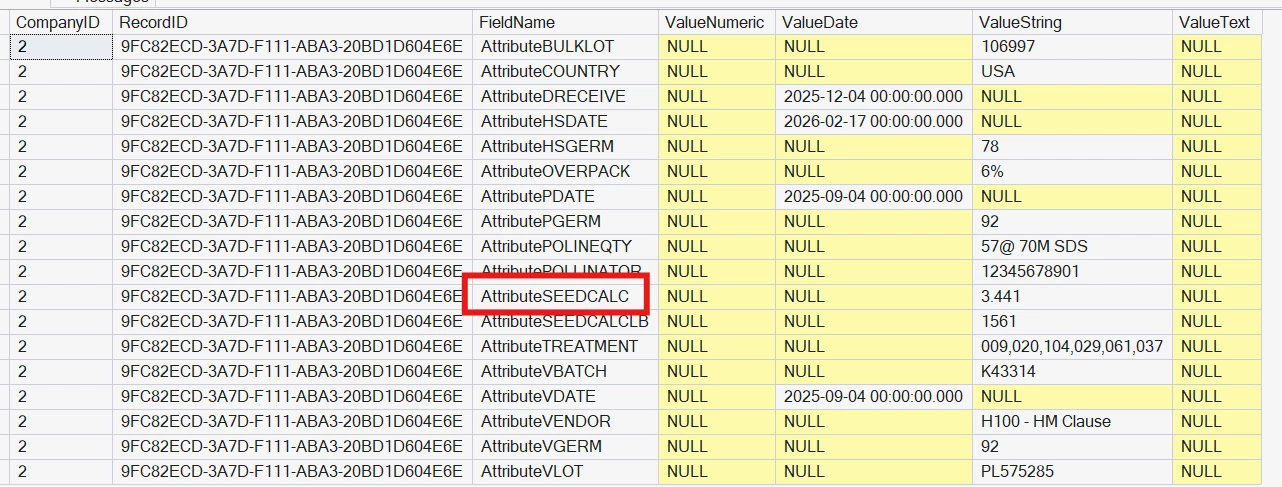
Here is the data in the table to show that there IS an attribute with that name.
select * from POReceiptItemLotSerialAttributesHeader

This is the data in the KV table
select * from POReceiptItemLotSerialAttributesHeaderKvExt where RecordID = '9FC82ECD-3A7D-F111-ABA3-20BD1D604E6E'
Any ideas?
My current workaround is to create a SQL view and pull directly from the KV table, but I would like to do it the correct way.