Answer

Trying to capture price list update in customer screen

  • December 12, 2024
  • 5 replies
  • 113 views

Forum|alt.badge.img

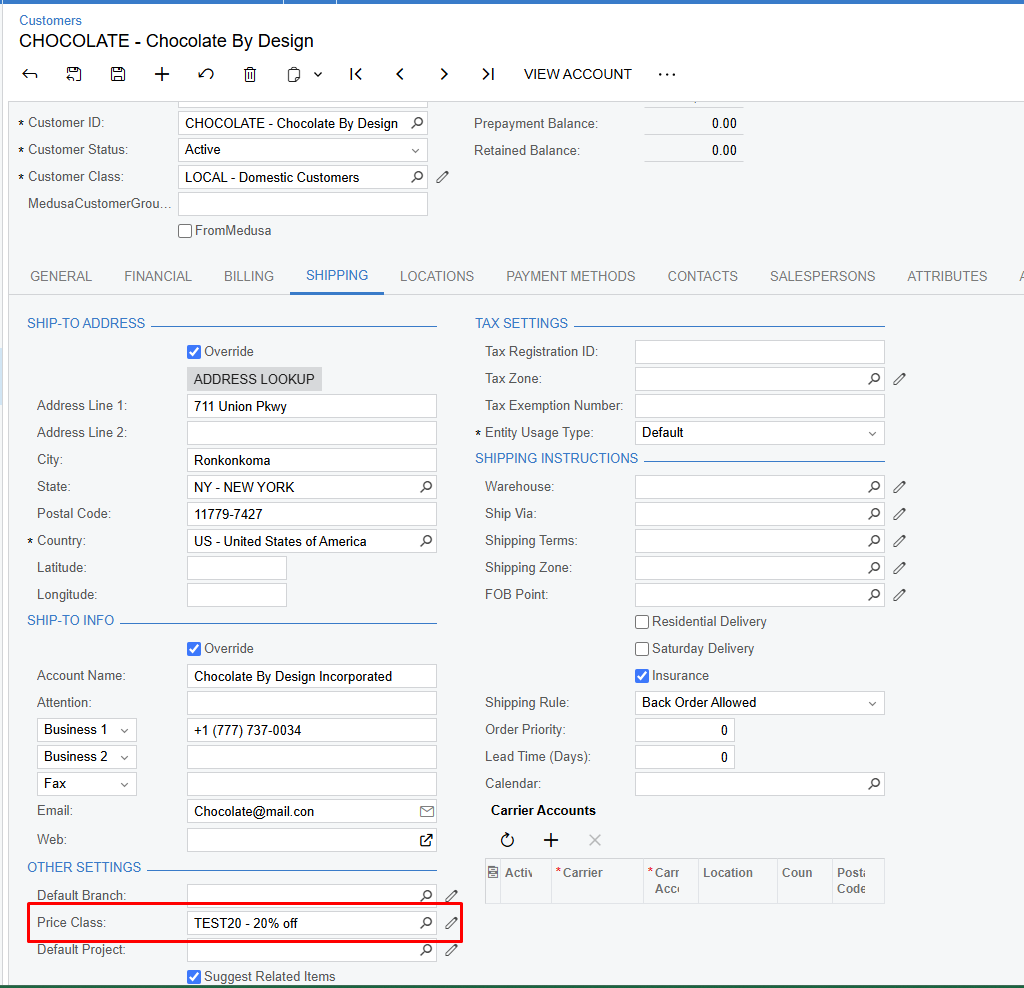
I’m trying to capture the update in price class when changing it in customer. I can capture the customer updating in persist method but I can’t capture the new price class value only the old one. I need to capture both the oldvalue of the price class and the new one.


Best answer by stephenward03

Hi ​@jmc37,

You could use the following to get the new ID value in the Persist method. Just tested and it worked for me, so I hope it works for you too. 

using PX.Data;
using static PX.Objects.AR.CustomerMaint;
namespace PX.Objects.AR
{
public class CustomerMaint_Extension : PXGraphExtension<PX.Objects.AR.CustomerMaint>
{
public static bool IsActive() => true;

public delegate void PersistDelegate();
[PXOverride]
public void Persist(PersistDelegate baseMethod)
{
var cPriceClassID = Base.GetExtension<DefLocationExt>().DefLocation.Current.CPriceClassID;
baseMethod();
}
}
}

 

5 replies

Forum|alt.badge.img+1
  • Jr Varsity III
  • December 13, 2024

Hi ​@jmc37 ,

To capture both the old and new values of the Price Class field when it's updated in the Customer screen, you can use either the FieldUpdated event handler or Persist.

You need to create one more custom field for capturing old value.


Forum|alt.badge.img
  • Author
  • Jr Varsity III
  • December 13, 2024

Hi ​@jmc37 ,

To capture both the old and new values of the Price Class field when it's updated in the Customer screen, you can use either the FieldUpdated event handler or Persist.

You need to create one more custom field for capturing old value.


Those only retrieve the old fields. For the customer screen it isn’t working for getting the new value.


Forum|alt.badge.img+1
  • Varsity III
  • Answer
  • December 16, 2024

Hi ​@jmc37,

You could use the following to get the new ID value in the Persist method. Just tested and it worked for me, so I hope it works for you too. 

using PX.Data;
using static PX.Objects.AR.CustomerMaint;
namespace PX.Objects.AR
{
public class CustomerMaint_Extension : PXGraphExtension<PX.Objects.AR.CustomerMaint>
{
public static bool IsActive() => true;

public delegate void PersistDelegate();
[PXOverride]
public void Persist(PersistDelegate baseMethod)
{
var cPriceClassID = Base.GetExtension<DefLocationExt>().DefLocation.Current.CPriceClassID;
baseMethod();
}
}
}



Forum|alt.badge.img
  • Jr Varsity III
  • May 29, 2025

Hi ​@jmc37,

You could use the following to get the new ID value in the Persist method. Just tested and it worked for me, so I hope it works for you too. 

using PX.Data;
using static PX.Objects.AR.CustomerMaint;
namespace PX.Objects.AR
{
public class CustomerMaint_Extension : PXGraphExtension<PX.Objects.AR.CustomerMaint>
{
public static bool IsActive() => true;

public delegate void PersistDelegate();
[PXOverride]
public void Persist(PersistDelegate baseMethod)
{
var cPriceClassID = Base.GetExtension<DefLocationExt>().DefLocation.Current.CPriceClassID;
baseMethod();
}
}
}


Hi Stephen,

How to properly raise an exception when Customer’s Price Class value is empty on Save so that it will display error against cPriceClassID field?


Forum|alt.badge.img
  • Jr Varsity III
  • May 29, 2025

Actually, got this code working fine:

bool anyError = false;

DefLocationExt extension = Base.GetExtension<DefLocationExt>();

var currentLocation = extension?.DefLocation?.Current;
if (currentLocation.CPriceClassID is null)
{
    anyError = true;
    extension.DefLocation.Cache.RaiseExceptionHandling(nameof(currentLocation.CPriceClassID), currentLocation, currentLocation.CPriceClassID, new PXException("Price Class is required", PXErrorLevel.Error));
}
if (anyError) throw new PXException(PX.Objects.Common.Messages.RecordCanNotBeSaved);