

Answer

Trim starting string in acumatica

  • May 6, 2022
  • 6 replies
  • 590 views

Forum|alt.badge.img

Hi Team,

I want to Trim the starting characters from a field in acumatica. I tried using “Split” function, but it is not working as expected.

Please help me on this.
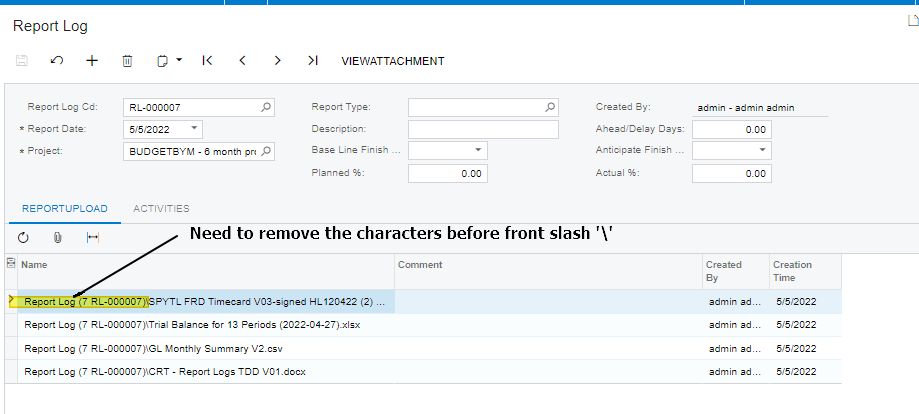


Sample code:
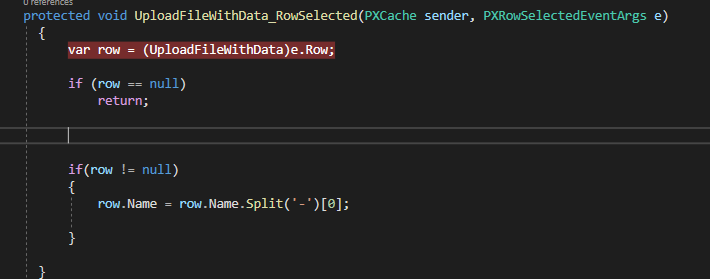
 

Regards,

Ramya

Best answer by NageswaraRaoAddanki60

Hi @ramya15 

You can use this in your solution, may be  it will help you for splitting (\) slash.

string value = @"Report Log(7 RL-000007)\SPYTL FRD Timecard V03-signed";
          value = value.Split('\\')[1]; 


Thank you..!

6 replies

jinin
Pro I
Forum|alt.badge.img+11
  • Pro I
  • May 6, 2022

Hi @ramya15 

You need to split with a front slash (\) and get the list. Then You can eliminate the first record and use the second one. Adjust the code as per your requirement.


Sample:
string[] values = row.Name?.Split('\,');

 string value = values.Length > 1 ? values[1] : string.Empty;


Naveen Boga
Captain II
Forum|alt.badge.img+19
  • Captain II
  • May 6, 2022

Hi @ramya15  

Hope you are doing well!

You can use the normal C# code to substring based on the slash character. Please find the line below for reference.


https://stackoverflow.com/questions/1857513/get-substring-everything-before-certain-char


hope this helps!


Forum|alt.badge.img

Hi @ramya15 

You can use this in your solution, may be  it will help you for splitting (\) slash.

string value = @"Report Log(7 RL-000007)\SPYTL FRD Timecard V03-signed";
          value = value.Split('\\')[1]; 


Thank you..!


Forum|alt.badge.img
  • Author
  • Jr Varsity III
  • May 6, 2022

Hi @Naveen Boga/ @jinin 

Thanks for the response. hope you are doing well!!

I’m facing one more problem escape character ‘\’.  could you please help me yo rectify.


Forum|alt.badge.img
  • Author
  • Jr Varsity III
  • May 6, 2022

Thanks @Naveen Boga\ @NageswaraRaoAddanki60 \ @jinin 


after using “\\” it is working.


Regards,

Ramya


Naveen Boga
Captain II
Forum|alt.badge.img+19
  • Captain II
  • May 6, 2022

Awesome @ramya15  Thanks for sharing the update.



